

2Do - Tasks, Lists & Notes
Beehive Innovations Services · Productivity
Independent analytics for this App Store listing. AppTracker is not affiliated with Beehive Innovations Services.
Chart standing · US
What changed · US
Listing changes AppTracker has observed for this app in this storefront — new versions, price moves, rating shifts, and store copy.
· [NEW] New option to choose which list opens at launch and in new windows · [NEW] New option for each Today widget to include starred tasks that aren’t due today · [NEW] New option to save tasks directly into projects and checklists from the share sheet · Improved iCloud sync recovery after replacing server data from another device · Improved Apple Watch task editing and completion syncing · Improved cleanup of files left behind by interrupted backups · Fixed Smart Lists losing or changing search rules when editing filters · Fixed Smart List searches using list groups, multiple task types, and date exclusions · Fixed section duration totals to include matching subtasks and remain consistent when expanding projects · Fixed task ordering in Today · Fixed Shortcuts destination matching when supplying an exact list, project, or checklist name · Fixed Toodledo sync separating subtasks from their projects or checklists, including on free accounts · Fixed subtasks losing their parent’s repeat schedule during Toodledo sync · Fixed Todoist sync failures on accounts without reminder support while keeping alerts in 2Do · Fixed Mail message links in task notes · Fixed entering Visit addresses with Chinese and other non-Latin keyboards · Fixed text selection when renaming lists · Fixed a rare crash during Dropbox sync · Fixed task list refreshes when moving between task editors with the keyboard on Mac
Price & rating history · US
Reconstructed from the listing changes AppTracker has observed in this storefront. A field is charted once it has changed more than once, and each line starts at the value it moved from.
Average rating · ★ 4.88 now · 9 changes on record
In-app purchases · US
No in-app purchases.
Screenshots

About
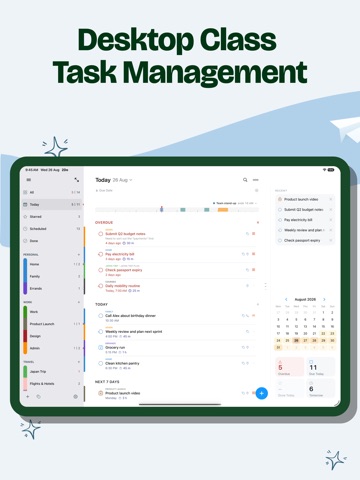
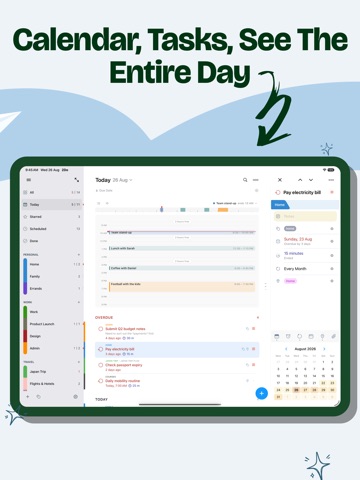
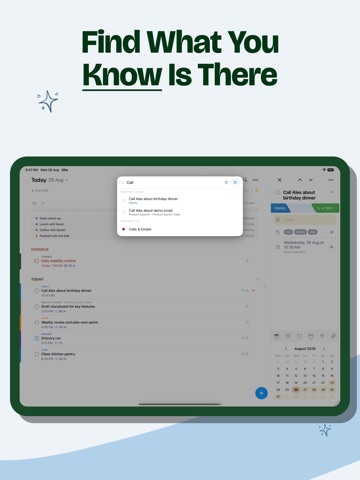
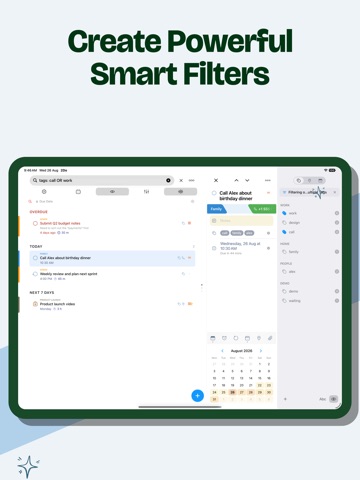
"2Do adapts to my needs, not the other way around. 2Do gets me." — MacStories 2Do is a to do list, task manager and daily planner in one, with a simple, fluid interface wrapped around a deep and flexible set of features. Keep a quick checklist, run a full GTD® system, or anything in between: there is no wrong way to use 2Do, and it never forces a methodology on you. Rebuilt from the ground up as a true desktop-class iPad app, and a one-time purchase. No subscription, no account to create, no strings attached. DESKTOP GRADE TASK MANAGEMENT • Lists, tasks, the editor and a utility panel with Tags, Nearby and Calendar Events, all on one screen • The editor sits in its own panel beside your list and follows you from task to task; no sheets in the way • Open a second window, keep Today in view while you plan a project beside it, and drag tasks between the two • Full keyboard support with the iPadOS menu bar: capture, navigate, schedule and review without lifting your hands • Split View, Slide Over, drag & drop, pinch to zoom: everything the iPad does well, 2Do does too TYPE IT THE WAY YOU'D SAY IT • New: natural language input. Type "Call the dentist tomorrow at 3pm #health" and 2Do fills in the due date, time and tag as you type • Reads dates, times, repeats, alerts, durations, priorities, tags, lists and saved locations, in English, German, Spanish, French, Italian, Dutch, Japanese, Korean, Chinese and Russian CAPTURE ANYTHING, FAST • Quick Add: touch and hold [+] and file task after task, with dates, tags and lists as you type • Siri & Shortcuts, widgets and Control Center, so capture never waits for the app • Mail to 2Do: your device gets a private email address; anything you send it lands as a task, checklist and all • Quick Open: type a few letters, land on any task or list • A GTD® Inbox for anything not yet sorted SIMPLE TASKS, OR AS MUCH AS YOU NEED • Start with a task, grow it into a checklist or a project with sub-tasks • Notes in Markdown, styled as you type, with links collected for you • Flexible repeats, start dates that hide tasks until they matter, durations and one-tap actions • Attach images and voice notes • Batch edit and drag & drop: defer, tag or move a stack of tasks in one go SMART LISTS: SAVED SEARCHES WITH SUPERPOWERS • Search titles, notes, tags and dates; sounds-like matching finds it even when you can't spell it • Save any search as a one-tap view: your weekly review, stalled projects, errands nearby • Focus filter: set a rule per list and one tap hides everything that can wait TAGS THAT SORT EVERYTHING • One tap on a tag filters your day to that context; Tag Groups keep big collections tidy • Pause a tag and every task carrying it steps out of view until you're ready NEVER MISS A THING • Stack multiple alerts on a task and let 2Do nag until it's done • On iPadOS 26.1 and later, an alert can ring like a Clock alarm: full screen, through Silent mode, until you answer • Nearby: location reminders that fire when you're close enough to do the task • Calendar events appear right above your tasks, so plans never collide SYNC YOUR WAY • iCloud: uses the account already on your device; syncs tasks, Smart Lists, tags, groups and attachments • Apple Reminders: your tasks live in Reminders too, so Siri and anything that reads Reminders can see them • Todoist: connect your account and run your Todoist projects right inside 2Do • Dropbox, Toodledo, Fastmail, or any CalDAV server you trust, including one you run yourself • When two devices meet, 2Do can merge them instead of making you pick a winner • 2Do for Mac is available separately, so your lists follow you to the desktop YOURS, PRIVATELY • Lock single lists or the whole app • Automatic backups, with single-list restore • Share lists over Wi-Fi with 2Do users nearby, no cloud in between • Separate light and dark themes Use 2Do as a simple list, or push it into full GTD® territory. On iPad, it spreads out and feels like the desktop app it truly is.
What's new · 4.1.5
· [NEW] New option to choose which list opens at launch and in new windows · [NEW] New option for each Today widget to include starred tasks that aren’t due today · [NEW] New option to save tasks directly into projects and checklists from the share sheet · Improved iCloud sync recovery after replacing server data from another device · Improved Apple Watch task editing and completion syncing · Improved cleanup of files left behind by interrupted backups · Fixed Smart Lists losing or changing search rules when editing filters · Fixed Smart List searches using list groups, multiple task types, and date exclusions · Fixed section duration totals to include matching subtasks and remain consistent when expanding projects · Fixed task ordering in Today · Fixed Shortcuts destination matching when supplying an exact list, project, or checklist name · Fixed Toodledo sync separating subtasks from their projects or checklists, including on free accounts · Fixed subtasks losing their parent’s repeat schedule during Toodledo sync · Fixed Todoist sync failures on accounts without reminder support while keeping alerts in 2Do · Fixed Mail message links in task notes · Fixed entering Visit addresses with Chinese and other non-Latin keyboards · Fixed text selection when renaming lists · Fixed a rare crash during Dropbox sync · Fixed task list refreshes when moving between task editors with the keyboard on Mac
Details