

Unity Reflect Review
Unity Technologies ApS · Productivity
Independent analytics for this App Store listing. AppTracker is not affiliated with Unity Technologies ApS.
Chart standing · US
In-app purchases · US
No in-app purchases.
Screenshots



About
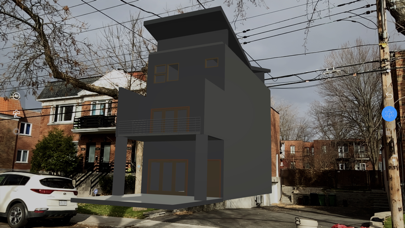
Unity Reflect is a BIM design and coordination solution that connects all project members on one immersive, collaborative, real-time platform regardless of device, model size, or geographic-location. Transfer your BIM data from Revit, Navisworks, SketchUp, and Rhino into real-time 3D experiences on a range of devices in AR and VR to bridge the gap between design and construction. Unity Reflect allows you to: • Visualize BIM (Building Information Modelling) models on your phone or tablet by connecting to a Unity Reflect server. • Open a live link and see changes made to the model in your design application reflected in real time in the Unity Reflect app. • Filter your model based on its BIM metadata and highlight systems and components independently. • View your model in augmented reality in world-scale In order to make your model available to the Unity Reflect app, you must first publish it to a Unity Reflect server. To do so, simply install a Unity Reflect plugin in your design application (Revit, Navisworks, BIM360, Sketchup, Rhino) and tap the Export or the Sync button.
What's new · 3.2.1
The latest Unity Reflect Review release includes the following new features and improvements; - UK server option: users can now publish their models to a UK-based server! To use, please change the region in the dashboard application first. - Revit 2023 and Navisworks 2023 plugins: users can now publish models from the 2023 versions of Revit and Navisworks - Meta Quest 2 support: collaborate with up to 25 users cross-platform, inspect BIM data, take accurate measurements in imperial and metric units and complete sun studies. - General improvements - updates to performance stability, tool tips, annotations, navigation, AR markers and the measurement tool.
Details