

SpyWatch: Hidden Camera Finder
Mikhail Altunin · Utilities
Independent analytics for this App Store listing. AppTracker is not affiliated with Mikhail Altunin.
Chart standing · US
What changed · US
Listing changes AppTracker has observed for this app in this storefront — new versions, price moves, rating shifts, and store copy.
Ratings breakdown · US
The star breakdown behind this app's rating in this storefront.
Screenshots


About
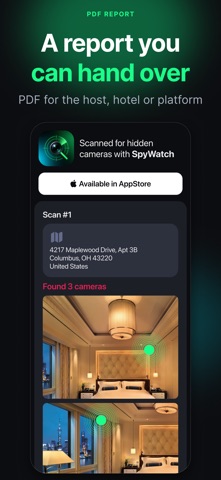
Checking into a hotel room or a short-term rental? SpyWatch helps you inspect it for hidden cameras and suspicious devices in about five minutes — with the phone you already carry. FOUR INDEPENDENT CHECKS • Network scan — looks for cameras and smart devices sharing the same Wi-Fi, reads their service banners and matches them against a signature database that updates without app updates. • Bluetooth scan + Proximity Hunt — lists nearby BLE devices and guides you hot-and-cold to whichever one you want to locate. • Lens check — the camera and flashlight work together to highlight the reflective glint a lens gives back. • Magnetic check — the magnetometer reacts to motors and magnets hidden inside enclosures, mirrors and fixtures. HOW IT WORKS 1. Pick a check and start the scan. 2. Walk the room slowly — bed, mirror, smoke detector, sockets, TV, air vents. 3. Review the findings. Mark anything you have identified as harmless, so the report stays clean. A REPORT YOU CAN SHARE Every scan is saved with the address, your photos and the list of findings. Export it as a PDF and send it to the host, the hotel or the booking platform — a screenshot is easy to dismiss, a dated report is not. WHAT SPYWATCH DOES NOT PROMISE No phone can guarantee that a room is clean. SpyWatch highlights what looks suspicious and deserves a closer look by hand — it does not replace professional detection equipment, and it cannot see through walls. Treat every result as a reason to check, not as a verdict. SUBSCRIPTION Core checks are free. A subscription unlocks unlimited scans, the full findings history and PDF reports. Payment is charged to your Apple Account; the subscription renews automatically unless cancelled at least 24 hours before the end of the period. You can manage or cancel it in your Apple Account settings. Terms of Use: https://drive.google.com/file/d/1bItBkPfhid8OHlahoJtJx7T_kK4mNSPP/view?usp=share_link Privacy Policy: https://drive.google.com/file/d/1J5cE6_9OTYLm7PE_4tIxsL-iWnn_AHwU/view?usp=share_link
Details