

School Assistant – Planner
Sun Apps, LLC · Education
Independent analytics for this App Store listing. AppTracker is not affiliated with Sun Apps, LLC.
Chart standing · US
What changed · US
Listing changes AppTracker has observed for this app in this storefront — new versions, price moves, rating shifts, and store copy.
Hello everyone! Hope you’ve had a great start to the school year! I’ve got a small update for you all: NEW - Added an option to export JSON templates for the recently added Import / Export Data feature, so you can create your own custom data imports - Swapped the Share button in Schoolwork and Class Details for an Edit button for quickly editing all details (Share remains in the Actions list) - Updated naming of calendar integration feature to Sync to Calendar - Added a Schedule shortcut from Dashboard (tap on Current / Next Class) - Added Deep Link support for basic navigation / tab switching - Added Deep Link support for opening Schoolwork with specific filters - Added a Deep Links settings page to explain and configure all the available links FIXED - Removed one-device-only restriction on Sync to Calendar, in case you are using local calendars rather than iCloud calendars - Removed Completed Schoolwork and archived Classes from Siri AI and Spotlight features - Fixed an issue where Siri AI would treat the category of a Schoolwork as the class, rather than the actual assigned class - A few UI fixes and improvements
Ratings breakdown · US
The star breakdown behind this app's rating in this storefront.
In-app purchases · US
What this app sells inside itself, grouped by kind and priced for this storefront.
Screenshots




About
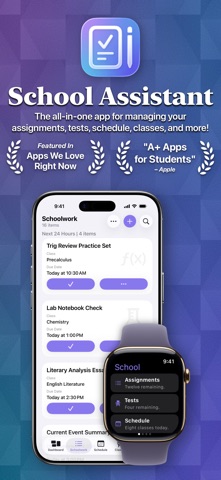
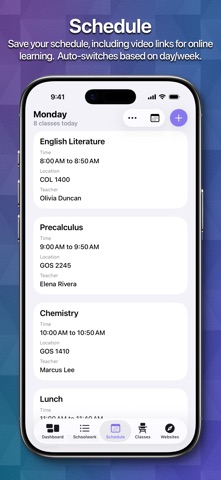
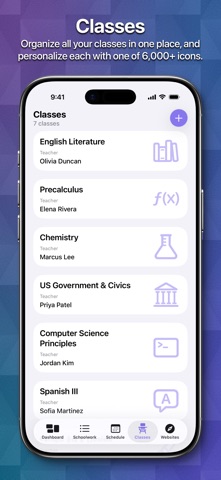
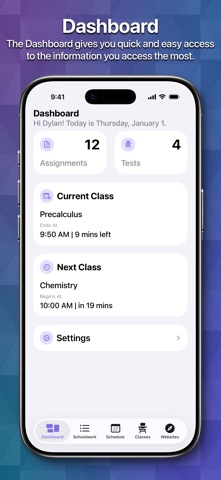
School Assistant by Sun Apps is a simple but powerful school planner app. It allows you to quickly and easily keep track of your homework and tests, manage your schedule, save all your class info, quickly access saved websites, and more. First, as a student myself, I know how hard it can be to pay for these types of apps. So, School Assistant is 100% free: no subscriptions, no paywalls, no premium features, and no ads! There is a tip jar if you feel like supporting, though (these are the in-app purchases the App Store shows). Schoolwork: - Manage your upcoming assignments and tests - Sort by due date, class, category, alphabetically, or manually - Add a related class, due date, links, and notes - Add Subtasks to your schoolwork to keep track of large assignments - Schedule reminders - Highlight upcoming and overdue schoolwork - Keep an entire archive of your completed schoolwork - View how many assignments/tests you have right from your Home Screen with Widgets Schedule: - Keep track of your classes for every day - Add associated teacher and room information (or, add a link for online classes) - Automatically switch days based on the day of the week - Automatically switch between two weeks (great for A/B week schedules) - Manually switch between up to ten weeks - See your current class and next class on the Dashboard and with Widgets Classes: - A dedicated place to manage all your class info - Store your teacher’s name and email - Store a title, class code, links, and notes for each class - Assign an icon to each class, which also shows in Schoolwork Apple Watch App: - Super quick access to your most important information - View your Schoolwork, automatically sorted into assignments and tests - View your Schedule for any day - View your current and next classes, and how long you have left - Set a custom theme color to match your Watch, band, or outfit - Designed for quick interactions Other features: - Save website bookmarks for quick and easy access right in the app - Set a custom accent color - Theme the entire app with a color of your choosing - Over 20 app icon choices - Liquid Glass design - Full and automatic data syncing over iCloud - Tight iOS and iPadOS integration with support for features like Slide Over and Split View, iPad cursor, keyboard shortcuts, system sidebars, Home Screen widgets, Dynamic Text, and multi-window support - Support for iPhone, iPad, iPod touch, Mac, Apple Watch, and Apple Vision Pro - Designed with quick and easy usability in mind - Full support for Dark, Tinted, and Clear Home Screen modes
What's new · 5.0.1
Hello everyone! Hope you’ve had a great start to the school year! I’ve got a small update for you all: NEW - Added an option to export JSON templates for the recently added Import / Export Data feature, so you can create your own custom data imports - Swapped the Share button in Schoolwork and Class Details for an Edit button for quickly editing all details (Share remains in the Actions list) - Updated naming of calendar integration feature to Sync to Calendar - Added a Schedule shortcut from Dashboard (tap on Current / Next Class) - Added Deep Link support for basic navigation / tab switching - Added Deep Link support for opening Schoolwork with specific filters - Added a Deep Links settings page to explain and configure all the available links FIXED - Removed one-device-only restriction on Sync to Calendar, in case you are using local calendars rather than iCloud calendars - Removed Completed Schoolwork and archived Classes from Siri AI and Spotlight features - Fixed an issue where Siri AI would treat the category of a Schoolwork as the class, rather than the actual assigned class - A few UI fixes and improvements
Details