

Slideshow with Music Maker App
Editr Apps Inc. · Photo & Video
Independent analytics for this App Store listing. AppTracker is not affiliated with Editr Apps Inc.
Chart standing · US
What changed · US
Listing changes AppTracker has observed for this app in this storefront — new versions, price moves, rating shifts, and store copy.
1. Minor performance improvements and bug fixes. 2. Added a new Popular Filters section. 3. Quickly discover the most-used filters. 4. Improved filter selection experience.
Ratings breakdown · US
The star breakdown behind this app's rating in this storefront.
In-app purchases · US
What this app sells inside itself, grouped by kind and priced for this storefront.
Screenshots




About
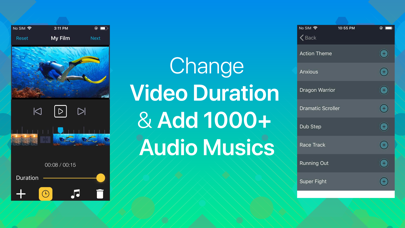
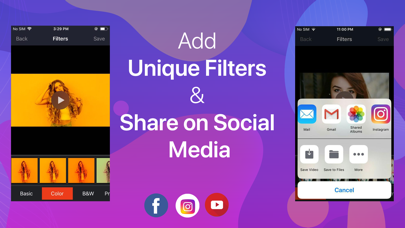
If you love to make videos using your pictures with your preferred music, picture video maker is the perfect app for you. It’s time to add all of your memorable photos on your slideshow with music and share it on your social media pages right away with just a few clicks. Features Camera - You can access your camera instantly to take amazing pictures of yourself and start playing. Moments- Anytime access the moments from your phone. Photos - Access all photos from your gallery and select any amount of them you prefer. Videos - Access your saved videos on your phone. Albums - Access and use the photo albums to select preferred photos. Music - Access and add varieties of music on your video. Duration - Change and control the speed limit of your slideshows. Filters - Apply filters of your choice to make the video slideshow more attractive. Share - Share your slideshow videos on social media pages. Instructions Add an unlimited number of images of your preference through your phone camera, moments or photos from the phone gallery. You can also choose your phone videos if you want. Get back to the main page and press “done” to access the editing page. In the editing page use the + button to access the homepage again for using the previous features. You can tap the music icon to add music and the duration icon to control slideshow speed. The filter icon is also there to give your slideshow a wonderful new look. After editing press the save button and share the video to Facebook, Instagram or YouTube. Information about the auto-renewable subscription: Subscription name: Subscribe for access Subscription price: 3 days free then, $2.99/week Auto-renew: This is a auto-renewing subscription, read below to know more. – Payment will be charged to iTunes Account at confirmation of purchase – Subscription automatically renews unless auto-renew is turned off at least 24-hours before the end of the current period – Account will be charged for renewal within 24-hours prior to the end of the current period, and identify the cost of the renewal – Subscriptions may be managed by the user and auto-renewal may be turned off by going to the user's Account Settings after purchase - Our Terms of Service : https://editr.app/tos.html – Our Privacy Policy : https://editr.app/privacy-policy.html – Any unused portion of a free trial period, if offered, will be forfeited when the user purchases a subscription to that publication, where applicable
What's new · 2.0.44
1. Minor performance improvements and bug fixes. 2. Added a new Popular Filters section. 3. Quickly discover the most-used filters. 4. Improved filter selection experience.
Details