

Progress 2.0
INII Co., Ltd. · Productivity
Independent analytics for this App Store listing. AppTracker is not affiliated with INII Co., Ltd.
Chart standing · US
What changed · US
Listing changes AppTracker has observed for this app in this storefront — new versions, price moves, rating shifts, and store copy.
v3.5.0 Update [New] Countdown Task Mode Set a total of 100 and count down: cards show "x remaining / total" with the progress bar filling as you go — perfect for reading pages or habit breaking. [New] Check-in Undo Accidental check-ins can be undone within 5 seconds from the list bottom bar, including bulk progress added from the context menu. [New] Freer Progress Tracking • Custom units: pages, times, minutes, km... • Per-tap step: auto +N on each check-in • Optional percentage display for progress [New] Display Modes & Ordering • Cards support large / compact grid / list modes • New drag-and-drop reorder page for task ordering [Improved] • Adapted for wide-canvas foldables and large iPads with multi-column layouts • iOS 26 glass styling for notifications, AI assistant and habit calendar • Widgets and Today view fully support countdown tasks and stepped check-ins [Fixed] • Fixed several issues that could cause data anomalies or battery drain Thanks for using Progress!
Screenshots




About
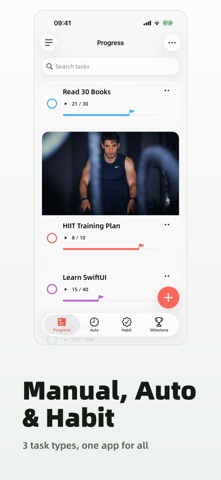
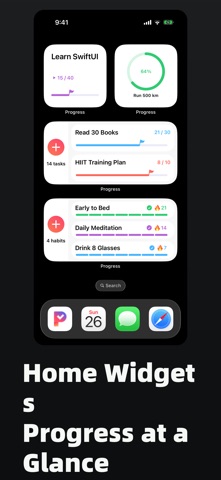
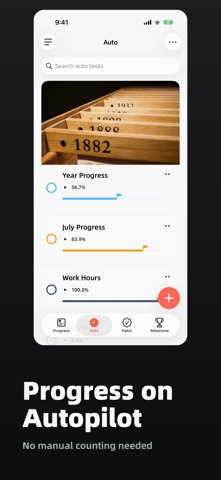
Progress: Managing Task Progress, Habit Tracking, and Food Inventory. Which chapter are you on in that book? How many days have you successfully woken up early? How many eggs are left in your fridge? Do you often face similar questions? Is there a better way than jotting them down in a notebook? Progress is a minimally designed app that helps you manage your daily progress and enhance your goal achievement efficiency. Often, patience and monotony interrupt our record-keeping efforts. Progress solves this with its simple interactions and visually appealing design. You can manage the progress of various goals within the app and share your goal achievements on social media. Of course, you can also manage quickly in Today, such as incrementing progress by +1. 「Scenario Examples」 - Keep track of which episode you're on in a TV series - Note how many pages you've read in a book and how many are left - Track your progress in a 21-day early rising goal - Monitor how many cans of milk you have left ... 「Feature Highlights」 1. Create and manage your tasks, turning them into beautiful cards 2. Habit Tracking: Daily check-ins, streak counting, and calendar view to build great habits 3. Achievement Wall: 23 achievements to unlock - your persistence deserves to be celebrated 4. Various ways to increase your progress until tasks are completed 5. Display and manage these tasks on home screen widgets 6. Share visually appealing progress cards to share the joy of fulfillment 7. Stunning icons and themes to choose from 8. Supports iCloud backup and data restoration 「Feedback」 We greatly value your feedback and suggestions after using the app to better meet the needs of the public. If Progress has impressed you in any way, we would appreciate your positive review and sharing it with your friends! --- 「About Membership」 With subscription, you will be Progress Member, enjoying more Member-Only features. Payment: Upon confirmation of purchase and payment, the benefits will be credited to your iTunes account and will be automatically renewed through your iTunes account. Renewal/Automatic renewal: Apple's iTunes account will deduct a fee within 24 hours before the expiration date, and the subscription cycle will be extended one more time after the deduction is successful. Cancel renewal: To cancel your subscription, manually turn off the automatic renewal feature in the iTunes/AppleID Settings management 24 hours before the current subscription cycle expires. 「Policy」 Privacy Policy: https://www.privacypolicies.com/live/7b3e2c73-314a-4793-a87a-d5c1423b8cb3 Terms of Use: https://www.apple.com/legal/internet-services/itunes/dev/stdeula/
What's new · 3.5.0
v3.5.0 Update [New] Countdown Task Mode Set a total of 100 and count down: cards show "x remaining / total" with the progress bar filling as you go — perfect for reading pages or habit breaking. [New] Check-in Undo Accidental check-ins can be undone within 5 seconds from the list bottom bar, including bulk progress added from the context menu. [New] Freer Progress Tracking • Custom units: pages, times, minutes, km... • Per-tap step: auto +N on each check-in • Optional percentage display for progress [New] Display Modes & Ordering • Cards support large / compact grid / list modes • New drag-and-drop reorder page for task ordering [Improved] • Adapted for wide-canvas foldables and large iPads with multi-column layouts • iOS 26 glass styling for notifications, AI assistant and habit calendar • Widgets and Today view fully support countdown tasks and stepped check-ins [Fixed] • Fixed several issues that could cause data anomalies or battery drain Thanks for using Progress!
Details