

DocScan – Document Scanner App
Anh Nguyen · Productivity
Independent analytics for this App Store listing. AppTracker is not affiliated with Anh Nguyen.
Chart standing · US
What changed · US
Listing changes AppTracker has observed for this app in this storefront — new versions, price moves, rating shifts, and store copy.
Add photos and PDFs to Folda from any app. • In Photos, Files or any other app, tap Share and choose Folda, then pick a name and a folder • Leave the name empty and Folda names the document from its text • Search now highlights the whole word you type, in document names and on every page Updating from DocScan? Folda is the all-new DocScan: find any word in any scan, scan and export PDFs for free, and your documents move over automatically.
Ratings breakdown · US
The star breakdown behind this app's rating in this storefront.
In-app purchases · US
What this app sells inside itself, grouped by kind and priced for this storefront.
Screenshots




About
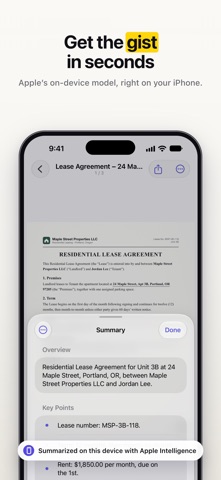
Turn paper into sharp, searchable PDFs. Folda scans, reads and organizes your documents right on your iPhone and iPad — free and unlimited, with no watermark and no account. SCAN ANYTHING • Apple’s document camera finds the page, captures it automatically and scans many pages in a row • Straighten, rotate and clean up with Enhanced, Grayscale, Black & White and Whiteboard filters • Import photos and PDFs from Photos and Files, or open them in Folda from other apps FIND ANY WORD • On-device text recognition (OCR) makes every page searchable • Search all your scans at once, even handwriting, and jump straight to the right page • Copy text from any page, have it read aloud, or translate it SIGN, REDACT AND SHARE • Fill in and sign with Apple Markup • Redact names and numbers for good before you share • Share as searchable PDF, JPG, PNG or plain text; merge, split and reorder pages; print • Scan QR codes and barcodes ORGANIZED FOR YOU • Names suggested from what’s on the page • Folders, tags, list or grid, and Recently Deleted • Spotlight search, Siri Shortcuts, a Quick Scan widget and Control Center buttons PRIVATE BY DESIGN • Scanning, text recognition, search and naming happen on your device • No account, no tracking, and your documents are never uploaded Folda PRO (optional subscription or one-time purchase) • Apple Intelligence, on the device: summaries of long documents, questions about a document, smart names and folders, and expense CSVs from receipts (supported devices) • 300 dpi exports and password-protected PDFs • App Lock with Face ID or passcode • Share many documents at once and automatic backup to a folder you choose • Scan the front and back of an ID card or driver’s license onto one page at actual size, so a printout works like a photocopy • Book mode that splits an open book into pages, and business cards straight to Contacts Scanning, text recognition and PDF export stay free and unlimited without Pro. Folda is the new DocScan. Documents from DocScan move over automatically. Terms of Use: https://navlab.app/terms Privacy Policy: https://navlab.app/privacy Questions? support@navlab.app
What's new · 2.0.1
Add photos and PDFs to Folda from any app. • In Photos, Files or any other app, tap Share and choose Folda, then pick a name and a folder • Leave the name empty and Folda names the document from its text • Search now highlights the whole word you type, in document names and on every page Updating from DocScan? Folda is the all-new DocScan: find any word in any scan, scan and export PDFs for free, and your documents move over automatically.
Details