

PHOTOCA / photos calendar
tomople · Photo & Video
Independent analytics for this App Store listing. AppTracker is not affiliated with tomople.
Chart standing · US
What changed · US
Listing changes AppTracker has observed for this app in this storefront — new versions, price moves, rating shifts, and store copy.
- Fixed an issue where the app could close when turning calendar pages.
Screenshots



About
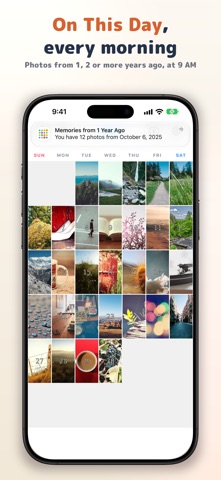
PHOTOCA - Photo Calendar Fill your calendar with memories. Why not capture each day with a single photo? PHOTOCA is an app that beautifully organizes your precious photos in calendar format. You'll rediscover your memories in unexpected moments - 'Oh, that's what happened on that day.' Your children's growth, time with family, memories with friends, travel records... Let's preserve these everyday moments in your calendar. [Simple and Beautiful Calendar] A delightful design with photos lined up in your monthly calendar. Smooth page-turning animations let you navigate to past months effortlessly. [Customize to Your Taste] - Toggle date display ON/OFF, adjust position and size freely - Choose photo display mode (zoomed/full view) - Fine-tune display position for the perfect look - Show/hide holiday markers [Add Memos to Photos] Add memos to each photo (up to 140 characters). 'My son's first sports day' or 'Anniversary dinner' - preserve your precious memories in words too. You can also search photos by memo. [Handy Features] - Copy photos to other dates (organize travel photos by actual date) - 'On This Day' reminders: at 9 AM, get photos taken on this day 1, 2 or more years ago. Tap the notification to open that day's photos right away - Zoom photos up to 3x [Premium Features (In-App Purchase)] Special features for an enhanced experience. - Completely ad-free - Home screen widgets (3 sizes: small, medium, large) View your memory photos on your home screen every day - Slideshow feature Auto-play the month's photos with adjustable speed - Export calendar to PDF Print as an album or share with family -------------------- [Purchasing Premium] Premium is an in-app purchase with three options. Prices are shown on the purchase screen. - Yearly plan (auto-renewing; eligible users get a 1-week free trial first) - Monthly plan (auto-renewing) - Lifetime (one-time purchase; does not renew) [Auto-Renewal] Payment is charged to your Apple ID when you confirm the purchase. Subscriptions renew automatically unless canceled at least 24 hours before the end of the current period, and the next period is charged at renewal. If you do not cancel during the free trial, the yearly plan is charged when the trial ends. [Canceling] Cancel from your iPhone, not from the app: Settings > your name > Subscriptions. If you cancel mid-period, Premium stays active until the period ends. No refunds are given for the unused part of a period. https://support.apple.com/en-us/HT202039 [Restore Purchase] If you have purchased before, you can restore your purchase. Tap 'Restore purchase' at the bottom of the Premium purchase screen. [Terms of Use] https://www.apple.com/legal/internet-services/itunes/dev/stdeula/ [Privacy Policy] https://tomople.com/privacy-policy/
What's new · 2026.10.7
- Fixed an issue where the app could close when turning calendar pages.
Details