

Mileage Tracker by MyCarTracks
Slash Idea s.r.o. · Finance
Independent analytics for this App Store listing. AppTracker is not affiliated with Slash Idea s.r.o.
Chart standing · US
What changed · US
Listing changes AppTracker has observed for this app in this storefront — new versions, price moves, rating shifts, and store copy.
Automatic recording received a new update and recording is now more reliable, especially in the background and after the app restarts. It better captures trip beginnings and endings, preserves missed mileage, and avoids extra points while stopped. You can now choose whether driving, cycling, running, or walking may start a recording. Work Hours recording has clearer alerts and recovery actions when a scheduled action needs attention. This release includes various fixes including destination addresses, feedback submission, and GPX export details.
Ratings breakdown · US
The star breakdown behind this app's rating in this storefront.
In-app purchases · US
No in-app purchases.
Screenshots




About
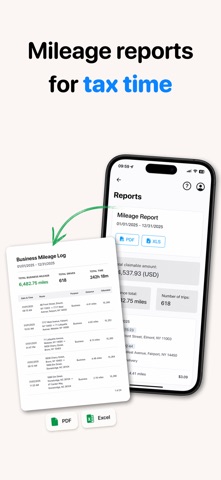
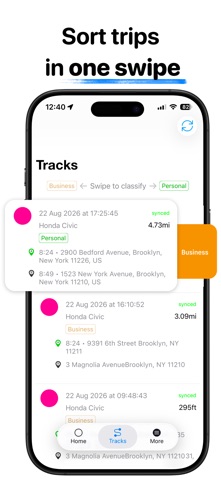
Every trip, automatically recorded, categorised and reported. MyCarTracks turns your phone into an automatic mileage tracker and GPS vehicle tracker. Whether you're logging business miles, managing a growing fleet, or coordinating municipal vehicles, you get the trip data and visibility you need - without installing or maintaining dedicated tracking hardware. Drivers track trips through the MyCarTracks mobile app, while mileage records, reports, vehicles, and fleet activity can be managed from the secure web application at www.mycartracks.com. ◉ AUTOMATIC MILEAGE TRACKING Stop rebuilding your mileage log at the end of the week. MyCarTracks automatically records your drives in the background, making it easier to capture business mileage for tax deductions, expense claims, and reimbursements. Ideal for freelancers, rideshare drivers, real estate agents, sales representatives, photographers, tradespeople, and small-business owners. • Record trips automatically with battery-friendly drive detection • Keep your mileage records securely backed up in the cloud • Export detailed mileage reports in PDF or Excel • Review trip history and mileage analytics from the web application • Track up to two vehicles with the free plan • Choose flexible paid plans as your needs grow Open the app and let MyCarTracks build your mileage log throughout the day - without entering every trip manually. ◉ GPS FLEET AND VEHICLE TRACKING Know where your vehicles are, where they've been, and what they cost to operate. MyCarTracks combines automatic mileage tracking with practical fleet management tools for businesses with a few company cars or more than 1,000 vehicles. • View vehicle locations on a real-time GPS map • Access unlimited location and trip history • Add vehicles quickly with bulk imports and guided web setup • Log fuel, maintenance, and other vehicle expenses • Generate detailed expense and refueling reports • Schedule preventive maintenance • Use Drive Score insights to encourage safer driving • Create geofences, points of interest, and customer locations • Analyze geofence activity to improve efficiency and control costs • Connect payroll, CRM, and other systems through Zapier, Make, CSV, or API • Share live locations and recorded routes with colleagues, customers, or partners • Keep a clear record of completed trips and field work Start with a 14-day free trial for up to 10 vehicles, then choose a plan that scales with your fleet. ◉ CITIES AND GOVERNMENT Track snowplows, street sweepers, leaf-collection vehicles, and other municipal fleets in real time. MyCarTracks gives public-service teams a clear view of vehicle locations, routes, and speeds. It also makes it easier to verify completed work and share service progress with residents. ◉ NO DEDICATED TRACKING HARDWARE MyCarTracks uses the driver's phone to record trips and locations, helping you avoid the installation and maintenance costs associated with dedicated GPS tracking devices. ◉ LEARN MORE Pricing: https://mycartracks.com/pricing Features: https://mycartracks.com/features Help Center: https://community.mycartracks.com Facebook: https://facebook.com/mycartracks LinkedIn: https://linkedin.com/company/mycartracks Continued use of GPS running in the background may decrease battery life.
What's new · 2.1.1
Automatic recording received a new update and recording is now more reliable, especially in the background and after the app restarts. It better captures trip beginnings and endings, preserves missed mileage, and avoids extra points while stopped. You can now choose whether driving, cycling, running, or walking may start a recording. Work Hours recording has clearer alerts and recovery actions when a scheduled action needs attention. This release includes various fixes including destination addresses, feedback submission, and GPX export details.
Details