

Poly Metronome
Imre Virag · Music
Independent analytics for this App Store listing. AppTracker is not affiliated with Imre Virag.
Chart standing · US
What changed · US
Listing changes AppTracker has observed for this app in this storefront — new versions, price moves, rating shifts, and store copy.
A big update for practicing and playing live. • Time signatures for everyone: any beat count in quarter or eighth notes — 7/8, 9/8 and 12/8 are free, with accent groupings like 2+2+3 • Two-voice polyrhythms are now free • Edit presets and setlists directly; add notes, duplicate and update them • Practices can load a preset and set a goal, and the new practice log shows your streak and tempo progress • Siri, Shortcuts and Spotlight: start, stop, play a preset or open a setlist hands-free • Lock Screen, Dynamic Island and Control Center controls • AirPlay picker with a latency notice, plus an option to play exclusively and show up in Now Playing • A searchable user guide with live examples, and helpful tips • End a practice or setlist to return to your own settings • More precise timing: tempo steps land on the downbeat, and the visuals stay with the sound when you switch to AirPods or AirPlay
In-app purchases · US
What this app sells inside itself, grouped by kind and priced for this storefront.
Screenshots


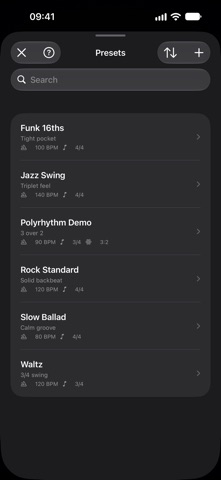
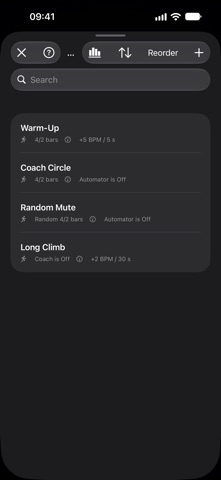

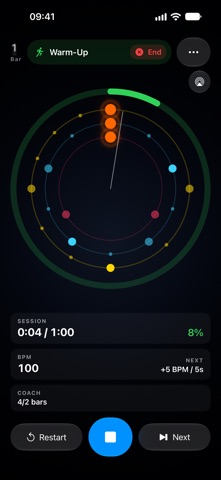


About
Poly Metronome is a precise, modern practice tool for musicians who want more than just a click. Set any time signature, shape odd meters with accent groupings, layer polyrhythms, then save your setups as presets and setlists — or build up speed with practice sessions that track your progress. A clean interface scales from iPhone to iPad, with a live pulse ring that shows every voice and accent at a glance — and stays in sync with the sound on the speaker, headphones, AirPods or AirPlay. FREE FEATURES • Studio-grade timing engine, 1–800 BPM • Any time signature: 1–32 beats per bar, counted in quarter or eighth notes — 5/4, 7/8, 9/8, 12/8 and more • Accents and groupings such as 2+2+3 for odd meters • Two-voice polyrhythms such as 3:2 or 4:7 • Count-in before playback • Tap tempo and manual BPM entry • Vibration and LED flash on the beat (iPhone) • Foot pedal and Bluetooth keyboard control • Siri and Shortcuts: start, stop and set the tempo hands-free • Lock Screen, Dynamic Island and Control Center controls • AirPlay and Bluetooth speakers, with a latency notice • Searchable user guide with live examples • Ad-free, with dark, light or system theme PRO FEATURES — one-time purchase, Family Sharing supported • Up to 5 polyrhythm voices, each with its own sound, color, accents and pattern • 18 sound banks (10 metronome + 8 polyrhythm) • 16 built-in rhythm patterns and a custom pattern editor with real notation — even a different subdivision on every beat • Presets: create, edit and duplicate, with notes such as the key or capo shown on stage • Setlists: songs in order, each with its own tempo, notes and auto-advance on the downbeat — the app reopens on the same song if it closes mid-gig • Practice sessions: Coach mutes bars to test your inner time, Automator ramps the tempo by bars or seconds, and session goals keep you on track • Practice log: day streak, minutes per day and your top-tempo progress • Siri and Spotlight for your presets, practices and setlists • iCloud sync across all your devices Ideal for drummers, guitarists, pianists, singers, dancers and any musician serious about timing.
What's new · 5.8
A big update for practicing and playing live. • Time signatures for everyone: any beat count in quarter or eighth notes — 7/8, 9/8 and 12/8 are free, with accent groupings like 2+2+3 • Two-voice polyrhythms are now free • Edit presets and setlists directly; add notes, duplicate and update them • Practices can load a preset and set a goal, and the new practice log shows your streak and tempo progress • Siri, Shortcuts and Spotlight: start, stop, play a preset or open a setlist hands-free • Lock Screen, Dynamic Island and Control Center controls • AirPlay picker with a latency notice, plus an option to play exclusively and show up in Now Playing • A searchable user guide with live examples, and helpful tips • End a practice or setlist to return to your own settings • More precise timing: tempo steps land on the downbeat, and the visuals stay with the sound when you switch to AirPods or AirPlay
Details