

Jayson
Simon B. Støvring · Developer Tools
Independent analytics for this App Store listing. AppTracker is not affiliated with Simon B. Støvring.
Chart standing · US
What changed · US
Listing changes AppTracker has observed for this app in this storefront — new versions, price moves, rating shifts, and store copy.
Brings small optimizations for iOS 27.
Price & rating history · US
Reconstructed from the listing changes AppTracker has observed in this storefront. A field is charted once it has changed more than once, and each line starts at the value it moved from.
Average rating · ★ 4.52 now · 5 changes on record
Ratings breakdown · US
The star breakdown behind this app's rating in this storefront.
In-app purchases · US
What this app sells inside itself, grouped by kind and priced for this storefront.
Screenshots




Keywords this app targets
Search terms AppTracker associates with this app — estimates, not search volume. ❝ = in the app's title; a highlighted number is its current position for that term.
Similar apps
Competitors and close alternatives, as estimated by AppTracker.
 JSON Tools
Mohammed Aadhil
2 shared topics
JSON Tools
Mohammed Aadhil
2 shared topics
 Json Genie: JSON Editor/Viewer
Tommy Uytterhaegen
Json Genie: JSON Editor/Viewer
Tommy Uytterhaegen
 JSON Tools - View Edit
OKAN KAYCI
3 shared topics
JSON Tools - View Edit
OKAN KAYCI
3 shared topics
 JSON Viewer & Editor
志鹏 潘
3 shared topics
JSON Viewer & Editor
志鹏 潘
3 shared topics
 JSON Viewer - Json file reader
Beatcode Srl
2 shared topics
JSON Viewer - Json file reader
Beatcode Srl
2 shared topics
 JSON Editor Mobile
VDT LABS S.R.L.
1 shared topic
JSON Editor Mobile
VDT LABS S.R.L.
1 shared topic
 JSON Viewer Pro
晨 张
JSON Viewer Pro
晨 张
 Power JSON Editor Mobile
基伟 徐
1 shared topic
Power JSON Editor Mobile
基伟 徐
1 shared topic
About
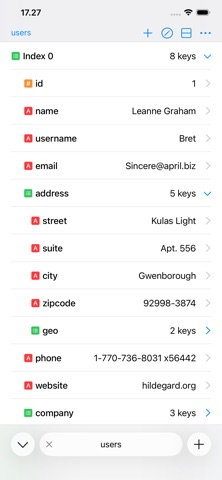
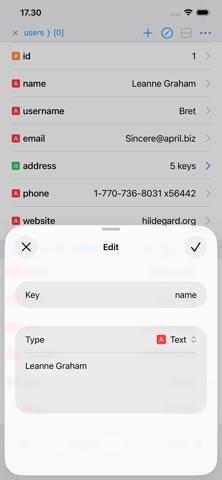
Jayson is a JSON viewer and editor for iPhone and iPad. Browse JSON as a structure, edit values, and save your changes back to the file. Whether you're inspecting an API response, checking a config file, or making a quick fix on the go, Jayson turns raw JSON into something you can actually read and change. BROWSE AND EDIT - Open JSON files stored on your device or in iCloud Drive. - Toggle between a structured table view and syntax highlighted text. - Add new values and keys, and save your changes back to the file. - Parse text or the contents of a URL from your clipboard into JSON. - Highlight a key from a child of an array to get a quick overview of your data. TABS, SPLITS, AND WINDOWS - Switch between files, or different objects in a single file, using tabs. - Compare JSON in a single file or across files using multiple splits. - Open multiple windows on the iPad. WORKS WITH SHORTCUTS Jayson integrates with Shortcuts, which comes in handy for debugging API calls, previewing JSON files, and building workflows around JSON. - Pass a response from Get Contents of URL to Jayson to see how it is structured. - Open JSON as a document you keep working on, or as a temporary preview. - Format JSON and hand the result to the next action, using spaces or tabs. FREE, WITH AN OPTIONAL UPGRADE Jayson's core functionality is free. Browsing, editing, saving, splits, Shortcuts, and working with up to two tabs at a time cost nothing. A one-time in-app purchase enables having more than two tabs open at once, switching between light and dark themes, and personalizing the app icon, accent color and type icons. One purchase, no subscription.
What's new · 1.5.3
Brings small optimizations for iOS 27.
Details