

Widget Timer
Foobar Creative · Utilities
Independent analytics for this App Store listing. AppTracker is not affiliated with Foobar Creative.
Chart standing · US
What changed · US
Listing changes AppTracker has observed for this app in this storefront — new versions, price moves, rating shifts, and store copy.
New: a Date widget. Show the date, the day or the week number on your Home Screen. Please don't hesitate to get in touch with any bugs or feature requests. P.S. Make Every Second Count!
Price & rating history · US
Reconstructed from the listing changes AppTracker has observed in this storefront. A field is charted once it has changed more than once, and each line starts at the value it moved from.
Average rating · ★ 4.11 now · 4 changes on record
Screenshots




About
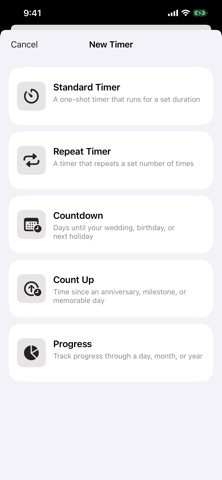
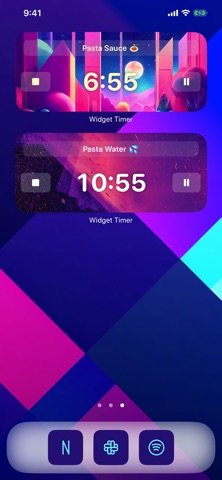
Widget Timer puts beautiful, customizable timers right on your Home Screen and Lock Screen. Pick the timer type that fits the moment, style it to match your setup, and keep it only a glance away. Every timer type, in one app: - Countdown: count down the days to a birthday, holiday, wedding, or trip, and let it roll over automatically every year. - Count Up: track the time since an anniversary, a milestone, or the day you started something new. - Progress: see how far through the week, month, quarter, or year you are. - Stopwatch: count elapsed time up from zero, starting and stopping as you go. - Standard: a simple one-shot timer that counts down (or up) to a set duration. - Repeat: a timer that repeats a set number of times, or infinitely, for periodic reminders like stretching or drinking water. Widgets, done right: - add timer widgets to your Home Screen and Lock Screen - interactive widgets, so you can start and stop your timers without opening the app - customize the theme of each widget, or pick one from a gallery of over 50 themes More to love: - run as many timers as you like, all at once - name every timer (emoji supported) - lots of alert sounds to choose from - multiple finished modes - local notifications alert you when the app is in the background (no network required) - long press to re-order the timers on the main screen - works with Siri and Shortcuts Some features require a purchase of either a Premium Subscription or a Premium Lifetime Unlock. Widget Timer Premium Subscription Payment will be charged to your Apple ID account at the confirmation of purchase. Subscription automatically renews unless it is canceled at least 24 hours before the end of the current period. Your account will be charged for renewal within 24 hours prior to the end of the current period. You can manage and cancel your subscriptions by going to your account settings on the App Store after purchase. Terms of Use: https://www.apple.com/legal/internet-services/itunes/dev/stdeula/
What's new · 3.7
New: a Date widget. Show the date, the day or the week number on your Home Screen. Please don't hesitate to get in touch with any bugs or feature requests. P.S. Make Every Second Count!
Details