

Watch Speedometer Pro
Bernhard Hering · Navigation
Independent analytics for this App Store listing. AppTracker is not affiliated with Bernhard Hering.
Chart standing · US
What changed · US
Listing changes AppTracker has observed for this app in this storefront — new versions, price moves, rating shifts, and store copy.
See your drives at a glance: recorded routes are now colored by speed. The improved track view brings together your map, speed profile, distance, and duration. Pauses and GPS gaps remain separate, and saving and reopening recordings is more reliable. Speed units: choose Automatic, km/h, or mph. Automatic follows your device's measurement system. CarPlay now respects your choice for current, average and maximum speed, and distance. Live Activities update when you switch units; widgets, history and track views also use your selected unit.
In-app purchases · US
What this app sells inside itself, grouped by kind and priced for this storefront.
Screenshots




About
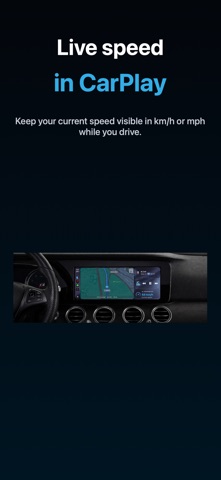
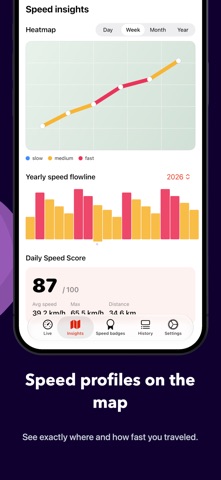
Watch Speedometer Pro shows your current speed directly on Apple Watch and iPhone while you walk, cycle, drive, or fly. CarPlay keeps your speed visible while you drive. The Live Activity also shows it on the Lock Screen, in the Dynamic Island, and in the CarPlay Dashboard. Highlights: - live speed with precise GPS - battery-friendly background updates - heatmaps for day, week, month, or year - Daily Speed Score and yearly flowline - history with time, coordinates, and accuracy - automatic speed badges for achieved goals - units: km/h, mph, knots, m/s, and ft/s - a dedicated CarPlay display for current speed - speed tracks with profile, average, maximum, distance, moving time, and GPX/CSV export - widgets, Apple Watch complications, and a Live Activity for the Lock Screen, Dynamic Island, and CarPlay Dashboard Measurements stay synchronized across iPhone and Apple Watch. The shared location history also works together with Watch Compass, Watch Altimeter, and WatchBarometer. Premium is available as an auto-renewing yearly subscription or a one-time lifetime unlock. Privacy Policy: https://bernhardhering.de/privacy/ Terms of Use: https://www.apple.com/legal/internet-services/itunes/dev/stdeula/
What's new · 2.6.2
See your drives at a glance: recorded routes are now colored by speed. The improved track view brings together your map, speed profile, distance, and duration. Pauses and GPS gaps remain separate, and saving and reopening recordings is more reliable. Speed units: choose Automatic, km/h, or mph. Automatic follows your device's measurement system. CarPlay now respects your choice for current, average and maximum speed, and distance. Live Activities update when you switch units; widgets, history and track views also use your selected unit.
Details