
Chart standing · US
What changed · US
Listing changes AppTracker has observed for this app in this storefront — new versions, price moves, rating shifts, and store copy.
For the latest, full-featured Code Analyzer experience, download Code Analyzer from the Mac App Store. Code Analyzer 1.16 adds font inspection, faster project search, and more dependable binary navigation. New • Font glyph viewer: open TrueType, OpenType, and font collection files to browse searchable glyph grids, switch faces, and inspect metadata and outlines. Improvements • Quick Open now searches files, classes, methods, and native symbols with responsive fuzzy matching and more accurate result navigation. • Mach-O analysis now finds more functions from function-start metadata, unwind data, Objective-C methods, and chained fixups, with reliable navigation across universal binary slices. • ELF structure entries in the Inspector now jump directly to their location in Paper View. • Opening workspaces now shows clearer progress, retry, permission, and missing-file states.
Ratings breakdown · US
The star breakdown behind this app's rating in this storefront.
Screenshots



About
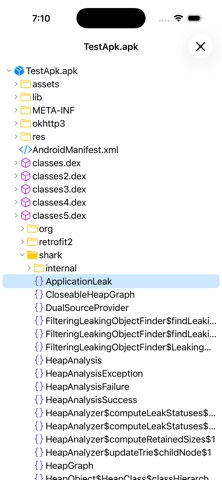
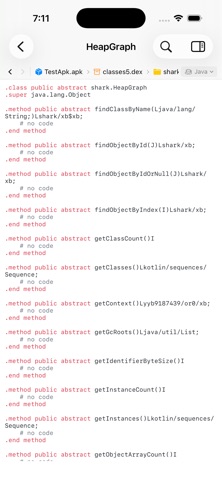
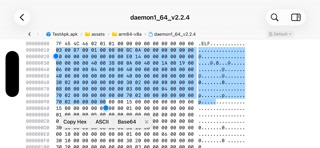
For the latest, full-featured Code Analyzer experience, download Code Analyzer from the Mac App Store. Code Analyzer turns opaque software into a workspace you can navigate. Analyze APK and JAR packages, inspect Mach-O and ELF binaries and font files, and move naturally from package structure to readable code, functions, symbols, assembly, and raw bytes. Code Analyzer combines an APK analyzer, JAR decompiler, native disassembler, font glyph viewer, bytecode viewer, and hex viewer in one focused iPhone and iPad workspace. There is no command-line setup and nothing to upload. PACKAGE AND BYTECODE ANALYSIS • Open APK packages and browse files, compiled classes, decoded resources, and manifest data • Decompile supported class files from JAR archives into readable high-level output • Fall back to low-level bytecode automatically when a higher-level result is unavailable • Follow nested ZIP, APK, and JAR containers in place without manually unpacking them NATIVE BINARY ANALYSIS • Inspect Mach-O universal binaries, dynamic libraries, application bundles, and frameworks • Explore ELF executables and shared libraries across multiple CPU architectures • Browse architecture slices, headers, segments, sections, symbols, and discovered functions • Explore ELF and Mach-O machine code in a continuous, architecture-aware disassembly view • Jump directly to discovered functions and symbols, including useful results from stripped binaries FIND THE SIGNAL • Open TrueType, OpenType, and font collections in a searchable glyph viewer with metadata and outline inspection • Use Quick Open to find files, classes, methods, resources, and symbols with responsive fuzzy matching • Search raw data as text or hex and step through every match • Jump to decimal or hexadecimal offsets without losing context • Copy any byte selection as hex, text, or Base64 • Keep syntax highlighting and symbol outlines beside the content you are reading ANALYZE ON THE GO • Native SwiftUI interface adapted for iPhone and iPad • Responsive background processing for large, multi-part files • Runs entirely offline, so your files stay on your device Built for developers, security professionals, and students who need clear answers from software they are authorized to inspect.
What's new · 1.16
For the latest, full-featured Code Analyzer experience, download Code Analyzer from the Mac App Store. Code Analyzer 1.16 adds font inspection, faster project search, and more dependable binary navigation. New • Font glyph viewer: open TrueType, OpenType, and font collection files to browse searchable glyph grids, switch faces, and inspect metadata and outlines. Improvements • Quick Open now searches files, classes, methods, and native symbols with responsive fuzzy matching and more accurate result navigation. • Mach-O analysis now finds more functions from function-start metadata, unwind data, Objective-C methods, and chained fixups, with reliable navigation across universal binary slices. • ELF structure entries in the Inspector now jump directly to their location in Paper View. • Opening workspaces now shows clearer progress, retry, permission, and missing-file states.
Details