

Iriun Webcam for PC and Mac
Iriun Oy · Photo & Video
Independent analytics for this App Store listing. AppTracker is not affiliated with Iriun Oy.
Chart standing · US
What changed · US
Listing changes AppTracker has observed for this app in this storefront — new versions, price moves, rating shifts, and store copy.
Price & rating history · US
Reconstructed from the listing changes AppTracker has observed in this storefront. A field is charted once it has changed more than once, and each line starts at the value it moved from.
Average rating · ★ 3.21 now · 3 changes on record
Ratings breakdown · US
The star breakdown behind this app's rating in this storefront.
Screenshots
About
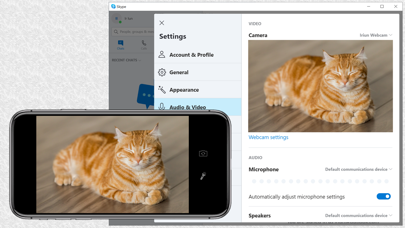
Use your iPhone's camera as a wireless webcam in personal computer. Install needed drivers and enjoy iPhone's sharp image with your favourite PC and Mac video applications. Installing Iriun Webcam drivers for your computer: 1. Please make sure to download the needed PC/Mac software from https://iriun.com 2. Run the installer and follow instructions on the screen. Using Iriun Webcam: 1. Launch Iriun Webcam app on your iPhone 2. Start Iriun Webcam Server on your PC/Mac 3. The phone is connected automatically to your computer using wireless WiFi network and the camera is ready to use. 4. Configure PC/Mac applications to use Iriun Webcam as a video source
What's new · 2.9.3
Library updates.
Details