

RedApp Lite: Private Browser
Minh Tran · Utilities
Independent analytics for this App Store listing. AppTracker is not affiliated with Minh Tran.
Chart standing · US
What changed · US
Listing changes AppTracker has observed for this app in this storefront — new versions, price moves, rating shifts, and store copy.
Thank you for choosing RedApp Lite! This release includes: - Bug fixes, stability and performance improvements. Love the app? Rate us! Your feedback is music to our ears, and it helps us make RedApp Lite even better. Got a question? Please drop us a line at: mqmedia29@gmail.com
Price & rating history · US
Reconstructed from the listing changes AppTracker has observed in this storefront. A field is charted once it has changed more than once, and each line starts at the value it moved from.
Average rating · ★ 4.60 now · 5 changes on record
Ratings breakdown · US
The star breakdown behind this app's rating in this storefront.
In-app purchases · US
What this app sells inside itself, grouped by kind and priced for this storefront.
Screenshots



About
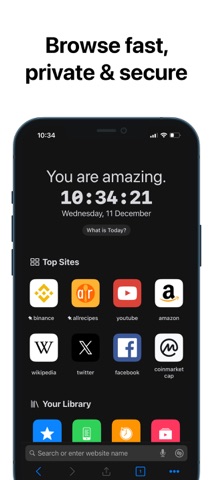
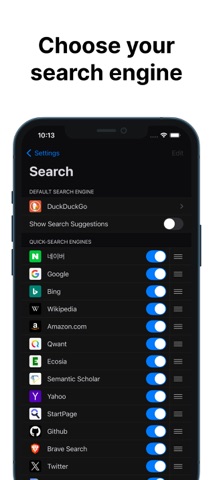
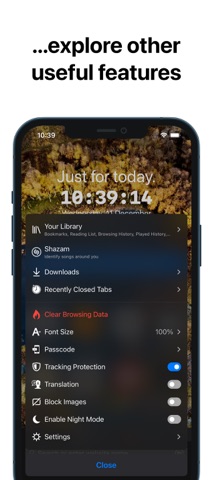
RedApp Lite is a private browser, simply provides the fastest, most secure private browsing experience available and is especially more customizable than other private browsers. Main features: • Fast, smart, integrates many great add-ons, security and energy efficiency than other browsers. • Search intelligently. Easily access shortcuts to search providers including Wikipedia, Twitter, YouTube, Amazon etc. • Private browsing. Using Passcode/TouchID or FaceID protection helps you keep more privacy and security in your business. • Tracking Protection. Let you identify advertisers and others who track your online behavior, and remove the cross‑site tracking data they leave behind. • Privacy Protection. Be protected with leading privacy and security features such as HTTPS Everywhere (encrypted data traffic), script blocking, cookie blocking, and private tabs. • Player Manager. You can play video links from YouTube, Vimeo while browsing. Play audio in background and without any annoying ads. • Download Manager, File Manager and Sharing Manager. Let you download, manage files or links and share them to nearby devices. Use Wi-Fi or WebDAV sharing to let you transfer files directly to other nearby devices (mobile or PC). • Widgets. Supports many useful widgets such as Calendar, Top Sites, Your Library, Video Meetings, Tracking Protection, Website Redirects, URL Shortcuts... • Default Browser. From iOS 14, set RedApp Lite as your default browser! Select Settings - scroll down to select RedApp Lite - select RedApp Lite as the Default Browser App. Additional Features: • Appearance. Use system Light/Dark mode or choose a predefined theme. • Theme Color. Change any text color you want. • Toolbar Color. Select a color-coded predefined toolbar. • Customize the toolbar. Allows adding or removing menu buttons. • Address Bar. Displayed at Top or Bottom. • Wallpapers. Set background image for New Tab. • Allows customization of font-size. • Reader Mode. Always on. • Require Passcode/TouchID or FaceID when the screen is locked. • Pop-up blocker. • Saves battery and data. • HTTPS everywhere (for security). • Script blocking. • Browsing history/Reading List/Bookmarks. • Private tabs. • Night Mode. Easily read in low light. • Blocks cookie consent notifications by default. • Use voice search in the browser. • Import/export bookmarks to another browser. AND you can explore other useful features in Settings. RedApp Lite is a compact version of the RedApp browser. Therefore, if you want to experience all the other useful features, you can download RedApp here: https://apps.apple.com/vn/app/redapp-web-browser/id1409063862 Love the app? Rate us! Your feedback is music to our ears, and it helps us make RedApp Lite even better. Got a question? Please drop us a line at: mqmedia29@gmail.com
What's new · 4.0.35
Thank you for choosing RedApp Lite! This release includes: - Bug fixes, stability and performance improvements. Love the app? Rate us! Your feedback is music to our ears, and it helps us make RedApp Lite even better. Got a question? Please drop us a line at: mqmedia29@gmail.com
Details