

hh2 AP Payments
Digital Business Integration · Business
Independent analytics for this App Store listing. AppTracker is not affiliated with Digital Business Integration.
Chart standing · US
What changed · US
Listing changes AppTracker has observed for this app in this storefront — new versions, price moves, rating shifts, and store copy.
Bug Fixes - Fixed receipts converted to invoices on the web still showing in your list. - Fixed crashes when switching between users. - Fixed crashes on the latest iOS version. - Fixed a coding error that blocked approval on fully coded invoices. - Fixed cost code and category being cleared after an invoice was approved. - Fixed the vendor changing after an invoice was approved. - Fixed expense sub-accounts not showing their parent account. - Fixed invoices approved by other users appearing in All and Approved tabs. - Fixed receipt lists showing more receipts than expected. - Fixed receipt lists not matching what you see on the web. - Fixed an incorrect message saying an invoice had no associated receipt. - Fixed being unable to approve invoices when a cost code or category was required. - Fixed distributions being duplicated when added to a receipt.
Ratings breakdown · US
The star breakdown behind this app's rating in this storefront.
Screenshots
About
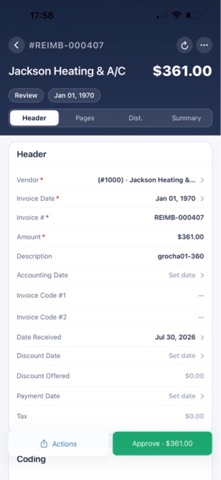
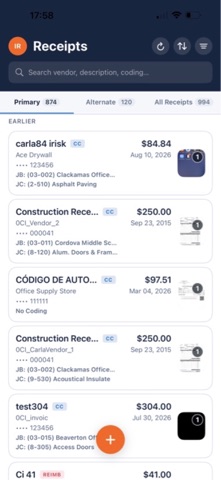
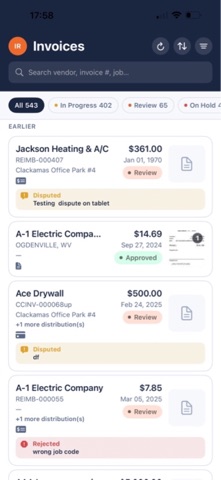
The only workflow you will need for invoices and credit cards. hh2 AP Payments. Take control of your invoices, credit card expenses, reimbursements and your purchasing workflow with hh2 AP Payments. With tools that let you capture and code invoices and credit card transactions, intuitive reimbursement workflows and a multitude of approval options, AP routing and approving never flowed so smoothly. All combined with expert accounting integration. Intuitive Invoice Coding and Approval Apps for smartphones and tablets, along with a fully-featured website, makes the process extremely mobile friendly. Bring in invoices through email, over your network or directly over your mobile device. Code the invoice to a job, commitment, commitment item, cost code, category, expense account, AP account or tax group. Distribute the cost between multiple jobs or coding practices. How it works: Bring your invoices into hh2 AP Payments with intuitive ways that won’t interrupt your day-to-day business activities. Email capture will take in PDFs from monitored email accounts and import them straight into our system. Network capture allows you to setup a folder on your network that will bring over all documents submitted to them. Mobile capture will take documents that have been scanned in using native mobile apps and deliver them to the hh2 AP Payments app. Invoices that are brought into the system can easily be assigned an approval path. The approval paths can be based on a job, a group, manually submitted or you can create custom approval paths to suit your approval needs. Once the invoice has reached the final approval, it will automatically sync back into your accounting system. Credit Card & Reimbursement Transaction Coding Your employees can capture photos of their receipts and code them on their smartphone or tablet at the time of purchase. Most receipts will automatically associate with the credit card invoices when they are imported into AP Payments. If your receipt does not tie to its associated invoice, take advantage of our easy-to-learn tools for manually linking your documents. Take the hassle out of credit card transactions and reimbursements with elegant coding and tracking features that AP Payments brings to your accounting processes. Revolutionary Credit Card Receipt and Reimbursement Approval and Routing Capture photos of the receipt at the time of purchase, eliminating the need to keep the receipt. Easily code the receipt to a job, cost code, category, commitment, commitment item or account. Distribute the cost between multiple jobs or coding practices. Reimbursements are coded similar to receipts and can go through the same approval paths or can be setup to their own approval path. How it works: Your employees will be able to take photos of their receipts at the time of purchase. They can code them to jobs, cost codes, commitments, commitment items, categories or accounts. They also will be able to place a comment for the receipt if needed. Your on-staff accountant imports the credit card expenses into AP Payments, and each expense will create an invoice that is automatically routed to the credit card holder. The invoices will automatically connect to the receipt if the date and expense match up with each other. Some receipts may not link due to the date or the amount entered for the receipt being incorrect. The user can easily associate these receipts with the invoices in a simple process. Once each invoice and receipt are linked and coded correctly, the credit card user approves the invoice and it is routed, by default, back to the on-staff accountant for their approval. You can give your users the ability to manually route the invoice to another person, such as a project manager, as well. The invoice is then brought back into the accounting system once the accountant gives the final approval.
What's new · 2.3.4
Bug Fixes - Fixed receipts converted to invoices on the web still showing in your list. - Fixed crashes when switching between users. - Fixed crashes on the latest iOS version. - Fixed a coding error that blocked approval on fully coded invoices. - Fixed cost code and category being cleared after an invoice was approved. - Fixed the vendor changing after an invoice was approved. - Fixed expense sub-accounts not showing their parent account. - Fixed invoices approved by other users appearing in All and Approved tabs. - Fixed receipt lists showing more receipts than expected. - Fixed receipt lists not matching what you see on the web. - Fixed an incorrect message saying an invoice had no associated receipt. - Fixed being unable to approve invoices when a cost code or category was required. - Fixed distributions being duplicated when added to a receipt.
Details