

TVAirScreen
翔宇 孙 · Productivity
Independent analytics for this App Store listing. AppTracker is not affiliated with 翔宇 孙.
Chart standing · US
What changed · US
Listing changes AppTracker has observed for this app in this storefront — new versions, price moves, rating shifts, and store copy.
TVAirScreen is now free — and made for sharing with the whole room. • Free to download: send up to 5 photos at a time, or unlock Pro once for unlimited batches and PDFs. Bought it before? Pro is already yours • Guest code: a new phone enters the 4-digit code shown on the TV once. Phones you already use keep working • Share button: send to the TV straight from Photos, Files or Safari • Send whole albums — photos arrive in the order you picked them • Slideshow on the TV: press Play/Pause on the Siri Remote • PDFs on the TV — every page becomes a slide • Open PDFs from Files in the full-screen viewer • Your iPhone stays awake while connected, so the connection no longer drops • Fixed picking photos from Files and the camera • More of the app is now translated
In-app purchases · US
What this app sells inside itself, grouped by kind and priced for this storefront.
Screenshots




Keywords this app targets
Search terms AppTracker associates with this app — estimates, not search volume. ❝ = in the app's title; a highlighted number is its current position for that term.
Similar apps
Competitors and close alternatives, as estimated by AppTracker.
 PhotoDj: In-Person Slideshow
AnswerSolutions LLC
1 shared topic
PhotoDj: In-Person Slideshow
AnswerSolutions LLC
1 shared topic
 Air Beamer
APPTREME STUDIO
Air Beamer
APPTREME STUDIO
 Screen Mirroring With Miracast
Ahtisham Muhammad Sagheer
Screen Mirroring With Miracast
Ahtisham Muhammad Sagheer
 Easy Air Screen
JEONG HYEON CHOI
Easy Air Screen
JEONG HYEON CHOI
 TVScreen - Cast & Remote
健 耿
TVScreen - Cast & Remote
健 耿
 Media TV Cast
ARTAK ALAIN SAROYAN
Media TV Cast
ARTAK ALAIN SAROYAN
 Cast To TV Screen Mirror
Heer Patel
Cast To TV Screen Mirror
Heer Patel
 AirPly Camera
ALI OZAN CIL
AirPly Camera
ALI OZAN CIL
About
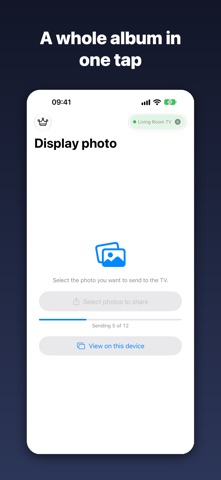
Pass the remote, not the phone. Stop crowding around one tiny screen. TVAirScreen puts your photos on your Apple TV in seconds, so the whole room can enjoy them together — big, bright and easy to browse with the Siri Remote. NO SETUP. NO ACCOUNTS. NO APPLE ID. Your iPhone and Apple TV connect directly. There's no AirPlay to configure, no Apple ID to share and nothing to sign up for. Guests can put their own photos on your TV without touching your settings. A CODE FOR NEW PHONES Your TV shows a 4-digit code. A new phone enters it once and is remembered from then on. Phones that already use your TV keep working. WHY YOU'LL LOVE IT • Send a whole album in one go — photos arrive in the order you picked them • Press Play/Pause on the Siri Remote for an instant, looping slideshow • Swipe left and right to browse on the big screen • Share straight from Photos, Files or Safari with the TVAirScreen share button • Send PDFs — every page becomes a slide. Perfect for sheet music, lessons and presentations • Pick from Photos or Files, or take a new photo with the camera • Your iPhone stays awake while connected, so the show keeps going • View photos and PDFs full screen on your iPhone, with pinch-to-zoom MADE FOR MOMENTS LIKE • Holiday photos with the grandparents on the couch • Parties, weddings and reunions — every guest can add their shots • Travel slideshows the evening you get home • Classrooms, meetings and presentations • Choir, band and church rehearsals with the music on the big screen • Holiday rentals — let your guests share to the TV FREE TO START. PRO IS YOURS FOREVER. Send up to 5 photos at a time for free, with no account. Unlock Pro once — no subscription — for unlimited batches and PDFs. Bought TVAirScreen before it became free? Pro is already yours. GET STARTED 1. Install TVAirScreen on your Apple TV, or scan the QR code it shows. 2. Open TVAirScreen on your iPhone and tap “Connect to Apple TV”. 3. Enter the code from the TV the first time, choose your photos, and watch them appear. Requires the TVAirScreen app on your Apple TV.
What's new · 2.9.0
TVAirScreen is now free — and made for sharing with the whole room. • Free to download: send up to 5 photos at a time, or unlock Pro once for unlimited batches and PDFs. Bought it before? Pro is already yours • Guest code: a new phone enters the 4-digit code shown on the TV once. Phones you already use keep working • Share button: send to the TV straight from Photos, Files or Safari • Send whole albums — photos arrive in the order you picked them • Slideshow on the TV: press Play/Pause on the Siri Remote • PDFs on the TV — every page becomes a slide • Open PDFs from Files in the full-screen viewer • Your iPhone stays awake while connected, so the connection no longer drops • Fixed picking photos from Files and the camera • More of the app is now translated
Details