

TOTP Authenticator – Fast 2FA
AppyFactor · Utilities
Independent analytics for this App Store listing. AppTracker is not affiliated with AppyFactor.
Chart standing · US
What changed · US
Listing changes AppTracker has observed for this app in this storefront — new versions, price moves, rating shifts, and store copy.
IMPORT FROM YOUR OLD AUTHENTICATOR • Move across from Google Authenticator using its export QR code. • Import an Aegis encrypted vault or a 2FAS backup. • Bring in a plain otpauth:// list. • Open a QR image from Files, not just Photos. BACKUP HISTORY & RECOVERY • Point-in-time snapshots of your accounts that you can restore from. • Undo an accidental delete. • After a restore you land back on your list with a confirmation, not a blank screen. CODES YOU CAN TRUST • Time-drift detection with one-tap repair, so your codes keep working when the device clock is wrong. • Copied codes now clear from the clipboard automatically after a short delay. • Stricter checks when adding or importing: unsupported algorithms and out-of-range digit counts are rejected up front instead of quietly creating an account that never works. ORGANISE FASTER • Opt-in auto-categorisation that files new accounts by issuer. • Reorder accounts within a label group. • Smarter search, several words now narrow across issuer, account and category together. • Set a custom image for any account. • View an account's QR code from its edit screen. • A newly added account is highlighted and scrolled into view. SYNC FIXES • Google Drive: a missing backup file is re-created rather than failing silently, and accounts are removed from the cloud only on a proven local delete. • A sync that would destroy data now raises a sheet you can review and resolve instead of failing quietly. • Cloud sync reconciles on cold launch. ALSO • The browser extension enables itself when you sign in with Google, the manual step is gone. • Theme changes apply instantly. • Now in 10 languages: English, German, Spanish, French, Hindi, Italian, Japanese, Portuguese, Russian and Simplified Chinese. Questions or problems? info@binaryboot.com
Price & rating history · US
Reconstructed from the listing changes AppTracker has observed in this storefront. A field is charted once it has changed more than once, and each line starts at the value it moved from.
Average rating · ★ 4.71 now · 2 changes on record
Ratings breakdown · US
The star breakdown behind this app's rating in this storefront.
In-app purchases · US
What this app sells inside itself, grouped by kind and priced for this storefront.
Screenshots


About
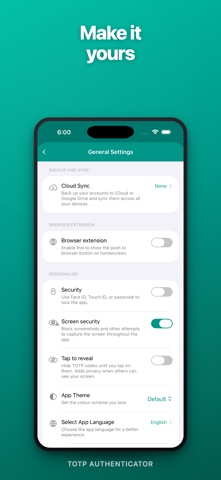
The 2FA authenticator for people with more than five accounts. TOTP Authenticator generates the six-digit verification codes you need to sign in to Google, Microsoft, Facebook, Amazon, GitHub, PayPal and 1000+ other services — but with the cloud sync, browser push, and widgets that the other authenticators don't give you. — WHY PEOPLE SWITCH — • ENCRYPTED CLOUD SYNC — Back up to iCloud or Google Drive. Your data stays in your own cloud account; you stay in control. Restore on a new Phone in seconds. • PUSH CODES TO YOUR BROWSER — Pair our Chrome or Firefox extension once. From then on, one tap on your phone copies the right 2FA code to your desktop clipboard — ready to paste. Your security key never leaves your phone. We never see your codes. • LOCK SCREEN & HOME SCREEN WIDGETS — Pin your most-used accounts to your Lock Screen or Home Screen. Glance, tap, copied. Live countdown built in. • YOUR DATA TRAVELS WITH YOU — Already used our app on a different platform? Encrypted backups round-trip cleanly between iOS and other platforms via Google Drive. — PRIVACY BY DEFAULT — • Face ID or Touch ID lock. • Tap-to-reveal — codes stay hidden in the list until you tap. • Screen Security blocks screenshots and screen recording, on by default. • No analytics. No tracking. No servers that can leak your secrets. — ORGANISED THE WAY YOU THINK — • Eight colour-coded categories: Personal, Work, Social, Entertainment, Tools, Finance, Favourites, Other. • Instant search with one-tap category filter. • Drag to reorder. Pin to Favourites for one-tap access. • Pick an issuer icon from our library, or auto-match when you scan a QR code. • Add accounts by camera, by photo library QR scan, or by typing the key manually. • Works offline — codes are generated on your device. No network required to sign in. — WORKS WITH — Google, Apple ID, Facebook, Amazon, Microsoft, GitHub, PayPal, Dropbox, LinkedIn, Twitter / X, Instagram, Yahoo, WordPress, Epic Games, Blizzard, GoDaddy, Bitbucket, TeamViewer, Dashlane, Evernote — and 1000+ other services that support the RFC 6238 TOTP standard that Google Authenticator uses. — WHAT'S NEW IN v1.23 — Rebuilt from the ground up. Faster, cleaner, fully localised in English, German, and Japanese. iCloud sync rewritten for reliability. New Lock Screen widget. New search with category filter. New tap-to-reveal privacy mode. — PREMIUM — Cloud Sync and Browser Push are part of TOTP Premium — a one-time purchase, not a subscription. Try the app free; upgrade if and when you need them. Questions, bug reports, requests? Use the in-app Contact form or email hello@binaryboot.com — we read every message. App-based 2FA only. Does not receive or generate SMS codes.
What's new · 1.24
IMPORT FROM YOUR OLD AUTHENTICATOR • Move across from Google Authenticator using its export QR code. • Import an Aegis encrypted vault or a 2FAS backup. • Bring in a plain otpauth:// list. • Open a QR image from Files, not just Photos. BACKUP HISTORY & RECOVERY • Point-in-time snapshots of your accounts that you can restore from. • Undo an accidental delete. • After a restore you land back on your list with a confirmation, not a blank screen. CODES YOU CAN TRUST • Time-drift detection with one-tap repair, so your codes keep working when the device clock is wrong. • Copied codes now clear from the clipboard automatically after a short delay. • Stricter checks when adding or importing: unsupported algorithms and out-of-range digit counts are rejected up front instead of quietly creating an account that never works. ORGANISE FASTER • Opt-in auto-categorisation that files new accounts by issuer. • Reorder accounts within a label group. • Smarter search, several words now narrow across issuer, account and category together. • Set a custom image for any account. • View an account's QR code from its edit screen. • A newly added account is highlighted and scrolled into view. SYNC FIXES • Google Drive: a missing backup file is re-created rather than failing silently, and accounts are removed from the cloud only on a proven local delete. • A sync that would destroy data now raises a sheet you can review and resolve instead of failing quietly. • Cloud sync reconciles on cold launch. ALSO • The browser extension enables itself when you sign in with Google, the manual step is gone. • Theme changes apply instantly. • Now in 10 languages: English, German, Spanish, French, Hindi, Italian, Japanese, Portuguese, Russian and Simplified Chinese. Questions or problems? info@binaryboot.com
Details