

ZenJournal: Private Diary
IdealistSpace Inc · Health & Fitness
Independent analytics for this App Store listing. AppTracker is not affiliated with IdealistSpace Inc.
Chart standing · US
What changed · US
Listing changes AppTracker has observed for this app in this storefront — new versions, price moves, rating shifts, and store copy.
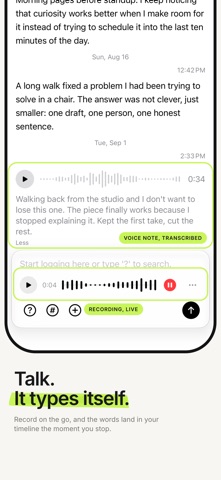
What's new in 5.4.1 - Fixed a freeze on first launch, where the keyboard could rise over the welcome screen and cover its only button. - The first-run setup can now be skipped from the top right. Voice logs, an activity chart, home screen widgets, and a real editor for your timelines. Talk instead of typing - Record a voice log right in the input, without leaving your timeline. Scrub the waveform, pause and resume mid-thought, or discard and start over. - Transcription happens on device, in the language you actually speak, and the words land in your timeline the moment you stop. The audio never leaves your iPhone. - Copy the transcript from any recording. See every day you showed up - Swipe up from the input for a chart of your activity. Not a streak counter, just the shape of your months. - Put the Activity widget on your home screen, small or medium. Tap a day and the app opens right there. - With Lock Mode on, the widget stays put and shows the shape without a single word. Timeline Garden - Your timelines are now a tree you can tend. Drag a bubble onto another to nest it, tap to rename, reorder, or remove. Entries in a removed timeline are kept and stay searchable in All. Also new - A share extension: send text, links, or photos from any app straight into a timeline. - New photo and camera cards for attaching images. - Journal reminders as real notifications, with the frequency set in Settings. - A guided first run that lets you try each feature instead of reading about it. Replay it any time from Settings. - Discreet Mode keeps dates and times readable so you can still find your way around, and Copy and Share ask you to unlock first when Lock Mode is on. - Haptics across capture, save, and selection. Zen Pro has new pricing, and every plan now starts with a 7-day free trial. If you already subscribe, your price stays exactly as it was.
Ratings breakdown · US
The star breakdown behind this app's rating in this storefront.
In-app purchases · US
What this app sells inside itself, grouped by kind and priced for this storefront.
Screenshots


About
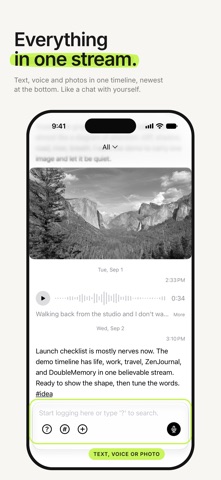
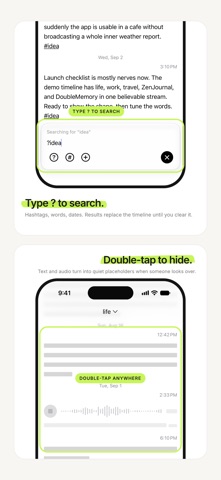
ZenJournal is a fast, private journal built around calm, frictionless writing. Open the app and start logging. Speak it, type it, or snap it. Search with ?, organize with #hashtags, and switch between timelines for life, work, travel, ideas, or anything else you want to keep separate. ZenJournal keeps journaling simple: - Fast timeline-first writing - Voice logs with on-device transcription, so your audio never leaves your phone - Photos attached to any entry - Export in Paper, Ink, and Warm styles as an image, PDF, TextBundle, or text - Separate timelines for separate parts of your life - iCloud sync across your devices - Discreet Mode to blur your logs in public - Face ID and Touch ID lock - #hashtags and ? search built into the same input - Backup and restore - Dark mode and light mode support Use ZenJournal for stream-of-consciousness writing, morning pages, private notes, ideas, memories, travel logs, work reflections, or a calmer alternative to noisy feeds. ZenJournal is free to use, with unlimited logs and two timelines. Zen Pro adds photo and voice logs, on-device transcription, PDF and TextBundle export, and as many timelines as you need. Every plan starts with a 7-day free trial. Privacy Policy: https://thezenjournal.com/posts/privacy-policy Terms of Service: https://thezenjournal.com/posts/terms
What's new · 5.4.1
What's new in 5.4.1 - Fixed a freeze on first launch, where the keyboard could rise over the welcome screen and cover its only button. - The first-run setup can now be skipped from the top right. Voice logs, an activity chart, home screen widgets, and a real editor for your timelines. Talk instead of typing - Record a voice log right in the input, without leaving your timeline. Scrub the waveform, pause and resume mid-thought, or discard and start over. - Transcription happens on device, in the language you actually speak, and the words land in your timeline the moment you stop. The audio never leaves your iPhone. - Copy the transcript from any recording. See every day you showed up - Swipe up from the input for a chart of your activity. Not a streak counter, just the shape of your months. - Put the Activity widget on your home screen, small or medium. Tap a day and the app opens right there. - With Lock Mode on, the widget stays put and shows the shape without a single word. Timeline Garden - Your timelines are now a tree you can tend. Drag a bubble onto another to nest it, tap to rename, reorder, or remove. Entries in a removed timeline are kept and stay searchable in All. Also new - A share extension: send text, links, or photos from any app straight into a timeline. - New photo and camera cards for attaching images. - Journal reminders as real notifications, with the frequency set in Settings. - A guided first run that lets you try each feature instead of reading about it. Replay it any time from Settings. - Discreet Mode keeps dates and times readable so you can still find your way around, and Copy and Share ask you to unlock first when Lock Mode is on. - Haptics across capture, save, and selection. Zen Pro has new pricing, and every plan now starts with a 7-day free trial. If you already subscribe, your price stays exactly as it was.
Details