

Simple Diary - Daily Journal
Komorebi Inc. · Lifestyle
Independent analytics for this App Store listing. AppTracker is not affiliated with Komorebi Inc.
Chart standing · US
What changed · US
Listing changes AppTracker has observed for this app in this storefront — new versions, price moves, rating shifts, and store copy.
What's New - Photo storage fix — Attached photos were being saved at much larger sizes than needed, and leftover cache was steadily growing the app's storage footprint. Both issues are fixed, so the app stays lighter over time. Thank you to everyone who reported this. - Smoother editing — Starting to edit a long entry no longer jumps the scroll position. - Better image & PDF export — A redesigned preview lets you check the result before saving or sharing. - Improved photo display on iPad & Mac — Attached photos now appear at a comfortable size while reading. Tap to enlarge as before. - Copy & paste images again — Paste images copied from a browser directly into your diary, no need to save them to your device first. - Other improvements — Refreshed Help Center with more languages, fixed banner ads unexpectedly playing sound, updated premium plan screen, SDK updates and stability improvements. -------- Found a bug or have a request? Reach us anytime via "Contact" in the app. If you enjoy Simple Diary, a review on the App Store would mean a lot to us.
Ratings breakdown · US
The star breakdown behind this app's rating in this storefront.
In-app purchases · US
What this app sells inside itself, grouped by kind and priced for this storefront.
Screenshots



Keywords this app targets
Search terms AppTracker associates with this app — estimates, not search volume. ❝ = in the app's title; a highlighted number is its current position for that term.
Similar apps
Competitors and close alternatives, as estimated by AppTracker.
 Day One: Daily Journal & Diary
Bloom Built Inc
1 shared topic · 4 shared title words
Day One: Daily Journal & Diary
Bloom Built Inc
1 shared topic · 4 shared title words
 Moment Diary (journal)
Tomonari Sonoda
1 shared topic · 2 shared title words
Moment Diary (journal)
Tomonari Sonoda
1 shared topic · 2 shared title words
 Chronicle - A Personal Journal / Writing Diary
Steven Romej
1 shared topic · 2 shared title words
Chronicle - A Personal Journal / Writing Diary
Steven Romej
1 shared topic · 2 shared title words
 Bitz KeepADiary
Bitz Co., Ltd.
1 shared topic
Bitz KeepADiary
Bitz Co., Ltd.
1 shared topic
 Loonie Diary - Daily Journal
EUIHYUNG JUNG
4 shared title words
Loonie Diary - Daily Journal
EUIHYUNG JUNG
4 shared title words
 DrawerJournal - Private Diary
ToastPlanet Inc.
1 shared topic · 1 shared title word
DrawerJournal - Private Diary
ToastPlanet Inc.
1 shared topic · 1 shared title word
 DailyBean - simplest journal
BlueSignum Corp.
1 shared topic · 1 shared title word
DailyBean - simplest journal
BlueSignum Corp.
1 shared topic · 1 shared title word
 Daylio Journal - Mood Tracker
Relaxio s.r.o.
1 shared title word
Daylio Journal - Mood Tracker
Relaxio s.r.o.
1 shared title word
About
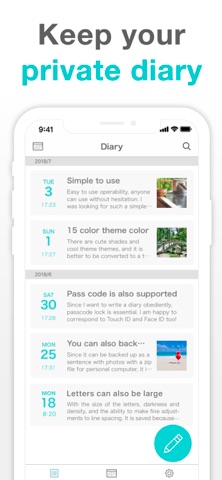
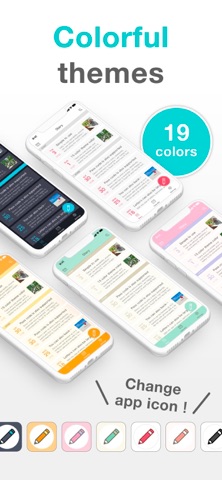
Simple Diary is a simple, easy-to-use free diary app where you can save photos along with your entries. Use it for daily journaling, baby milestones, travel memories, a record of your pet's growth, or a secret diary just for you. Clean, simple screens help you keep going, even if diaries never stuck before. No account registration. Download it and start writing. Your diary stays on your device, and the app works offline. [Features] ■ Add Photos to Entries (Up to 10 per Entry) Like a blog, insert images between paragraphs. Attach photos from your camera roll. ■ Secure Passcode Lock Protect your diary with a passcode. Supports Face ID and Touch ID for quick, secure access. ■ 22 Font Styles Change the look of your diary with 22 font styles, from cute to classic serif. (Some fonts are premium.) ■ Theme Colors and App Icons Choose from 19 theme colors, from cute to cool. You can also change the app icon. (Requires the latest iOS version.) ■ Data Export Export your diary as PDF, HTML, RTFD, or TXT files (premium service). Open them on a computer to reread your diary on a bigger screen, or print entries on paper. ■ Turn an Entry into an Image or PDF Save an entry as one image or a PDF to post to social media, send to family, or print. ■ Data Backup Back up your data to iCloud or your computer. RTFD export (premium service) lets you move your entries to your notes app or cloud storage. ■ iCloud Backup Back up your diary to iCloud and restore it on another device (premium service). It is a manual backup, not automatic sync: back up on your iPhone, then restore on your iPad. ■ Calendar and List Views Look back at your diary on a calendar or as a list. Tap a date to reread that day. ■ Tag Search Use the built-in search to find entries quickly. Write a tag such as "#travel" in the text, and searching for it brings up just those entries. ■ Font Settings Adjust text size, contrast, and line spacing. Great if you prefer larger text. ■ Reminders Set a reminder time and get a push notification, so you don't forget to write. ■ Multiple Entries Per Day Write one entry per day, or add several for memos, work records, or passing thoughts. Change an entry's date and time to write about past days. There is no limit on entry length. [Pricing] The core diary features are all free: entries, photos, passcode lock, search, and reminders. The free version shows ads. The premium service removes all ads and unlocks iCloud backup, data export, all theme colors, and all font styles. Premium is available as a monthly plan, a yearly plan, or a one-time purchase, all with the same features, and covers both your iPhone and iPad under the same Apple Account. [Your Data] Your diary is stored on your device and is not synced to the cloud automatically. To protect your data, use the premium iCloud backup or Apple's iPhone backup. There is no feature to publish your diary or share it with other users. To show someone an entry, turn it into an image and send it. A backup moves your data to a new iPhone. Data transfer to or from other operating systems is not supported. [Perfect For] ■ Students A secret diary for your day, your feelings, and your crushes. Writing out what you can't post online helps you feel lighter. ■ Parents Record your pregnancy and your baby's growth as a photo diary. Write several entries a day, and share special pages with family as images. ■ Anyone Who Wants to Keep a Record Travel journals, reading and movie notes, food diaries, dream journals, daily work logs, or your pet's growth. Simple Diary fits whatever you want to remember, one day at a time. [Help, Feedback] For help, go to "Help / FAQ" in the app settings. Still have questions? Tap "Feedback" on the settings screen to contact us for faster support. Terms of Use: https://komorebi-studio.com/tos_en.html Privacy Policy: https://komorebi-studio.com/policyredirect.html
What's new · 5.3.0
What's New - Photo storage fix — Attached photos were being saved at much larger sizes than needed, and leftover cache was steadily growing the app's storage footprint. Both issues are fixed, so the app stays lighter over time. Thank you to everyone who reported this. - Smoother editing — Starting to edit a long entry no longer jumps the scroll position. - Better image & PDF export — A redesigned preview lets you check the result before saving or sharing. - Improved photo display on iPad & Mac — Attached photos now appear at a comfortable size while reading. Tap to enlarge as before. - Copy & paste images again — Paste images copied from a browser directly into your diary, no need to save them to your device first. - Other improvements — Refreshed Help Center with more languages, fixed banner ads unexpectedly playing sound, updated premium plan screen, SDK updates and stability improvements. -------- Found a bug or have a request? Reach us anytime via "Contact" in the app. If you enjoy Simple Diary, a review on the App Store would mean a lot to us.
Details