
Chart standing · US
Screenshots





About
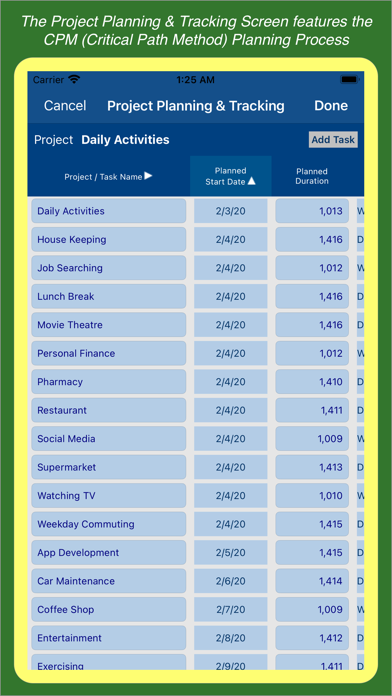
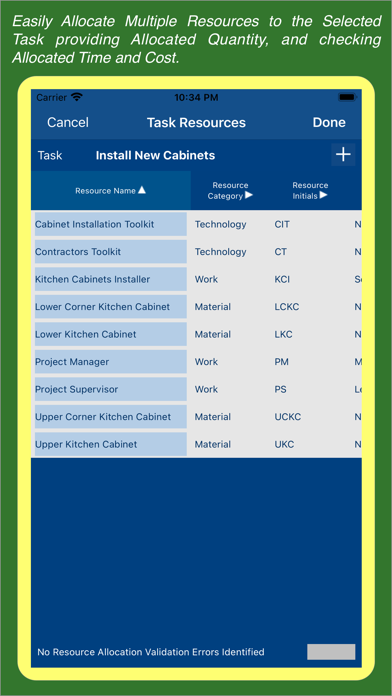
The Project & Resource Management features implement the following project planning & tracking workflow: a) Project Planning - Create project providing its planning data: start date, duration, finish date, effort and cost. b) Task Planning - Using CPM (Critical Path Method) b.1) Tasks Without Predecessors - Add tasks providing their planning data: start date, duration, finish date, effort and cost. b.2) Tasks With Predecessors - Add tasks providing their planning data: duration, predecessors, effort and cost. CPM calculates task planned start & finish dates. b.3) All Tasks - CPM calculates task planning data: earliest start & finish dates, latest start & finish dates, and total & free floats. c) Resource Planning Screen & Chart - Add project resources providing resource identification, category, availability, and cost details. d) Resource Allocation - Allocate project resources to tasks providing allocated quantity, and allocated daily hours. e) Resource Projections Screen & Chart - Evaluate resource and task level allocation values projected for weekly & monthly periods. f) Project Cost Projections Screen & Chart - Evaluate project, resource category, and resource level costs projected for weekly & monthly periods. g) Task Tracking - Track task execution providing actual start & end dates, actual effort & effort to complete, and actual cost & cost to complete. h) Project Tracking - Analyze project execution data: actual start & end dates, actual effort & effort to complete, and actual cost & cost to complete. h.1) The "Project Planning & Tracking" screen provides project & task effort & cost based progress indicators. h.2) The "Project Gantt Chart" screen highlights project & task planning & tracking dates, progress, and delay risks. The Time Tracking feature allows you to track the time spent on your project tasks a) The Time Tracking Dashboard screen allows you to automatically track the time spent on your project tasks. b) The Time Sheet Details screen allows you to manually track the time spent on your project tasks. c) The Time Tracking Report & Chart provide the daily, weekly, and monthly total times spent on your projects & tasks. d) The Task Timer screen allows you to automatically track the time spent on one particular project task. e) The Task Time Split screen allows you to split one particular task time record into two records. f) The Task Time Transfer screen allows you to transfer one particular task time record from one task to another. The Project Billing Feature allows you to configure project & task billing settings, and create & export project billing reports. a) The Project Billing Settings screen allows you to configure several project billing parameters such as regular time rate and daily & weekly overtime rates & limits. b) The Project Planning & Tracking screen includes the "Billable" switch, which allows you to identify which project tasks should be billed. c) The Billing Report Details screen provides a multi-level billing report encompassing the Report Summary, Weekly Summary, Daily Summary, and Daily Details sections. d) The Billing Report Export button allows you to export billing reports with different levels of granularity. The To Do Lists feature allows you to create and track Project & Task Level To Dos. Smart Arrow Project Manager® supports iCloud connectivity ensuring that local database changes are uploaded to the iCloud database, and synchronized with your iPhone & iPad devices. The Standard App provides the following features: Project Management using Critical Path Method, Time Tracking, and To Do Lists. The "Premium" Subscription Plans provide the following features: Resource Management, Manual Time Sheets, and Project Billing. The "Premium Plus" Subscription Plans provide the following features: Resource Management, Manual Time Sheets, Project Billing, Amazing Charts, and Family Sharing. Terms of Use (EULA): https://www.apple.com/legal/internet-services/itunes/dev/stdeula/
What's new · 9.4
Project Planning & Tracking Screen (Enhancements) ---------------------------------------------------- * Improved the Project & Task Planning & Tracking Dates Validation Process to ensure full consistency across all Project & Task Records. * All errors identified are listed in the Screen Footer Section and the associated Project & Task Date Cells are highlighted in the screen grid. Task Predecessors & Task Successors Screens (Enhancements) ---------------------------------------------------------------- Implemented Non-Intrusive Task Dependency Validation Process as described below: * The Task Dependency Errors identified are listed in the Screen Footer Section. * The Task Dependency Cells with Critical Errors are highlighted with Red Color Border. * The Task Dependency Cells with Non-Critical Errors are highlighted with Yellow Color Border. Improved Task Dependency Validation Logic as follows: * Task Dependency Records having Incomplete Information are flagged as Critical Errors. * Task Dependency Records having Cyclical Dependency are flagged as Critical Errors. * Task Dependency Records having Redundant Dependency are flagged as Non-Critical Errors. Improved Task Dependency Errors User Review Logic as follows: * Users must review and clear all Critical Task Dependency Errors identified. * Users can either review and clear the Non-Critical Task Dependency Errors identified or just accept them by confirming the latest updates.
Details