

FoxFM - Offline Video Player
Erdem Erciyas · Utilities
Independent analytics for this App Store listing. AppTracker is not affiliated with Erdem Erciyas.
Chart standing · US
What changed · US
Listing changes AppTracker has observed for this app in this storefront — new versions, price moves, rating shifts, and store copy.
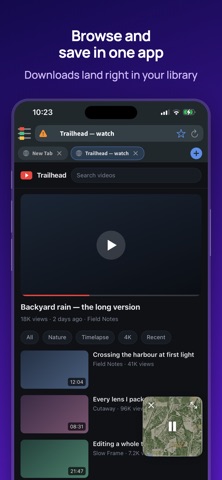
NEW IN 4.3.0 • Ad and tracker blocking — The browser now blocks ads and trackers on the pages you visit far more thoroughly. Pages look cleaner and open faster. • A faster browser — Pages full of videos and images no longer stutter; scrolling and switching tabs stay smooth. • Tabs where you left them — Close and reopen the app, and your tabs come back with their history and your place on the page. FIXES • Sound quality — Music plays exactly as the file has it again: every detail, full clarity. • Some video streams that wouldn't start on certain sites now play. • Stability improvements. Thanks for all your feedback — enjoy!
Ratings breakdown · US
The star breakdown behind this app's rating in this storefront.
Screenshots


About
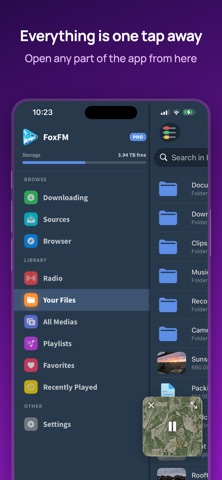
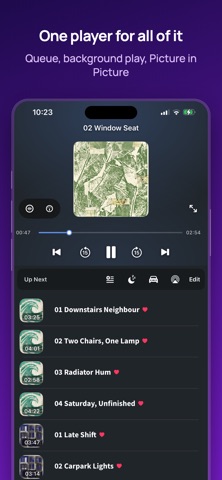
FoxFM is a media player and file manager that plays your music and videos without an internet connection. Bring your files in once; everything after that works offline. PLAYER • Background playback with the screen off and while you use other apps • PiP player, so you can keep watching while you get on with something else • Sleep timer, playback speed, car mode and AirPlay • Build playlists, sort them and reorder the queue however you like • Picks up where you left off: the track and the position survive a restart RADIO • Thousands of live stations from around the world • Save favorites and see the name of the track that is playing • Stations keep going in the background and on your widgets VISUALIZER • Visual effects that move with the music • Choose between different patterns and color palettes • With "Audio Only" the effects run for music, while videos keep their picture • Turn it on in Appearance HOME SCREEN AND LOCK SCREEN WIDGETS • See what is playing on your Home Screen and control the player from there • Lock Screen widgets are supported too • Small, medium and large sizes • Seven looks: six ready-made palettes plus one that follows the app's own color • Widgets keep their own light or dark setting, whatever mode your phone is in BRING YOUR FILES IN • Send files from a computer on the same network with Wifi File Transfer • Import from the Files app • Take photos and videos from Photos, and send them back • Share straight into FoxFM from the share menu in other apps CLOUD AND ARCHIVES • Reach the files you keep with providers such as Dropbox, Google Drive and OneDrive through the Files app, and bring them into FoxFM • Keep archives such as ZIP and RAR, and send them on to the Files app or another app to open them FILE MANAGER • Create folders; move, rename and sort • Preview your documents and images inside the app • Share your files or send them on to other apps EXTRACT AUDIO • Pull the soundtrack out of your videos and keep it as music PRIVACY • Lock the app with a passcode or Face ID • A recovery key means a forgotten passcode never locks you out • Your files stay on your device APPEARANCE • Change the app's color theme; light and dark • Learn the features step by step in Guides SUPPORTED FORMATS Video: MP4, M4V, MOV, MKV, WEBM, AVI, FLV, WMV, MPG, 3GP Audio: MP3, M4A, AAC, FLAC, WAV, AIFF, ALAC, OGG, OPUS, WMA Playlists: M3U, M3U8, PLS Documents and images open in the system preview. Premium access With Premium access you get unlimited access to all the features FoxFM has in stock. The app contains the following subscription options: • Payment will be charged to iTunes Account at confirmation of purchase • Subscription automatically renews unless auto-renew is turned off at least 24-hours before the end of the current period • Account will be charged for renewal within 24-hours prior to the end of the current period, and identify the cost of the renewal • Subscriptions may be managed by the user and auto-renewal may be turned off by going to the user's Account Settings after purchase • Any unused portion of a free trial period, if offered, will be forfeited when the user purchases a subscription to that publication, where applicable Privacy & Policy https://foxfm.app/privacy-policy/ Terms of Use https://foxfm.app/terms-of-use/
What's new · 4.3.0
NEW IN 4.3.0 • Ad and tracker blocking — The browser now blocks ads and trackers on the pages you visit far more thoroughly. Pages look cleaner and open faster. • A faster browser — Pages full of videos and images no longer stutter; scrolling and switching tabs stay smooth. • Tabs where you left them — Close and reopen the app, and your tabs come back with their history and your place on the page. FIXES • Sound quality — Music plays exactly as the file has it again: every detail, full clarity. • Some video streams that wouldn't start on certain sites now play. • Stability improvements. Thanks for all your feedback — enjoy!
Details