

Sacrament Meeting Program LDS
Latter-day Apps · Reference
Independent analytics for this App Store listing. AppTracker is not affiliated with Latter-day Apps.
Chart standing · US
Ratings breakdown · US
The star breakdown behind this app's rating in this storefront.
Screenshots


About
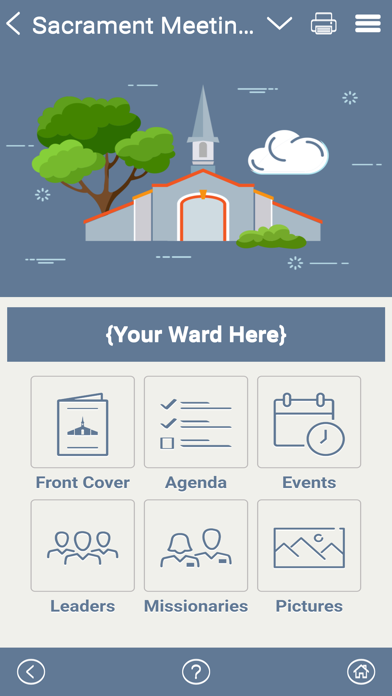
The "Sacrament Meeting Program" app provides users a quick, easy way to create their sacrament meeting programs. Then it gives them the option to (1) print traditional paper programs, or (2) give members access to a digital version of the program on their phones. Wards/branches can use this app to create and print traditional paper programs, or they can go 100% paperless saving literally thousands of trees. Benefits This app offers many advantages over the old traditional paper programs, these include: o Automatically formats and creates weekly sacrament meeting programs. o Create both traditional paper programs and digital programs (visible in the app). o Ward and auxiliary leaders can collaborate to add/manage the agenda items, calendar events and announcements in next week's program. o Last minute program changes go live instantly in the digital program. o Hymns and music deep link to the "Sacred Music" mobile app. o Missionaries deep link to the "Called to Serve" mobile app. o Pictures of recent stake/ward activities can be uploaded by auxiliary leaders for members to view and download from the app. Traditional vs Digital Programs 1. Paper Programs – Once the program is created, a PDF version can be downloaded and printed in a traditional, two-page layout. 2. Digital Programs – The digital program can be viewed by scanning a QR code on the bottom of the printed program, or by downloading the Sacrament Meeting Program app and joining your ward/branch group. Each sacrament meeting program is organized into content blocks. The app helps Admins create each block, one at a time. Then it does all of the formatting to create beautifully printed programs. Each week, your Sunday programs are available to print or view digitally. 1. FRONT COVER o Ward name (i.e. "Oak Hills 2nd Ward" or "Washington Branch") o Meeting date, time and location o Inspirational image (choose from stock images or upload your own) o Scripture or inspirational quote from a general authority o Scripture or inspirational quote reference 2. AGENDA o A simple agenda format is used week to week o The agenda includes general conducting/presiding information o Standard agenda items (music, prayers, sacrament, speakers, etc.) are included o Custom agenda items can be added (for special numbers, etc.) o Hymns deep link to the Church's "Music" mobile app o Optional footers can be turned ON/OFF 3. EVENTS o Add/manage calendar events and announcements o Ward and auxiliary leaders can easily collaborate to add/manage agenda items and announcements in next week's program o The digital program provides a way for members to read announcements o The digital program allows wards/branches to make last-minute changes o Sharing stake and ward information and announcements is possible 4. LEADERS o Add/manage a short list of the local leaders in your ward/branch o Tap a leader to view their profile picture and contact information o Tap a leader's phone number to click-to-call that leader o Tap a leader's email address to send an email to that leader 5. MISSIONARIES o Add/manage a short list of the missionaries serving from your ward/branch o Sort the missionaries by their name, entry dates or return dates o Tap a missionary to view their profile picture and contact information o Tap the missionary's email address to send an email to that missionary o Tap the missionary's "View More" button to deep link to their pictures in the "Called to Serve" mobile app 6. PICTURES o Share hundreds pictures from recent stake/ward activities o Pictures can be uploaded for members to view o Pictures can be download from the app by members who want a copy 7. LEFT-MENU o Provides access to your user Profile o Provides access to the app's Settings page o Provides program Creators access to the Ward Admin menu (to manage images, etc.)
What's new · 1.0.1
Your Stake or Ward – Now if your Stake or Ward isn’t listed, you can add these yourself. Open the app, (1) tap the Menu (top-right) to access the Left-Menu, (2) select Ward Admin, (3) tap the Stake Profile button, and (4) use the green “+” Add button (bottom-right), and (5) add your Stake first and then add your Ward.
Details