Chart standing · US
What changed · US
Listing changes AppTracker has observed for this app in this storefront — new versions, price moves, rating shifts, and store copy.
- Fixed GeoPizzBass going silent and reverting to "not purchased" even after Restore Purchases - New — Three new playing surfaces. A preset can now be saved with one of four keyboards: the Isomorphic grid, the Piano Keyboard, the Uniform Keyboard and the Janko Keyboard. Pick the type at the top of Menu > Keyboard. - New — All playing surfaces now support Touch Velocity! Touch Velocity uses iOS/iPadOS device's Accelerometer to measure how hard you tap a note. How hard you tap a note is directly converted into MIDI velocity. - New — All the new playing surfaces support MPE. This means that the Piano Keyboard is an MPE keyboard, the Uniform Keyboard is an MPE keyboard and the Janko Keyboard is an MPE keyboard - New — Asymmetric pitch bend range is now supported for all playing surfaces. For instance, your pitch bend range up could be 24 semitones and your pitch bend range down could be -12. - New — GeoJamTrax backing tracks including: Ode To Pink (Uniform Keyboard), Dirt_Blues, Todd Is God (Piano Keyboard), Tribal, Easy Street, Be-Whole(Janko Keyboard) - New — Three new factory setlists — PKB Keyboard, UKB Keyboard and JANKO Keyboard — 50 presets each one for each instrument type and MIDI Out type - New — Multi-select import. The import file picker now lets you select many presets and setlists and import them all in one go. - New — MIDI Visual Feedback of incoming-note indicators now show both expression axes at once: vertical (CC74) motion moves the indicator up and down while pressure brightens and darkens it — the two no longer fight over the display - New — The Naada plucked-string keyboard presets have a Mono button for legato playing, so you can switch without opening Performance Settings. - New — Strum zones can be turned on and off individually. Double-tap to enable or disable each of the Chords, Strum and Keyboard zones; the remaining zones resize to fill the space, and re-enabling restores your original layout exactly. - New — The standalone GeoShred Studio window is resizable, holding a constant 4:3 aspect ratio as you drag it. Launch and resize flicker are fixed, and the keyboard no longer lays itself over the chord and strum zones after a resize. - New Connect Send can keep the sending device's audio on — a MIDI configuration option, so you can hear both instruments - GarageBand tip: for recording the new keyboards, use the MPE Channel Mode MIDI configuration — and make sure GarageBand's Support MPE setting is turned on (recent GarageBand updates turn it off). - Improved or fixed - MPE, temperaments, sustain, Hammer On Pull Off Legato (aka HOPO), setlist management, visual feedback, startup flow, MOTD context in plugin hosts, handling of hardware interrupts for touches, LinnStrument support, Control Surface picker menu, GeoSWAM Pan, GeoSWAM Course Tune
Price & rating history · US
Reconstructed from the listing changes AppTracker has observed in this storefront, so each line starts at the first change on record.
Average rating
Ratings breakdown · US
The star breakdown behind this app's rating in this storefront.
Screenshots
About
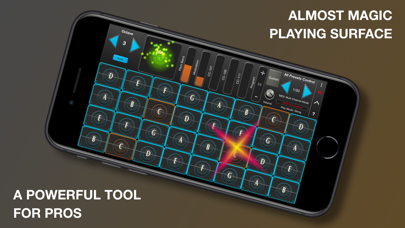
GeoShred Control Version 7 GeoShred Control is a standalone MIDI/MPE controller based on GeoShred. Important: GeoShred Control is a MIDI/MPE controller. It does not make sound and does not include a built-in audio engine. It is designed to control external synthesizers, apps, plug-ins, and hardware instruments. It can also be upgraded*** to the functionality of GeoShred Pro. If you already own GeoShred Pro (green icon), you do not need GeoShred Control, because GeoShred Pro already includes MIDI. GeoShred Control can also be used to control GeoShred Studio for macOS. Perform external MIDI and MPE instruments with GeoShred’s expressive playing surface. Move seamlessly between fretless and diatonic playing using GeoShred’s isomorphic keyboard and groundbreaking intelligent pitch rounding. GeoShred Control is especially expressive with instruments that support MPE (MIDI Polyphonic Expression). It is a powerful iPad and iPhone performance controller, and it can also operate as an AUv3 plug-in that sends MIDI. GeoShred Control includes an arpeggiator, backing tracks, alternative tunings, world scales and temperaments, and 3D Touch on supported devices. It can be upgraded*** to the functionality of GeoShred Pro, including GeoShred’s powerful physically modeled string instruments. Awards include: • 2nd Place Winner, 2022/2025 MIDI Innovation Award for Software • Gold Medal Winner, 2019 Denny Award • Winner, 2019 Guthman New Musical Instrument Award • Winner, 2017 Electronic Musician Editor’s Choice Award GeoShred Control Features • Send/Connect so GeoShred for iOS/iPadOS can control GeoShred Studio for macOS • Fluidly expressive playing surface • Intelligent pitch rounding • Diatonic keyboard mode where every key is in the scale • MIDI and MPE support • MIDI over Wi-Fi, Bluetooth, Virtual MIDI, and digital interfaces • MIDI configuration presets • iCloud preset synchronization • 3D Touch on supported iPhones • Customizable control surface mapped to MIDI controls • Backing tracks from the Music library • Built-in arpeggiator • Alternative tunings • Support for world scales and temperaments, including Indian ragas, Arabic scales, and Balinese scales • Easy preset sharing • Upgrade path to the functionality of GeoShred Pro If upgraded*, GeoSWAM and Naada instruments may be purchased and performed from the GeoShred keyboard, MPE controllers, conventional MIDI controllers, and wind controllers. We are dedicated to delivering the highest level of musical instrument experience for our customers worldwide. If you enjoy GeoShred Control, please leave a review on the App Store. Questions? Contact us at support@moforte.com Minimum Requirements iOS 13 or later is required for AUv3 support and GeoSWAM and Naada instruments. * GeoShred Control must be upgraded to the functionality of GeoShred Pro in order to purchase GeoSWAM and Naada instruments. ** Due to App Store limitations, previously purchased individual instrument IAPs cannot be applied to the purchase of a collection IAP. *** The Pro upgrade is to the functionality of GeoShred Pro. The app remains GeoShred Control, but gains all Pro features and becomes functionally identical to GeoShred Pro.
What's new · 7000.383.1.497
- Fixed GeoPizzBass going silent and reverting to "not purchased" even after Restore Purchases - New — Three new playing surfaces. A preset can now be saved with one of four keyboards: the Isomorphic grid, the Piano Keyboard, the Uniform Keyboard and the Janko Keyboard. Pick the type at the top of Menu > Keyboard. - New — All playing surfaces now support Touch Velocity! Touch Velocity uses iOS/iPadOS device's Accelerometer to measure how hard you tap a note. How hard you tap a note is directly converted into MIDI velocity. - New — All the new playing surfaces support MPE. This means that the Piano Keyboard is an MPE keyboard, the Uniform Keyboard is an MPE keyboard and the Janko Keyboard is an MPE keyboard - New — Asymmetric pitch bend range is now supported for all playing surfaces. For instance, your pitch bend range up could be 24 semitones and your pitch bend range down could be -12. - New — GeoJamTrax backing tracks including: Ode To Pink (Uniform Keyboard), Dirt_Blues, Todd Is God (Piano Keyboard), Tribal, Easy Street, Be-Whole(Janko Keyboard) - New — Three new factory setlists — PKB Keyboard, UKB Keyboard and JANKO Keyboard — 50 presets each one for each instrument type and MIDI Out type - New — Multi-select import. The import file picker now lets you select many presets and setlists and import them all in one go. - New — MIDI Visual Feedback of incoming-note indicators now show both expression axes at once: vertical (CC74) motion moves the indicator up and down while pressure brightens and darkens it — the two no longer fight over the display - New — The Naada plucked-string keyboard presets have a Mono button for legato playing, so you can switch without opening Performance Settings. - New — Strum zones can be turned on and off individually. Double-tap to enable or disable each of the Chords, Strum and Keyboard zones; the remaining zones resize to fill the space, and re-enabling restores your original layout exactly. - New — The standalone GeoShred Studio window is resizable, holding a constant 4:3 aspect ratio as you drag it. Launch and resize flicker are fixed, and the keyboard no longer lays itself over the chord and strum zones after a resize. - New Connect Send can keep the sending device's audio on — a MIDI configuration option, so you can hear both instruments - GarageBand tip: for recording the new keyboards, use the MPE Channel Mode MIDI configuration — and make sure GarageBand's Support MPE setting is turned on (recent GarageBand updates turn it off). - Improved or fixed - MPE, temperaments, sustain, Hammer On Pull Off Legato (aka HOPO), setlist management, visual feedback, startup flow, MOTD context in plugin hosts, handling of hardware interrupts for touches, LinnStrument support, Control Surface picker menu, GeoSWAM Pan, GeoSWAM Course Tune
Details