

Pedometer β Step Counter Stepy
NilCraft Inc. · Health & Fitness
Independent analytics for this App Store listing. AppTracker is not affiliated with NilCraft Inc.
Chart standing · US
What changed · US
Listing changes AppTracker has observed for this app in this storefront — new versions, price moves, rating shifts, and store copy.
Adjusted the Home screen display. Made the screen for new app announcements easier to read.
Ratings breakdown · US
The star breakdown behind this app's rating in this storefront.
In-app purchases · US
What this app sells inside itself, grouped by kind and priced for this storefront.
Screenshots






About
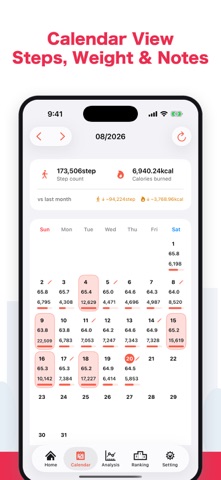
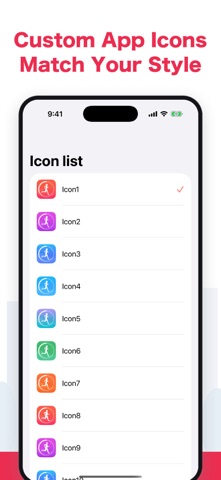
Stepy is a pedometer app that works with Apple Health on your iPhone to clearly track your daily steps, walking distance, active calories, and exercise time. See how much you have walked today at a glance. View step trends by hour, day, and month in graphs to help build a habit of strolling, walking, or running. 【Key Features】 • Automatically records steps, distance, active calories, and exercise time from Apple Health • Analyzes daily, hourly, and monthly step and weight trends in graphs • Set step goals and check your progress • Record your weight and notes for each day • Review your highest-step days in an on-device ranking • Get a daily notification at the time you choose to check your steps • Keep important records with iCloud backup Recommended for anyone who wants to check their steps, keep up healthy habits, or save walking and exercise records. -- Premium Features -- • Remove ads • Add notes • Change the theme color • Automatic backup 【Make daily tracking more comfortable with Premium】 Focus on your steps and weight in a clear, ad-free screen. Leave notes for each date to make it easier to look back on walks, exercise, and changes in how you feel. Customize Stepy with your favorite theme color, and protect your important records with automatic iCloud backup when the app starts. Choose Premium to make Stepy more useful and easier to keep using every day. -- About Auto-Renewable Subscriptions -- • Restoring after changing devices When you change devices, you can restore a previously purchased paid version at no additional cost. In the app, go to Settings > Paid Version. Sign in to iTunes on your iPhone or iPad with the same Apple ID used for the purchase. • Viewing and canceling In the App Store app, select Recommended at the bottom, choose Apple ID, then choose View Apple ID > Manage. From there, you can check the next renewal date and turn auto-renewal on or off. • About auto-renewal The free trial is available only for the first subscription. Unless you cancel at least 24 hours before the trial ends, you will be charged automatically after the two-week free trial. Unless auto-renewal is turned off at least 24 hours before the end of the current period, the subscription renews automatically. Renewal charges are made within 24 hours before the end of the subscription period. • Notes Subscriptions purchased in the app cannot be canceled by methods other than those above. Cancellations for the current month are not accepted. Charges are made through your iTunes account. • Terms of Use https://nilcraft.jp/terms
What's new · 2.0.1
Adjusted the Home screen display. Made the screen for new app announcements easier to read.
Details