

Customer App - Zoho Assist
Zoho Corporation · Utilities
Independent analytics for this App Store listing. AppTracker is not affiliated with Zoho Corporation.
Chart standing · US
What changed · US
Listing changes AppTracker has observed for this app in this storefront — new versions, price moves, rating shifts, and store copy.
With this update, your video experience stays smooth and reliable even when your network connection fluctuates. The app now automatically adjusts video quality in real time, so calls and streams remain uninterrupted without any action needed on your end.
Price & rating history · US
Reconstructed from the listing changes AppTracker has observed in this storefront. A field is charted once it has changed more than once, and each line starts at the value it moved from.
Average rating · ★ 4.09 now · 2 changes on record
Ratings breakdown · US
The star breakdown behind this app's rating in this storefront.
In-app purchases · US
No in-app purchases.
Screenshots


About
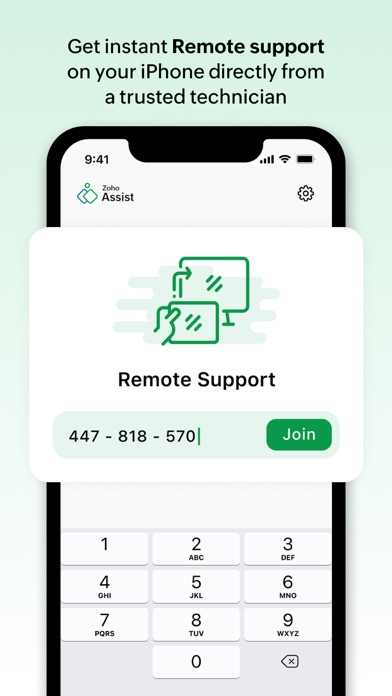
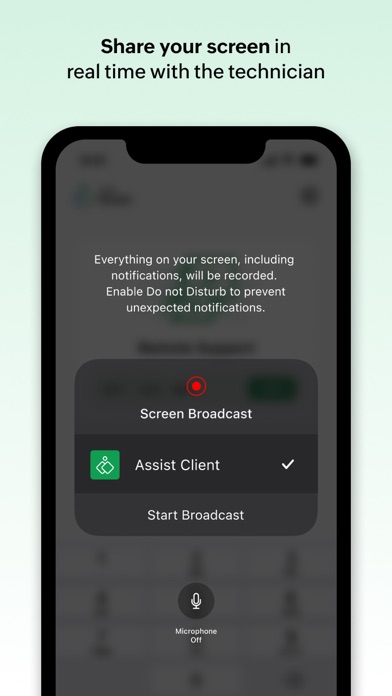
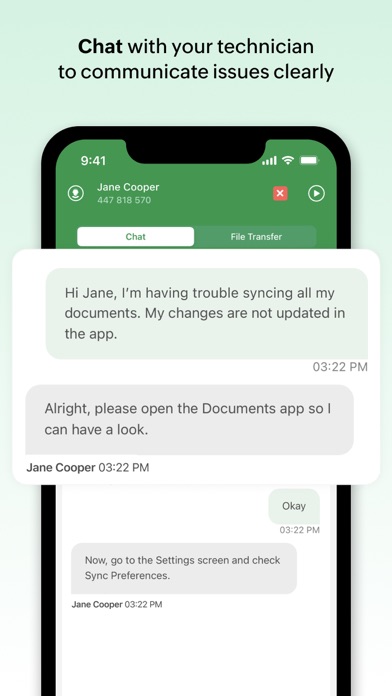
The Zoho Assist - Customer app enables you to receive remote support directly from a trusted technician. 1. With the Zoho Assist - Customer app, you can let technicians look at your iPhone remotely. The first thing you need to do is to request your technician for a remote session. 2. The technician will then send you a nine-digit session key. This is to ensure that each session is safe and secure. Open the Zoho Assist - Customer app and enter the session key. 3. You can then share your screens with the technician at the other end. 4. After going through the screens and getting an idea of the problem, the technician can communicate with you through the in-app chat. This will be ideal when the technician wants to send you instructions or ask you for quick clarifications. 5. Although you'll be sharing your screen directly with the technician, you're always in control as you can choose to stop/resume screen sharing at any time. 6. Additionally, you can configure your iOS device for unattended access by the trusted technician at any time. 7. During an ongoing remote support or unattended access session, technicians and customers can send or receive files of up to 2 GB using the File Transfer option. Download the Zoho Assist - Customer app and get contextual remote support on your iOS device.
What's new · 1.13
With this update, your video experience stays smooth and reliable even when your network connection fluctuates. The app now automatically adjusts video quality in real time, so calls and streams remain uninterrupted without any action needed on your end.
Details