

Voicepaper: PDF, eBooks & News
Lemon LLC · Magazines & Newspapers
Independent analytics for this App Store listing. AppTracker is not affiliated with Lemon LLC.
Chart standing · US
What changed · US
Listing changes AppTracker has observed for this app in this storefront — new versions, price moves, rating shifts, and store copy.
Hello, I'm still keeping up with getting up early. In this update, I increased the AI voices to 31 and made it possible to preview them in 12 languages before choosing one. I also added a weekly plan to the paid version and fixed issues where the screens for creating a new playlist or an audio file didn't appear. New - Increased the AI voices from 6 to 31, and made it possible to preview and choose them from a list grouped by use - Made the language for previews and sample text selectable, now supporting 12 languages with the addition of Italian, Portuguese, and Arabic - Moved “AI Voice” to the top of Voice Settings and now also show the selected voice - Improved AI voice highlighting so it's less likely to drift in languages other than Japanese and English - Shortened the wait before playback starts with Grok voices - Made AI voice loading continue even after you close the app (iOS 26 or later) - Made it possible to resume from where it left off when you return to the app, if AI voice loading stops partway through - Improved Japanese reading so that kanji words are misread less often - Added an “Improve Voice Quality” screen, opened from the notice shown while you're using a low-quality voice, where you can choose how to get a high-quality voice or preview AI voices - Added a weekly plan to the paid version, and the annual plan now also shows its price per week - Changed the update notice to a small “Update” label at the bottom of the screen Fix - Fixed an issue where “Create a New Playlist” didn't respond when importing from Dropbox or Aozora Bunko - Fixed an issue where the file name input and the in-progress display didn't appear when creating an audio file - Changed the default sort order for newly created playlists back to “Manual: Add New to Bottom,” as before - Fixed an issue where the AI voice “Preparing audio” display overlapped the buttons and menus at the top of the screen - Fixed an issue where AI voice samples and previews couldn't be played on devices set to Vietnamese or Traditional Chinese - Fixed the reordering guide's explanation, which had the swipe directions reversed, and some text that wasn't displayed correctly If you notice anything, please feel free to contact me through “Settings=>Ask Anything”. Your bug reports and feature requests are always a big help. If you like the app, I'd be happy if you could leave a review. See you next time!
Price & rating history · US
Reconstructed from the listing changes AppTracker has observed in this storefront. A field is charted once it has changed more than once, and each line starts at the value it moved from.
Average rating · ★ 4.41 now · 6 changes on record
Ratings breakdown · US
The star breakdown behind this app's rating in this storefront.
In-app purchases · US
What this app sells inside itself, grouped by kind and priced for this storefront.
Screenshots








Keywords this app targets
Search terms AppTracker associates with this app — estimates, not search volume. ❝ = in the app's title; a highlighted number is its current position for that term.
Similar apps
Competitors and close alternatives, as estimated by AppTracker.
 Voice Reader + Text to Speech
MONOPOLEAPPS K.K.
1 shared topic
Voice Reader + Text to Speech
MONOPOLEAPPS K.K.
1 shared topic
 Voice Narrator Text-to-speech
Takuya Endo
1 shared topic
Voice Narrator Text-to-speech
Takuya Endo
1 shared topic
 Text to Speech - Listen AI
DEEP FLOW SOFTWARE SERVICES
1 shared topic
Text to Speech - Listen AI
DEEP FLOW SOFTWARE SERVICES
1 shared topic
 Speechify – Text to Speech PDF
Speechify Inc.
1 shared topic · 1 shared title word
Speechify – Text to Speech PDF
Speechify Inc.
1 shared topic · 1 shared title word
 Text to Speech - SayTXT Reader
PDF GEAR TECH PTE. LTD.
1 shared topic
Text to Speech - SayTXT Reader
PDF GEAR TECH PTE. LTD.
1 shared topic
 Voice Dream - Natural Reader
Voice Dream LLC
1 shared topic
Voice Dream - Natural Reader
Voice Dream LLC
1 shared topic
 Read PDFs Aloud
Ian SMITH
1 shared topic
Read PDFs Aloud
Ian SMITH
1 shared topic
 NaturalReader - Text To Speech
NaturalSoft
1 shared topic
NaturalReader - Text To Speech
NaturalSoft
1 shared topic
About
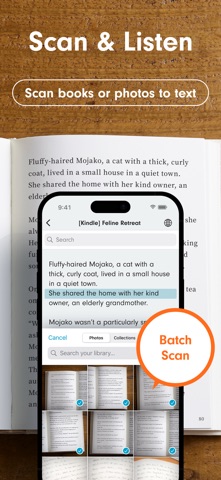
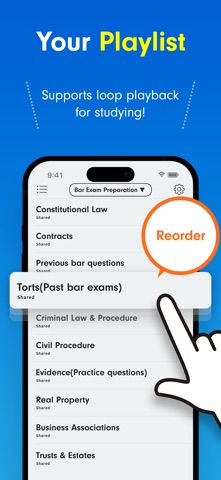
An ad-free, free-to-use, simple text-to-speech app. Popular with people who want to memorize by listening, read more books, or study languages. Recommended for: • People who want to study efficiently Use the camera or screenshots to recognize text from study books. Repeat playback helps with memorization, and playlists let you listen in order. • People who want to read more Listen to books and novels in your spare moments. Import PDFs and web articles to absorb information by ear. • Language learners Text is highlighted during playback, so you can read with both your eyes and ears. With AI voices, you can listen with natural, near-native pronunciation. Main Features ・Text recognition from camera, images, and screenshots ・Playback position highlighting and auto-scroll ・One-tap voice speed changes ・Double-tap to play from a chosen position ・Background playback and remote controls Ways to Import Text ・Create or paste text manually ・Text recognition from camera, images, and screenshots ・Scan web pages from the browser share menu ・Import from note apps via sharing ・Dropbox ・Evernote ・iCloud Drive ・Instapaper Supported Files text,pdf,image,epub,markdown,word(.docx) Other Install file-compatible apps and access them through the file button. ・Google Drive,OneDrive,Box,pCloud,Obsidian,Nextcloud,and many others Playlist Features ・Repeat playlists ・Shuffle playback ・Turn playlists into audio files ・Copy playlists ・Move texts between playlists Useful Features ・Edit text and titles ・Search within text ・Repeat text playback ・Sleep timer ・Change font size ・Bookmark text positions ・Automatically paste copied text ・Analyze text and switch voices ・Automatically switch languages in multilingual text ・Bulk text translation ・Share text and web links ・Backup and restore data ・Dark Mode support Useful Settings ・Turn playback position memory on/off ・Register pauses ・Play speech while music is playing ・Change voices and speed by language ・Customize pronunciation ・Randomly change speakers ・Replace specified characters when importing text ・Automatically refresh Instapaper and Evernote at launch Intuitive Controls ・Long-press a title to reorder the list ・Swipe left on a title to delete ・Swipe right on a title to move it to the top or to another playlist ・Swipe left on a playlist to delete, rename, or copy it ・Undo accidental deletions Voicepaper Plus Benefits ・Unlimited listening ・Voice speeds above 1.6x ・Audio file creation Voicepaper AI Benefits ・Load AI voices ・Keep the same intuitive controls ・Create audio files with AI voices Terms and Privacy https://intercom.help/voicepaper-ce4adc785260/articles/13768868
What's new · 3.9.44
Hello, I'm still keeping up with getting up early. In this update, I increased the AI voices to 31 and made it possible to preview them in 12 languages before choosing one. I also added a weekly plan to the paid version and fixed issues where the screens for creating a new playlist or an audio file didn't appear. New - Increased the AI voices from 6 to 31, and made it possible to preview and choose them from a list grouped by use - Made the language for previews and sample text selectable, now supporting 12 languages with the addition of Italian, Portuguese, and Arabic - Moved “AI Voice” to the top of Voice Settings and now also show the selected voice - Improved AI voice highlighting so it's less likely to drift in languages other than Japanese and English - Shortened the wait before playback starts with Grok voices - Made AI voice loading continue even after you close the app (iOS 26 or later) - Made it possible to resume from where it left off when you return to the app, if AI voice loading stops partway through - Improved Japanese reading so that kanji words are misread less often - Added an “Improve Voice Quality” screen, opened from the notice shown while you're using a low-quality voice, where you can choose how to get a high-quality voice or preview AI voices - Added a weekly plan to the paid version, and the annual plan now also shows its price per week - Changed the update notice to a small “Update” label at the bottom of the screen Fix - Fixed an issue where “Create a New Playlist” didn't respond when importing from Dropbox or Aozora Bunko - Fixed an issue where the file name input and the in-progress display didn't appear when creating an audio file - Changed the default sort order for newly created playlists back to “Manual: Add New to Bottom,” as before - Fixed an issue where the AI voice “Preparing audio” display overlapped the buttons and menus at the top of the screen - Fixed an issue where AI voice samples and previews couldn't be played on devices set to Vietnamese or Traditional Chinese - Fixed the reordering guide's explanation, which had the swipe directions reversed, and some text that wasn't displayed correctly If you notice anything, please feel free to contact me through “Settings=>Ask Anything”. Your bug reports and feature requests are always a big help. If you like the app, I'd be happy if you could leave a review. See you next time!
Details