
Chart standing · US
What changed · US
Listing changes AppTracker has observed for this app in this storefront — new versions, price moves, rating shifts, and store copy.
Meet Wallet 3.0 — our biggest update ever. NEW: Capsule Prepare encrypted data for a person you trust. A QR invitation, control over every access attempt, and if you cannot respond within the grace period, the Capsule opens only for the person who answers your personal questions. Sharing it now is too early. Never sharing it is risky. Now there is Capsule. Also: security improvements, faster performance, bug fixes.
Price & rating history · US
Reconstructed from the listing changes AppTracker has observed in this storefront, so each line starts at the first change on record.
Average rating
Screenshots





About
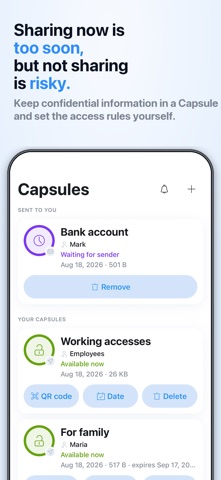
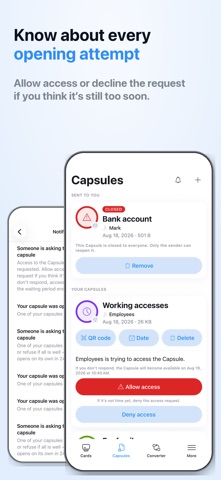
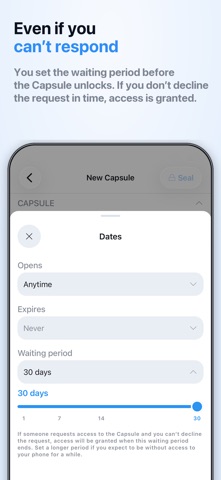
My Card Wallet is a secure app for storing bank cards and confidential information. Keep your card details on your device and create encrypted Capsules to prepare important information for someone you trust while staying in control of when it becomes accessible. BANK CARDS ALWAYS WITHIN REACH Add your bank, credit, and debit cards to Wallet and keep their details together in one secure place. • Store card numbers, expiration dates, and notes • Add cards by scanning them or entering details manually • Quickly find the card you need and copy its details • Keep your data only on your device or sync it via iCloud • Protect the app with a PIN, Touch ID, or Face ID Wallet is not a payment service and does not process banking transactions. CAPSULE — SECURE TRANSFER OF CONFIDENTIAL INFORMATION Some information should not simply be sent through a messenger, email, or stored in an ordinary file. But sometimes you need to prepare it in advance for someone you trust. Capsule lets you create encrypted storage for confidential information and provide the recipient with a QR code or link for future access. A Capsule can contain: • confidential notes and instructions • backup codes and two-factor authentication codes • account recovery information • bank account and financial service information • safe codes and information about important documents • crypto wallet recovery information and seed phrases • documents and other important files • work logins and passwords Sharing it now may be too early. Never sharing it may be too risky. Capsule was created for exactly these situations. MULTIPLE LAYERS OF CRYPTOGRAPHIC PROTECTION Capsule's architecture is designed so that the data required to open it is never kept in one place. Its cryptographic protection includes: • an invitation key contained in the QR code or link • key material generated on the owner's device • additional user-generated entropy • personal security questions The owner also determines the conditions and timing of access. Cryptographic keys are generated on the user's device, and the contents are encrypted before being sent to the server. The server stores only encrypted data and the service information required for Capsule to function. The invitation key is not stored on the server together with the Capsule. Therefore, even if someone obtained copies of encrypted Capsules from the server, that alone would not give them access to their contents. A server breach does not mean a Capsule breach. Wallet's developers cannot access the contents of your Capsules and do not possess all the data required to decrypt them. SHARE NOW — ALLOW ACCESS LATER — STAY IN CONTROL You determine the conditions for accessing your Capsule. Set a date before which it cannot be opened and choose a waiting period after an access request. When someone attempts to open the Capsule, you receive a notification and can approve or reject the request. If you do not respond within the period you set, the recipient can continue the opening process only after passing the protection you configured. You can edit or delete a Capsule, change its access conditions, and reissue its QR code. Once a new QR code is issued, previous links stop working. CURRENCY CONVERTER Wallet also includes a multi-currency converter. Point your camera at a price, and AI will convert it into your selected currency. Keep what you need today. Prepare what someone may need tomorrow. Terms of Use (EULA): https://www.apple.com/legal/internet-services/itunes/dev/stdeula/ Service Terms: https://capsule.highglossy.com/legal/terms-of-use Privacy Policy: https://capsule.highglossy.com/legal/privacy-policy
What's new · 3.0.0
Meet Wallet 3.0 — our biggest update ever. NEW: Capsule Prepare encrypted data for a person you trust. A QR invitation, control over every access attempt, and if you cannot respond within the grace period, the Capsule opens only for the person who answers your personal questions. Sharing it now is too early. Never sharing it is risky. Now there is Capsule. Also: security improvements, faster performance, bug fixes.
Details