

Play Chord
Junya Masuda · Music
Independent analytics for this App Store listing. AppTracker is not affiliated with Junya Masuda.
Chart standing · US
What changed · US
Listing changes AppTracker has observed for this app in this storefront — new versions, price moves, rating shifts, and store copy.
New - On iPad, your list and your chart now sit side by side. Pick a song in My Notes or a playlist and it opens right next to the list. Press play and the list slides away so you can see more of the chart. - When adding notes to a playlist, you can now sort, search and filter by artist, just like in My Notes. Improvements - You can close an ad with the × (while you stay on that screen). - Fixed a crash that could happen when tapping a text field on iPad.
Screenshots



About
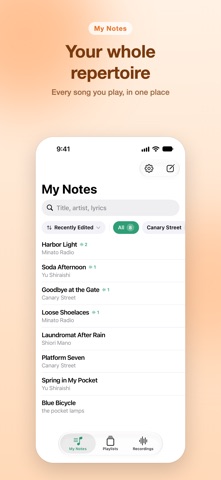
Play Chord is a chord chart app for people who sing and play. Keep your chord charts and your practice recordings in one place. When you play, the chart scrolls by itself, and you can change the key on the spot. ◆ Write Just write chords above the lyrics. A chord keyboard makes typing easy, and chords are highlighted in color. ◆ Play Press play and your chart scrolls by itself. Adjust the speed while you play; it's remembered for each song. ◆ Change the key (transpose) Pick a key and every chord is transposed at once. ◆ Text size Change it with the buttons or with a two-finger pinch. ◆ Listen back Record while you play and each day's takes are saved by song. Listen back by song or by day. ◆ Playlists Put songs in order for a gig or for practice. Play through a playlist and each song is recorded separately. ◆ Made for iPad, too Your list and your chart sit side by side, so you can switch songs in a tap. Your chart is laid out in columns and moves one column at a time as you play. ◆ Your notes are files Each song is saved as its own file in iCloud Drive, so you can open your notes in the Files app or on your Mac. ◆ Dark mode We'd love to hear what you think in a review.
What's new · 2.4.0
New - On iPad, your list and your chart now sit side by side. Pick a song in My Notes or a playlist and it opens right next to the list. Press play and the list slides away so you can see more of the chart. - When adding notes to a playlist, you can now sort, search and filter by artist, just like in My Notes. Improvements - You can close an ad with the × (while you stay on that screen). - Fixed a crash that could happen when tapping a text field on iPad.
Details