

Cards2: Manage Cards by Photo
YOUSUKE YASUDA · Lifestyle
Independent analytics for this App Store listing. AppTracker is not affiliated with YOUSUKE YASUDA.
Chart standing · US
What changed · US
Listing changes AppTracker has observed for this app in this storefront — new versions, price moves, rating shifts, and store copy.
▼ Fixes • Fixed the app freezing and quitting while the widget was syncing • Fixed the widget not updating after adding several cards at once • Fixed the widget showing old cards after restoring from a backup • Fixed your top/bottom widget choice resetting just from opening the widget settings • Fixed expiry reminders being cleared when the database could not be read • Fixed being unable to restore from a backup after an earlier restore was interrupted • Fixed some cards failing to add to Apple Wallet ▼ Improvements • Card names no longer linger in the widget, the home screen quick actions, or device search after a fresh start or an erase • Rescue copies now appear in the backup list and can be deleted by hand Thank you for using Cards2. Send feedback from Settings.
In-app purchases · US
What this app sells inside itself, grouped by kind and priced for this storefront.
Screenshots



Keywords this app targets
Search terms AppTracker associates with this app — estimates, not search volume. ❝ = in the app's title; a highlighted number is its current position for that term.
Similar apps
Competitors and close alternatives, as estimated by AppTracker.
 My Cards Pro - Wallet
Raffaele Di Marzo
1 shared title word
My Cards Pro - Wallet
Raffaele Di Marzo
1 shared title word
 My Cards - Wallet
Raffaele Di Marzo
1 shared title word
My Cards - Wallet
Raffaele Di Marzo
1 shared title word
 Card Wallet Pro
MaxSoft
Card Wallet Pro
MaxSoft
 StoreCard: Loyalty Card Wallet
Maksim Chentsov
StoreCard: Loyalty Card Wallet
Maksim Chentsov
 StoreCard - Store Cards Wallet
Sabitzer OU
1 shared title word
StoreCard - Store Cards Wallet
Sabitzer OU
1 shared title word
 Cardman
KauriLab Inc.
Cardman
KauriLab Inc.
 Wallet Creator
at2 GmbH
Wallet Creator
at2 GmbH
 Stocard - Loyalty Cards Wallet
Evaldas Gudeikis
1 shared title word
Stocard - Loyalty Cards Wallet
Evaldas Gudeikis
1 shared title word
About
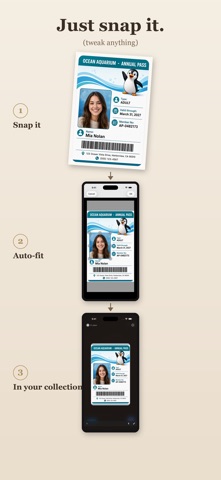
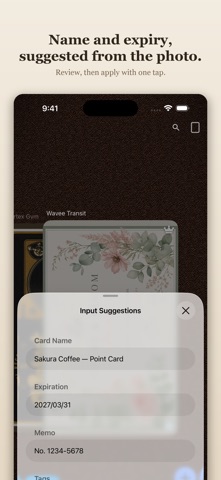
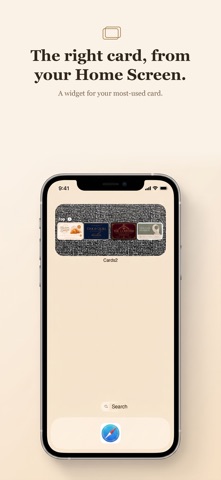
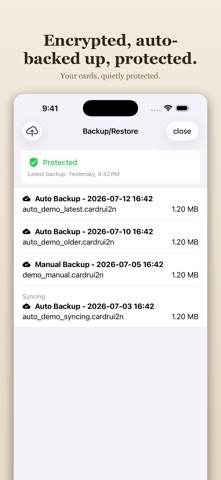
Cards2 is an app for photographing the cards scattered around your life with your iPhone's camera and keeping them all in one place. Loyalty cards, membership cards, clinic cards, annual passes — even the cards overflowing from your wallet fit right here, with just a photo. But it isn't only about tucking them away. Line up your favorite cards, and the ones that matter, on backgrounds with the texture of leather or fabric — flip through them, and view them large. Take your time with the little details you never noticed inside your wallet. In Japan, the series has sold over 130,000 paid copies (Cards and Cards2 combined). Come see for yourself why it has been the card organizing tool of choice for so long. ■ What you can do ・Import cards from the camera or your photo library ・Perspective (skew) correction, cropping, and aspect adjustment ・Input suggestions for names, expiration dates, and more from your images (processed on-device) ・Organize with tags and collections, and switch between multiple views ・Customize the background texture (skins) to your taste ・Quickly show a saved barcode or QR code ・Add or update compatible cards in Apple Wallet ・Customize each Wallet pass's color, logo, and displayed fields ・View your cards quickly from a home screen widget ・Expiration date notifications ・Protection with a passcode, Face ID, or Touch ID ・Automatic iCloud backup (keeps the last 3 generations) ■ For your peace of mind The app is protected by a passcode and all images are stored encrypted. Even so, please be careful when handling sensitive information such as credit card numbers, and use the app at your own responsibility. ■ Apple Wallet Compatible cards with a saved barcode or QR code can be added to Apple Wallet as a Cards2 pass. Customize the pass color, logo, and displayed fields, then add, update, show, or remove it from Cards2. When you create or update a pass, the minimum data and pass images needed for signing are sent over an encrypted connection to the Cards2 signing service. Card content is not retained after the pass is generated. ■ Free and Pro The free version lets you save up to 5 cards and use 1 Apple Wallet pass. Pro unlocks unlimited cards, up to 10 Apple Wallet passes, applying input suggestions from images, automatic backup, and more. Your card data is never deleted, even if you don't buy Pro. ■ If you purchased the previous paid version If you have already purchased Cards2, lifetime Pro is applied automatically at no extra cost. There is no need to repurchase or subscribe. Note: Cards2 passes are not official passes issued by the original card provider. They do not replace Apple Pay, NFC/contactless cards, magnetic stripes, or the physical card. Compatibility depends on the barcode format and the merchant's scanner. When the original card is required, please carry the original with you. This app has continued since the 2010 original, together with its users' voices — and we look forward to being with you going forward. ■ Subscriptions and purchases Pro Monthly (auto-renewable, 1 month) and Pro Yearly (auto-renewable, 1 year). Pro is also available as a one-time purchase. Prices are shown on this page and in the app. A subscription renews automatically unless it is canceled at least 24 hours before the end of the current period. Manage or cancel it in your Apple Account settings. Terms of Use (EULA): https://www.apple.com/legal/internet-services/itunes/dev/stdeula/ Privacy Policy: https://cards2.app/privacy
What's new · 3.1.3
▼ Fixes • Fixed the app freezing and quitting while the widget was syncing • Fixed the widget not updating after adding several cards at once • Fixed the widget showing old cards after restoring from a backup • Fixed your top/bottom widget choice resetting just from opening the widget settings • Fixed expiry reminders being cleared when the database could not be read • Fixed being unable to restore from a backup after an earlier restore was interrupted • Fixed some cards failing to add to Apple Wallet ▼ Improvements • Card names no longer linger in the widget, the home screen quick actions, or device search after a fresh start or an erase • Rescue copies now appear in the backup list and can be deleted by hand Thank you for using Cards2. Send feedback from Settings.
Details