

Cube CFOP
Tuan Truong · Education
Independent analytics for this App Store listing. AppTracker is not affiliated with Tuan Truong.
Chart standing · US
What changed · US
Listing changes AppTracker has observed for this app in this storefront — new versions, price moves, rating shifts, and store copy.
NEW IN 7.0.1 • OLL and PLL cases now have four viewing angles: Front, Right, Back and Left. Each angle is drawn and played in 3D from that side, and holds the algorithms you write for it. • Create from Front: on a side angle, one tap writes its algorithm from your Front one. • Execution Drill: when Recent is empty, start from F2L, OLL or PLL right there. • Fixed a crash when using search on a Mac. • Fixed the "Tap to reveal" hint being cut off on short algorithms. IN CASE YOU MISSED 7.0 Cube CFOP 7.0 is rebuilt from the ground up, with new ways to learn and practice every case. • Learning: a new tab with four-grade flashcards (Again, Hard, Good, Easy), daily review, and a report of your streak and study days. • Practice: OLL and PLL Recognition Quizzes, the F2L Corner Quiz, and a timed Execution Drill. • Algorithms: watch any algorithm on a 3D cube, add your own alias and note, and search every case. The editor checks that an algorithm solves its case. • Guides: the CFOP method from Overview to PLL, an Example Solve on the 3D cube, Finger Patterns, and a redrawn Notation guide. • Also: your cube's colors and grip, Light and Dark appearance, iPhone Duo and iPad two-column layouts, keyboard shortcuts, and a new app icon. • No usage analytics. The app sends crash reports only. Your favorites, edited algorithms and flashcard progress carry over. Your algorithm lists stay as they were; to take the new recommended algorithms, use Settings > Restore Default Algorithms.
Ratings breakdown · US
The star breakdown behind this app's rating in this storefront.
In-app purchases · US
No in-app purchases.
Screenshots





Similar apps
Competitors and close alternatives, as estimated by AppTracker.


About
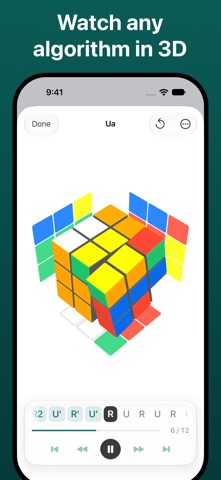
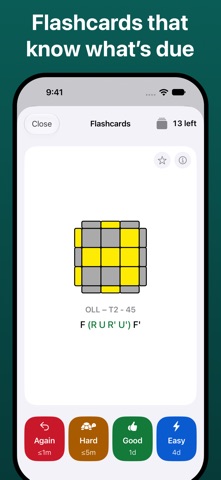
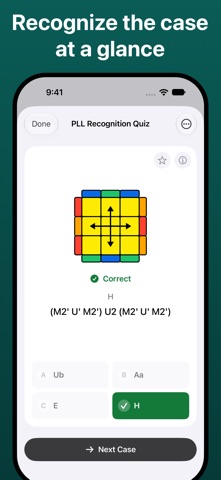
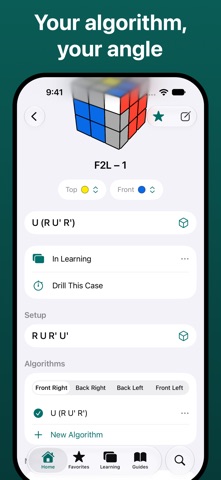
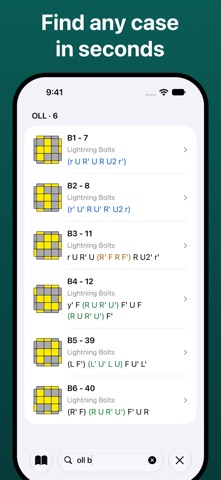
Learn CFOP, the most popular speedcubing method, one case at a time. Every F2L, OLL and PLL algorithm, with flashcards, quizzes and a timed drill to make them stick. EVERY CASE OF CFOP • 41 F2L, 57 OLL and 21 PLL cases, plus 2-Look OLL and 2-Look PLL to get you started. • Alternative algorithms for many cases: pick the one that suits your hands, or write your own. The editor checks that it solves the case. • Watch any algorithm on a 3D cube, and tap a move to play up to it. • See any F2L, OLL or PLL case from each of its four angles, and write or create the algorithm for that angle. • Setup moves for each case, and room for your own alias and note. • Search by name, alias, group or note. LEARN WITH FLASHCARDS • Add the cases you are working on to Learning. • Spaced repetition brings each card back when it is due. Grade it Again, Hard, Good or Easy. • Practice your hard, new or random cards whenever you like. • Report: a heat map of your study days, your streak, and what is due in the next 7 days. PRACTICE UNTIL IT IS AUTOMATIC • OLL and PLL Recognition Quizzes: name the case from its pattern, against the clock. • F2L Corner Quiz: name the sticker a corner hides. • Execution Drill: time a case and beat your best. GUIDES • The CFOP method step by step: Overview, Cross, F2L, OLL and PLL. The Cross guide starts from the daisy, for a first cross. • Example Solve: watch one whole solve on the 3D cube, with every step and case named. • Notation, with every move shown on a cube. • Finger Patterns: the triggers and grips behind fast turning. MADE FOR THE WAY YOU CUBE • Your color scheme and the way you hold the cube. • Light, Dark or System appearance. • iPhone, iPad and iPhone Duo, with two-column layouts on wide screens and hardware keyboard shortcuts. One purchase. No ads, no subscription, no account and no usage analytics.
What's new · 7.0.1
NEW IN 7.0.1 • OLL and PLL cases now have four viewing angles: Front, Right, Back and Left. Each angle is drawn and played in 3D from that side, and holds the algorithms you write for it. • Create from Front: on a side angle, one tap writes its algorithm from your Front one. • Execution Drill: when Recent is empty, start from F2L, OLL or PLL right there. • Fixed a crash when using search on a Mac. • Fixed the "Tap to reveal" hint being cut off on short algorithms. IN CASE YOU MISSED 7.0 Cube CFOP 7.0 is rebuilt from the ground up, with new ways to learn and practice every case. • Learning: a new tab with four-grade flashcards (Again, Hard, Good, Easy), daily review, and a report of your streak and study days. • Practice: OLL and PLL Recognition Quizzes, the F2L Corner Quiz, and a timed Execution Drill. • Algorithms: watch any algorithm on a 3D cube, add your own alias and note, and search every case. The editor checks that an algorithm solves its case. • Guides: the CFOP method from Overview to PLL, an Example Solve on the 3D cube, Finger Patterns, and a redrawn Notation guide. • Also: your cube's colors and grip, Light and Dark appearance, iPhone Duo and iPad two-column layouts, keyboard shortcuts, and a new app icon. • No usage analytics. The app sends crash reports only. Your favorites, edited algorithms and flashcard progress carry over. Your algorithm lists stay as they were; to take the new recommended algorithms, use Settings > Restore Default Algorithms.
Details