

GeoShred Play
Wizdom Music LLC · Music
Independent analytics for this App Store listing. AppTracker is not affiliated with Wizdom Music LLC.
Chart standing · US
What changed · US
Listing changes AppTracker has observed for this app in this storefront — new versions, price moves, rating shifts, and store copy.
- GeoSWAM 3/4. Ten new GeoSWAM Instruments - Try Before You Buy - New Setlist Navigation Wheel - Setlists may now have backing tracks. - World Flute Assets.
Ratings breakdown · US
The star breakdown behind this app's rating in this storefront.
In-app purchases · US
What this app sells inside itself, grouped by kind and priced for this storefront.
Screenshots


Keywords this app targets
Search terms AppTracker associates with this app — estimates, not search volume. ❝ = in the app's title; a highlighted number is its current position for that term.
Similar apps
Competitors and close alternatives, as estimated by AppTracker.
 ThumbJam
Sonosaurus LLC
2 shared topics
ThumbJam
Sonosaurus LLC
2 shared topics
 SWAM Cello Section
Audio Modeling Srl
1 shared topic
SWAM Cello Section
Audio Modeling Srl
1 shared topic
 SWAM Cello
Audio Modeling Srl
1 shared topic
SWAM Cello
Audio Modeling Srl
1 shared topic
 SWAM Violin
Audio Modeling Srl
1 shared topic
SWAM Violin
Audio Modeling Srl
1 shared topic
 SWAM Clarinet
Audio Modeling Srl
1 shared topic
SWAM Clarinet
Audio Modeling Srl
1 shared topic
 SWAM Viola
Audio Modeling Srl
1 shared topic
SWAM Viola
Audio Modeling Srl
1 shared topic
 irio pro
Mads Rohde
1 shared topic
irio pro
Mads Rohde
1 shared topic
 Groove Rider 2
Dmitrij Pavlov
1 shared topic
Groove Rider 2
Dmitrij Pavlov
1 shared topic
About
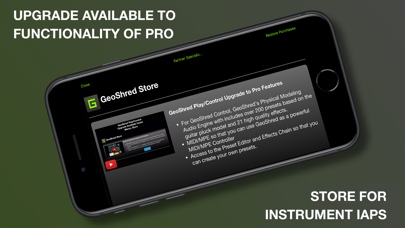
GeoShred Play Version 7 With In-App Purchases for GeoSWAM and Naada instruments on devices running iOS 13 or later. With GeoShred Play, everyone can shred. Play with confidence on GeoShred’s innovative diatonic playing surface, where every key can fit the scale. Slide your finger in any direction and let the music flow with expressive vibrato, seamless fretless playing, and GeoShred’s groundbreaking intelligent pitch rounding. GeoShred Play is the play-only version of the award-winning GeoShred musical instrument for iPad, iPhone, and iPod touch. It is a great way to get started with GeoShred, giving you access to the expressive GeoShred performance surface and the ability to play GeoShred Pro presets. GeoShred Play can also be upgraded** to the functionality of GeoShred Pro, adding powerful features including preset editing, AUv3 plug-in support, MIDI/MPE, and setlist editing. GeoSWAM and Naada instruments are also available as In-App Purchases. GeoShred’s expressive performance surface with “almost magic” pitch-rounding algorithms is coupled with physics-based models of musical instruments. It is a fusion of Jordan Rudess’ performance concepts and moForte’s powerful modeled guitar and effects technology, based on the physical modeling research of Dr. Julius O. Smith III of Stanford/CCRMA. Awards • 2nd Place Winner, 2022/2025 MIDI Innovation Award for Software • Gold Medal Winner, 2019 Denny Award • Winner, 2019 Guthman New Musical Instrument Award • Winner, 2017 Electronic Musician Editor’s Choice Award GeoShred Play Features • Fluidly expressive playing surface • Built-in physically modeled guitar • Diatonic keyboard mode where every key is in the scale • Backing track support • 3D Touch on supported devices • Inter-App Audio and Audiobus support • Play GeoShred Pro presets • In-App Purchases for GeoSWAM and Naada instruments • Upgrade path to the functionality of GeoShred Pro GeoSWAM and Naada instruments can be performed from the GeoShred keyboard, MPE controllers, conventional MIDI controllers, and wind controllers. Praise for the GeoShred family of apps “GeoShred is brilliant - it’s a real instrument.” — Eddie Jobson “A fantastic new invention which is going to revolutionize the way music is played, expressed and learned!” — Patrick Moraz “That’s just nuts. You’re the best guitarist-without-a-guitar of all time.” — Joe Satriani “GeoShred is a breakthrough musical instrument for the iPad.” — Craig Anderton, Harmony Central We are dedicated to delivering the highest level of musical instrument experience for our customers worldwide. If you enjoy GeoShred Play, please leave a review on the App Store. Questions? Contact us at support@moforte.com Minimum Requirements iOS 13 or later is required for the GeoSWAM and Naada instruments. * Due to App Store limitations, previously purchased individual instrument IAPs cannot be applied to the purchase of a collection IAP. ** The Pro upgrade is to the functionality of GeoShred Pro. The app remains GeoShred Play, but gains all Pro features and becomes functionally identical to GeoShred Pro
What's new · 7001.568
- GeoSWAM 3/4. Ten new GeoSWAM Instruments - Try Before You Buy - New Setlist Navigation Wheel - Setlists may now have backing tracks. - World Flute Assets.
Details