

Astro Tools
Dimitrios Kechagias · Utilities
Independent analytics for this App Store listing. AppTracker is not affiliated with Dimitrios Kechagias.
Chart standing · US
What changed · US
Listing changes AppTracker has observed for this app in this storefront — new versions, price moves, rating shifts, and store copy.
• New Plate Solver tool: ◦ Identify the stars in an astrophoto to find its coordinates, field of view and orientation. Plot constellation lines and label objects directly on the photo. ◦ A built-in database covers wide- and medium-angle photos, with optional downloads for telephoto and telescope fields of view. • DSO Database improvements: ◦ Added the minor planets Ceres, Pallas, Vesta and Juno. ◦ Redesigned object details with a clearer layout, including distance from the Moon. ◦ Altitude charts now show the Moon and how long an object stays at a useful altitude during darkness. The Moon can be hidden. ◦ Mark objects as observed, add notes, show them on a sky map, or copy and share their details and charts. ◦ Sort by rise, set or transit time, or by time above a configurable useful altitude. Sort directly from the list and see the sorted value on each row. ◦ Include notes in printouts, or export them as text or CSV. ◦ Lists indicate when an object is below the horizon. Object details and charts stay up to date. ◦ Objects that have set can now open on an equatorial sky chart, with a switch between chart views. ◦ Catalog and category settings now show object counts. • Clearer altitude charts throughout the app, including the Moon Calendar. • Optional Alt/Az and equatorial coordinate grids on all sky maps, configured in Settings. If you'd like to support Astro Tools, please rate or review!
In-app purchases · US
What this app sells inside itself, grouped by kind and priced for this storefront.
Screenshots




About
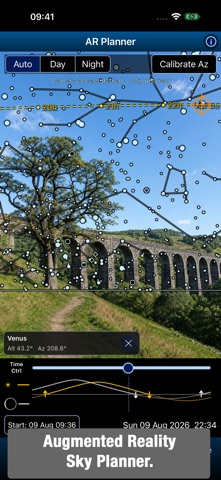
Every astronomy tool, in a single app. Astro Tools brings together the astronomy tools from Polar Scope Align Pro and Xasteria, while adding new tools including an Augmented Reality Sky Planner and a Digital Finderscope. It is a complete toolkit for amateur astronomers: plan the night, find targets, aim a telescope, check the weather, follow satellites, calculate an imaging setup and explore the sky - all from one app. PLAN THE NIGHT SKY Use any date, time and location to plan ahead. Browse Moon phases by month, with Moon and Sun rise, set and altitude graphs plus twilight times. Compare astronomy-focused forecasts for cloud layers, seeing, transparency, wind and precipitation, or use the Multi forecast to combine 7Timer’s astronomy data with MET Norway or Apple Weather forecasts. Check aurora forecasts, light pollution, animated satellite cloud maps, and the visibility of the ISS and other bright satellites. WIDGETS Keep essential observing information on your Home Screen. Widgets provide astronomy weather forecasts, aurora conditions and upcoming satellite passes. FIND AND OBSERVE Explore more than 22,000 deep-sky objects, stars and Solar System targets. Search, filter and create observing lists, then see object details and altitude charts. Turn a manual telescope into a Push-To system: attach your phone, select a target and follow live arrows. Sync on a known star or use star-hopping for improved accuracy. Digital Finderscope provides a live, zoomable sky map that follows your phone and guides you to a selected target. SEE THE SKY IN AUGMENTED REALITY AR Sky Planner overlays a star chart on your live camera view. Move through time to see where targets will be above the horizon or behind landmarks, whether you are planning an observing session or a nightscape photograph. LOCATE OBJECTS IN YOUR ASTROPHOTOS Plate Solver identifies the stars in a photo to find its sky coordinates, field of view and orientation. Overlay constellation lines and object labels on the image. ALIGN, MEASURE AND CONTROL Polar-align a star tracker or equatorial mount without a polar scope, even in daylight. Start with the compass or calibrate using the camera on the Sun, Moon or stars. Use Laser / Hop Align when the pole star is obstructed, measure level and tilt, inspect GPS and sensor data, or control compatible iOptron WiFi mounts. FOR OBSERVERS AND IMAGERS More than 30 calculators cover observing and astrophotography, with shared inputs and remembered values for quick comparisons. Find and simulate solar eclipses for your exact location, and use tools for field of view, magnification, exposure, focal length, image scale and more. Whether you observe with binoculars, a manual telescope, a GoTo mount or an imaging rig, Astro Tools keeps the information and practical tools you need close at hand. Many tools are completely free, for the rest there is a single Pro subscription with a free trial. Terms of Use: https://www.apple.com/legal/internet-services/itunes/dev/stdeula/
What's new · 1.3
• New Plate Solver tool: ◦ Identify the stars in an astrophoto to find its coordinates, field of view and orientation. Plot constellation lines and label objects directly on the photo. ◦ A built-in database covers wide- and medium-angle photos, with optional downloads for telephoto and telescope fields of view. • DSO Database improvements: ◦ Added the minor planets Ceres, Pallas, Vesta and Juno. ◦ Redesigned object details with a clearer layout, including distance from the Moon. ◦ Altitude charts now show the Moon and how long an object stays at a useful altitude during darkness. The Moon can be hidden. ◦ Mark objects as observed, add notes, show them on a sky map, or copy and share their details and charts. ◦ Sort by rise, set or transit time, or by time above a configurable useful altitude. Sort directly from the list and see the sorted value on each row. ◦ Include notes in printouts, or export them as text or CSV. ◦ Lists indicate when an object is below the horizon. Object details and charts stay up to date. ◦ Objects that have set can now open on an equatorial sky chart, with a switch between chart views. ◦ Catalog and category settings now show object counts. • Clearer altitude charts throughout the app, including the Moon Calendar. • Optional Alt/Az and equatorial coordinate grids on all sky maps, configured in Settings. If you'd like to support Astro Tools, please rate or review!
Details