

Repair360
AutoMobile Technologies, Inc · Business
Independent analytics for this App Store listing. AppTracker is not affiliated with AutoMobile Technologies, Inc.
Chart standing · US
What changed · US
Listing changes AppTracker has observed for this app in this storefront — new versions, price moves, rating shifts, and store copy.
- Home screen tools now follow your company or device’s Device Form Flow settings. Disabled tools are hidden, and the remaining tools appear in the configured order. - The My / Team switch on Inspections, Work Orders, and Invoices now appears only when team lists are enabled for your device. - You’ll now see a clear message if you try to update the database without an internet connection.
Ratings breakdown · US
The star breakdown behind this app's rating in this storefront.
In-app purchases · US
No in-app purchases.
Screenshots


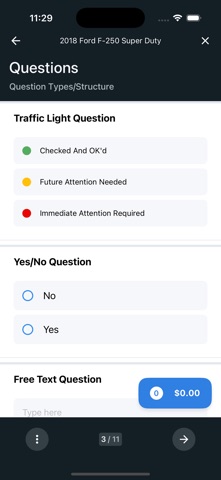
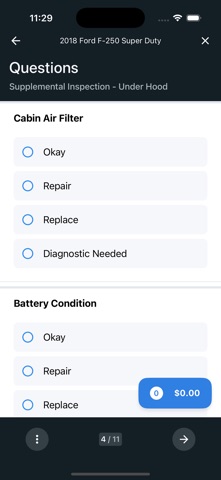


About
Repair360 puts vehicle repair and inspection management in your hands. Built for field technicians and service teams, it covers every step from inspection to invoice. Create inspections with customizable question forms, photo capture, and draft saving. Build repair orders from your service catalog with labor, parts, and expense tracking. Assign work across technicians with flexible tech-split allocation. Generate invoices, PDF reports, and print-ready documents — all from your phone. Look up vehicles by VIN, monitor your work queue in real time, and stay in sync with your team through built-in chat. Key features: - Vehicle inspections with photo capture and dynamic forms - Repair order and service catalog management - Invoice creation and approval workflows - Multi-technician assignment and tech-split - VIN lookup with vehicle images and history - PDF reports and printing - Real-time work queue and data sync - Team chat and vendor messaging
What's new · 4.0.21
- Home screen tools now follow your company or device’s Device Form Flow settings. Disabled tools are hidden, and the remaining tools appear in the configured order. - The My / Team switch on Inspections, Work Orders, and Invoices now appears only when team lists are enabled for your device. - You’ll now see a clear message if you try to update the database without an internet connection.
Details