

FlowRec: Web Demo Recorder
Flowboard LLC · Photo & Video
Independent analytics for this App Store listing. AppTracker is not affiliated with Flowboard LLC.
Chart standing · US
What changed · US
Listing changes AppTracker has observed for this app in this storefront — new versions, price moves, rating shifts, and store copy.
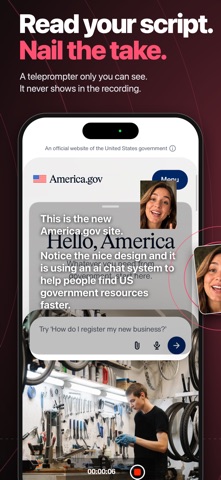
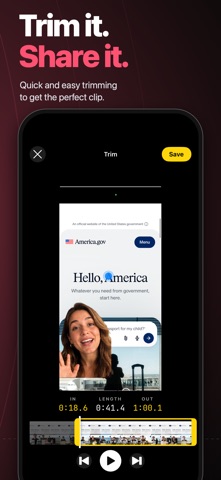
Record any app, with your face in it. • SCREEN CAM: record anything on your phone, not just websites. Your camera floats in a bubble over every app you open. • Bubble controls: drag it anywhere, pinch to resize, blur or fill the background, flip to the back camera. • Stop from the Dynamic Island: tap the recording indicator and choose Stop. Your Lock Screen shows the recording too. • Clips from Screen Cam open in Trim already cut to the part you recorded outside FlowRec. • Teleprompter for web recordings: paste a script and FlowRec scrolls it while you record. It stays out of the video. • Pick an accent color and the app icon changes to match. • Redesigned Home with a two-mode switch, new onboarding, and dozens of fixes.
Ratings breakdown · US
The star breakdown behind this app's rating in this storefront.
Screenshots



About
Record any app or website on your iPhone or iPad with your face in the picture. FlowRec is the screen recorder built for showing your work. Point it at a website and your green-screen camera floats over the page while sonar rings show every tap. Or switch to Screen Cam and record anything on your phone, with your face in a floating bubble that follows you from app to app. WEB CAM • Type a URL, hit record, and walk through any site or web app • Your camera floats over the page with the background removed, so it's just you • Sonar rings mark every tap, so viewers can follow along • A hidden teleprompter scrolls your script at reading pace. It never appears in the video • Trim and save straight to your Photos SCREEN CAM • Record any app on your phone, not just websites • Your face rides in a bubble over whatever you open. Drag it anywhere, pinch to resize • Blur or fill the background behind you, or flip to the back camera • Stop from the Dynamic Island: tap the recording indicator, choose Stop. The Lock Screen shows your recording too • Come back to FlowRec and the clip opens already trimmed to the part you recorded outside the app MADE FOR SHARING • Portrait, full resolution, ready for TikTok, Reels, Shorts, and iMessage • Review, trim, and save in a few taps • Pick an accent color and the app icon changes to match FREE AND PRO Record websites free with a small FlowRec watermark. Try Screen Cam twice for free. FlowRec Pro removes the watermark, lifts the time limit, and unlocks unlimited Screen Cam recordings. Who uses FlowRec: founders demoing their product, creators reacting to apps and sites, educators walking through tools, support teams showing how something works, and anyone who'd rather show than tell. Terms of Use: https://www.apple.com/legal/internet-services/itunes/dev/stdeula/ Privacy Policy: https://flowrec.app/privacy
What's new · 3.0
Record any app, with your face in it. • SCREEN CAM: record anything on your phone, not just websites. Your camera floats in a bubble over every app you open. • Bubble controls: drag it anywhere, pinch to resize, blur or fill the background, flip to the back camera. • Stop from the Dynamic Island: tap the recording indicator and choose Stop. Your Lock Screen shows the recording too. • Clips from Screen Cam open in Trim already cut to the part you recorded outside FlowRec. • Teleprompter for web recordings: paste a script and FlowRec scrolls it while you record. It stays out of the video. • Pick an accent color and the app icon changes to match. • Redesigned Home with a two-mode switch, new onboarding, and dozens of fixes.
Details