

Binaural Beats Generator +
TMSOFT · Utilities
Independent analytics for this App Store listing. AppTracker is not affiliated with TMSOFT.
Chart standing · US
What changed · US
Listing changes AppTracker has observed for this app in this storefront — new versions, price moves, rating shifts, and store copy.
- New Buffer Size setting under Advanced. Increase it if the sound skips frequently - Fixed bug where landscape tablets could not collapse the drawer menu - Audio engine improvements and fixes
Price & rating history · US
Reconstructed from the listing changes AppTracker has observed in this storefront. A field is charted once it has changed more than once, and each line starts at the value it moved from.
Average rating · ★ 4.72 now · 3 changes on record
Ratings breakdown · US
The star breakdown behind this app's rating in this storefront.
Screenshots




About
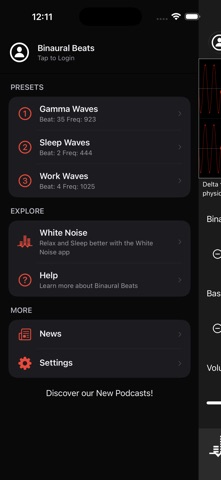
Generate custom binaural beats around any base frequency including Alpha, Beta, Delta, Gamma, Mu, and Theta waves. Simple modern interface allows selecting Binaural Beats from 1 to 50 Hz and a Base Frequency from 20 to 1500 Hz. Binaural Beats require high quality headphones or stereo speakers. What are binaural beats? Binaural beats can help with sleep, focus, and meditation. They are an auditory illusion perceived when two different tones of slightly different frequency are presented to each ear. The frequencies are very low and each one is tuned specifically for each ear which is why headphones are required. What are the different types of binaural beats? - Alpha waves are associated with a restful and relaxed state that exists when both entering and exiting sleep. - Beta waves are associated with concentration and moderate alertness. - Delta waves are associated with deep sleep cycles and the release of physical awareness. - Gamma waves are associated with alertness and sensitive perception. - Mu waves are associated with a state of physical rest, stillness, and immobility. - Theta waves are associated with the heavy relaxation that comes from frequency, deep meditation. Directions: Drag slider to select a desired Binaural Beat from 1 to 50 Hz. Next, drag the base frequency to a tone that sounds pleasant to your ears. The binaural beat is generated around this base frequency. Adjust device volume using the on-screen volume slider to a comfortable level. You can also specify to play audio to any AirPlay supported device. Toggle audio playback using the Play/Pause button. Created by the audio experts at TMSOFT that brought you the famous White Noise app. Check out all our apps and sounds at http://www.tmsoft.com/
What's new · 5.2.1
- New Buffer Size setting under Advanced. Increase it if the sound skips frequently - Fixed bug where landscape tablets could not collapse the drawer menu - Audio engine improvements and fixes
Details