

Music Looper - Practice Tool
Imre Virag · Music
Independent analytics for this App Store listing. AppTracker is not affiliated with Imre Virag.
Chart standing · US
What changed · US
Listing changes AppTracker has observed for this app in this storefront — new versions, price moves, rating shifts, and store copy.
• Apple Watch: control Music Looper from your wrist while your iPhone stays on the music stand — play, pause and switch loops, follow the repetition counter, run practices and set the metronome tempo with the Digital Crown. • Record from your wrist: start and stop Play Along takes with the count-in tapped on your wrist, then play them back, save or discard them. • Smart review: saved practices you've already played come back when they're due — sooner if they were hard, less often as they stick — with a Today's review card and reminders. • Fixes and performance improvements.
Ratings breakdown · US
The star breakdown behind this app's rating in this storefront.
In-app purchases · US
What this app sells inside itself, grouped by kind and priced for this storefront.
Screenshots





About
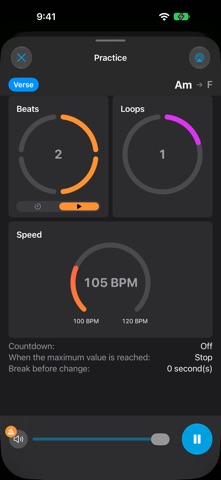
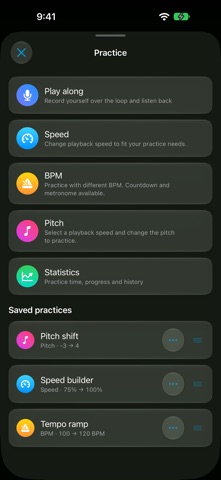
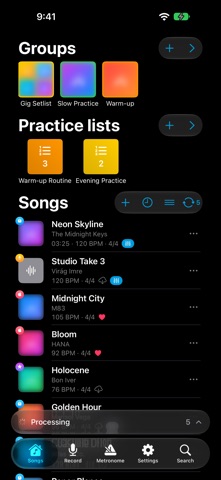
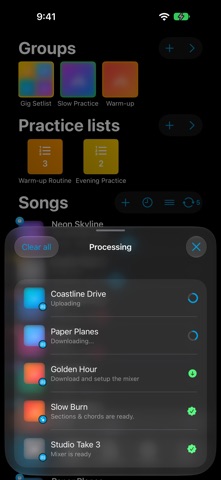
Practice smarter with Music Looper – the all-in-one app to slow down, loop and isolate any part of a song. Import your own files or use Apple Music, record yourself with a metronome, and take hands-free control with a Bluetooth foot pedal. Key Features: • Seamless A–B loop playback • Slow down music without changing pitch • EQ & filters: cut the lows or highs, boost the bass, or isolate the left or right channel — free • Automatically change speed, pitch, or BPM during practice • Practice Lists: save your loops as ready-to-go practice routines • Line up routines from different songs and practice them back-to-back • Play Along: record yourself playing over a loop, then hear your take lined up with the backing track • Progress tracking with daily goals, reminders, streaks, session history and stats • Smart review: saved practices come back when they're due, sooner if they were hard • Start a practice or practice list with Siri and Shortcuts • Find songs and practices instantly with Spotlight search • Follow your live practice on the Lock Screen and Dynamic Island • Control playback from the Lock Screen and your headphones — play, pause, jump back to the loop start • Apple Watch remote: play, switch loops, run practices and record takes from your wrist • iPad & Mac: a sidebar for your groups and practice lists, with your library beside the song editor • AI practice coach: a private, on-device suggestion for what to practice next • Free song analysis: reveal sections, chords and tempo for any song — no subscription needed • Tap a chord for guitar & piano finger charts; jump to any section and loop it • Auto-scrolling waveform: zoom in and it follows the playhead smoothly, keeping the next chords in view • Mixer AI: separate any song into 6 stems — vocals, drums, bass, guitar, piano and more • Automatic ready-named loops, BPM and first-beat detection • Hands-free control with Bluetooth foot pedals • Record music with metronome • Detect and import songs using Shazam • Organize your songs with folders and tags • Export changed pitch/speed files • Share loops with bandmates — export a song's loops and import them via AirDrop • Teacher & student: assign a whole practice list — loops, practices and a note — as one shareable file • Sync across your devices with iCloud Practice Lists – build your own routine: Save any loop with its perfect speed, pitch or BPM settings, then group your favorites into practice lists. Music Looper walks you through them one after another and gradually ramps up the tempo, key or BPM as you improve – so you can just play while the app keeps score. Set a daily goal, get an optional reminder, and track your streaks, session history and progress over time to stay motivated. Teaching? Share an entire practice list with your students as a single assignment they can import in a tap. Play Along – record yourself over the loop: Pick a loop, set a count-in, a short start delay and how many times you want to go round, then play while Music Looper records you through the mic. Your take is played back lined up with the backing track, so you hear exactly where you drifted – nudge the timing, keep the takes worth keeping and record again. Recordings stay on your device. Mix the backing stems to hear only the parts you need, save the whole setup as a practice, add it to a practice list, and every session counts in your daily goal, streaks and stats. Apple Music + Shazam support: Practice with your Apple Music songs. Record a melody offline and identify it later with Shazam. Perfect for: • Music students and teachers • Singers, drummers, guitarists, pianists • Dancers and choreographers • Anyone who wants to learn or practice music effectively To use Apple Music songs, an active Apple Music subscription is required. Terms of Service: https://musiclooper.com/index.php/terms-of-service/ Privacy Policy: https://musiclooper.com/index.php/privacy-policy/
What's new · 11.166
• Apple Watch: control Music Looper from your wrist while your iPhone stays on the music stand — play, pause and switch loops, follow the repetition counter, run practices and set the metronome tempo with the Digital Crown. • Record from your wrist: start and stop Play Along takes with the count-in tapped on your wrist, then play them back, save or discard them. • Smart review: saved practices you've already played come back when they're due — sooner if they were hard, less often as they stick — with a Today's review card and reminders. • Fixes and performance improvements.
Details