

Life Lists Organizer: All-in-1
DG Apps, Inc. · Productivity
Independent analytics for this App Store listing. AppTracker is not affiliated with DG Apps, Inc.
Chart standing · US
What changed · US
Listing changes AppTracker has observed for this app in this storefront — new versions, price moves, rating shifts, and store copy.
New in this version: • Answers you can swipe through: illustrations and short slideshows explain things in pictures, not just words. • Say "show me" and the picture is the answer — how to lay a wall, what's inside an atom. • Voice chat is faster and no longer cuts you off mid-sentence. • The assistant knows you: ask "what do you know about me?" and it answers from your folders and past chats. Review every note it keeps in Settings › AI › You. • No more permission pop-up: one labeled AI button sends your first request, and adding to a list works without AI until you allow it. • While dictating, Send sits on the outside, within reach of your thumb. • Plus many fixes and improvements.
Price & rating history · US
Reconstructed from the listing changes AppTracker has observed in this storefront. A field is charted once it has changed more than once, and each line starts at the value it moved from.
Average rating · ★ 4.65 now · 3 changes on record
Ratings breakdown · US
The star breakdown behind this app's rating in this storefront.
In-app purchases · US
No in-app purchases.
Screenshots



About
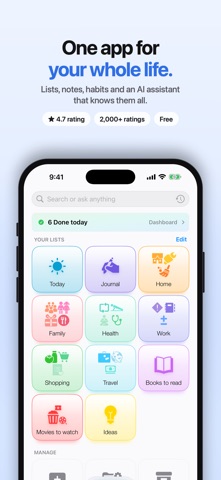
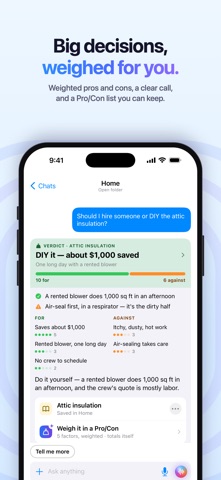
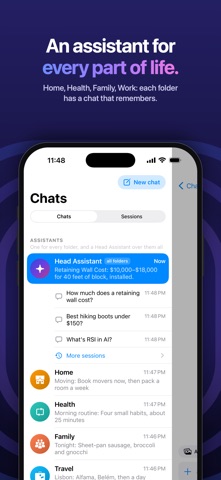
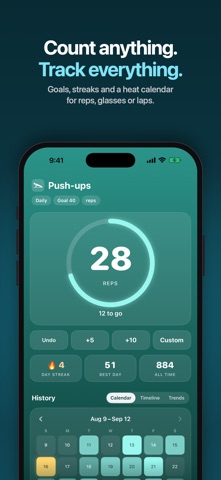
Life Lists is one place for everything in your life — lists, notes, habits, budgets and plans — with an AI assistant that keeps it organized. ASK, AND KEEP THE ANSWER • Ask anything. Answers come back as clear cards: a verdict, an estimate you can adjust, steps, comparisons, diagrams. • Turn an answer into something you own — a checklist, a budget, a pro/con list, habits — filed in the right folder. • Snap a photo of a listing, a receipt or a product and get the answer it implies: is it a good deal, how do we split the bill, what's next? • Research in depth: one sentence becomes a folder with an overview, budget, plan, options and sources. • Talk instead of typing with voice chat. • The chat knows your lists and updates them: "add milk and eggs", "what's left to pack?" ORGANIZED FOR YOU • A folder for each part of your life — Health, Home, Work, Family — with what you're working on at the top. • Organize automatically tidies as you go: related lists grouped, empty ones put away, every change one tap to undo. • A dashboard for your day: what's due, what's late, your habits and the weather. EVERY KIND OF LIST • Checklists, prioritized and numbered lists, sections • Groceries that sort themselves by aisle • Habits with streaks, reminders and packing lists • Notes, notebooks, a journal and stickies • Budgets that add up, weighted pro/con lists, side-by-side comparisons • People lists for birthdays and the details that matter • Tools beside your lists: timer, stopwatch, focus mode, counter, breathing, voice memos and meeting notes EVERYWHERE YOU ARE • iPhone, iPad, Mac and Apple Watch, plus home screen widgets • Sync with iCloud and share lists with family and friends — or keep everything on your device • 500+ icons and colors, unlimited lists, no ads YOUR DATA, YOUR CHOICE • Your lists live on your device and, if you choose, in your iCloud. • AI features send what you ask to our AI providers only after you allow it. Turn AI off anytime and Life Lists works as a classic list app.
What's new · 3.1.90
New in this version: • Answers you can swipe through: illustrations and short slideshows explain things in pictures, not just words. • Say "show me" and the picture is the answer — how to lay a wall, what's inside an atom. • Voice chat is faster and no longer cuts you off mid-sentence. • The assistant knows you: ask "what do you know about me?" and it answers from your folders and past chats. Review every note it keeps in Settings › AI › You. • No more permission pop-up: one labeled AI button sends your first request, and adding to a list works without AI until you allow it. • While dictating, Send sits on the outside, within reach of your thumb. • Plus many fixes and improvements.
Details