

iFire
Graham Murt · Lifestyle
Independent analytics for this App Store listing. AppTracker is not affiliated with Graham Murt.
Chart standing · US
What changed · US
Listing changes AppTracker has observed for this app in this storefront — new versions, price moves, rating shifts, and store copy.
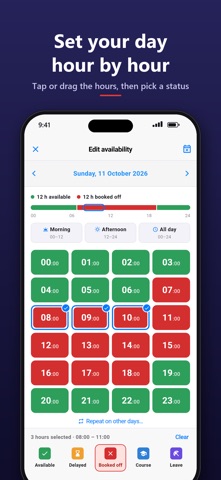
A big update, much of it from crews' feedback. NEW - Calendar: book time off for a day or a run of days, with start and end times if you need them, and tap anything under "Coming up" to cancel it or change it - Set my rota: set your pattern once and the app follows it - with shift hours, so night and day shifts only book you off while you're at work - A new Edit availability screen: your day in colour, tap or drag the hours, then pick a status - A new Team screen: your status as a coloured pill, solid status icons, unavailable crew dimmed - Dark mode across the whole app (Settings > Appearance: Light, Dark or Automatic), and your station can set the default - Settings > Crew list: sort by rank, availability or name, show ranks, and choose which view the list opens on - Your next planned change is shown under your status - The Overview shows how many are available each hour - Answer a call-out straight from the notification: responding, delayed or not responding - Auto book-off: say how long you're available for and the app books you off on time - Quiet alerts when you're booked off (optional) - Your station's own logo in the app - "Re-register this device" if alerts ever stop arriving IMPROVED - Picking your current status again clears an old "until" time - One set of status icons everywhere - Faster, clearer status picker and booking screens - Lots of smaller fixes and tidying
Screenshots




About
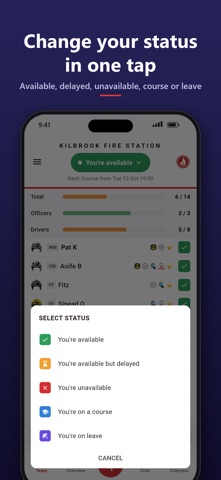
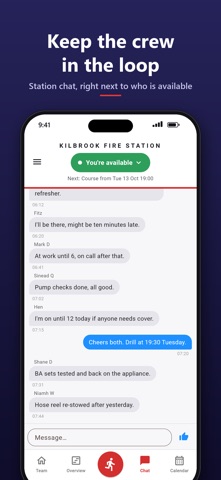
iFire shows your crew who is available right now, and makes booking on and off a single tap. Built by an on-call firefighter for on-call (retained) fire crews. WHO'S AVAILABLE, AT A GLANCE - A live crew list with everyone's status, rank and qualifications - Cover bars for every role (officers, drivers, BA wearers and more) turn orange or red as cover drops - Low crew alerts when your station falls below the levels you set YOUR STATUS IN ONE TAP - Available, delayed, unavailable, course or leave - "Back at..." timers book you back on automatically - Geofencing changes your status as you arrive at or leave the station* PLAN AHEAD - Book time off on the calendar - whole days, or from a start time to an end time - then change or cancel it any time - Set your rota once, with shift hours if you work shifts: you're only unavailable while you're at work - Set your day hour by hour: tap or drag the hours, then pick a status - See the whole crew's day, with how many are available each hour CALL-OUTS THAT GET THROUGH - Mobilisation alerts that sound through silent mode and Do Not Disturb - Answer "I'm responding" straight from the alert - See who is responding and how far away they are AND MORE - Station chat, events and training - Dark mode, set for the whole crew by your station or by you - Sort the crew list your way, choose which view it opens on, and show ranks if you like - Face ID / Touch ID app lock - Contracted hours tracking* FOR STATION MANAGERS Station managers can run their station from the iOnCall dashboard on a computer: availability planning, rotas, crewing rules and call-out history. * Included with a subscription. Your station may already cover this for you. SUBSCRIPTION iFire Premium is an optional auto-renewing subscription, monthly or yearly, that adds the features marked *, leave and course statuses, and extra statistics and alert options. - Price: £1.99 per month, or £8.99 per year - Payment is charged to your Apple Account when you confirm the purchase. - The subscription renews automatically unless you turn off auto-renew at least 24 hours before the end of the current period. Your account is charged for renewal within 24 hours before the end of the current period. - Manage or cancel it in your Apple Account settings after purchase. Privacy policy: https://ifire.ifireapp.net/privacy-policy.html Terms of use: https://ifire.ifireapp.net/app/html/terms
What's new · 5.0.13
A big update, much of it from crews' feedback. NEW - Calendar: book time off for a day or a run of days, with start and end times if you need them, and tap anything under "Coming up" to cancel it or change it - Set my rota: set your pattern once and the app follows it - with shift hours, so night and day shifts only book you off while you're at work - A new Edit availability screen: your day in colour, tap or drag the hours, then pick a status - A new Team screen: your status as a coloured pill, solid status icons, unavailable crew dimmed - Dark mode across the whole app (Settings > Appearance: Light, Dark or Automatic), and your station can set the default - Settings > Crew list: sort by rank, availability or name, show ranks, and choose which view the list opens on - Your next planned change is shown under your status - The Overview shows how many are available each hour - Answer a call-out straight from the notification: responding, delayed or not responding - Auto book-off: say how long you're available for and the app books you off on time - Quiet alerts when you're booked off (optional) - Your station's own logo in the app - "Re-register this device" if alerts ever stop arriving IMPROVED - Picking your current status again clears an old "until" time - One set of status icons everywhere - Faster, clearer status picker and booking screens - Lots of smaller fixes and tidying
Details