

Daily Planner - Couchday
Armin Kroll · Productivity
Independent analytics for this App Store listing. AppTracker is not affiliated with Armin Kroll.
Chart standing · US
What changed · US
Listing changes AppTracker has observed for this app in this storefront — new versions, price moves, rating shifts, and store copy.
Fixes, and clearer free time. • Free time between activities is now a dashed cell that says how long it lasts. The line for the current time passes behind it. • Tap a free time cell to see what's next, then tap Start Focus or Fill this gap. • Fixed: a marker's menu offered Delete All Below even when nothing was below it. • Fixed: Past 7 Days now ends today, not yesterday. Previously: Two days, side by side. • On iPad, just open two windows and each window keeps its own day. Put tomorrow next to today for better planning. • Focus mode uses the room it has. When an activity has a checklist, the list moves beside the ring on iPad and in landscape, instead of below it. • Adding an activity after another one now starts at 15 minutes, instead of inheriting the length of the one above. • Fixed: a calendar event you ignored could come back on the next calendar sync, and lose its place in the day. • Fixed: dragging an activity no longer shifts the rows under your finger when something overruns. • Fixed: tapping the date header always opens and closes the week strip. • Fixed: the Today button and the undo toast no longer overlap at the bottom of the screen. Previously: Your day, even more like a playlist. • Start now — running early? Open the next activity and tap Start now. The rest of the day follows. • Finish now — finished early? Tap Finish now on the current activity. Everything after it moves up. • Undo — deleted, reordered, or started the wrong thing? Undo is one tap away at the bottom of the screen. • Templates are now called Playlists. Same library, same place. Previously: Changing an activity's duration is much faster. The timeline keeps up as you tap, however many days you have behind you. Previously: Ask Siri about your day. Say "Couchday status" to hear what's on now and how long is left, "what's left in Couchday" for the rest of the day, or "what's lined up in Couchday" for the next three. No need to open the app. English only for now. Fixed: all-day calendar events jumped to the end of the day whenever a calendar changed elsewhere. They stay put now. Previously: Stability improvements and small fixes under the hood. Previously: Fixed: Send Feedback was broken. It works again — please do write in. On the focus timer: • See the time you've put in, alongside the time left. • Collapse the checklist down to its progress, the way timeline rows already work. • The next-activity line now shows only when there's a next one, and eases in instead of snapping.
Price & rating history · US
Reconstructed from the listing changes AppTracker has observed in this storefront. A field is charted once it has changed more than once, and each line starts at the value it moved from.
Average rating · ★ 3.60 now · 2 changes on record
Ratings breakdown · US
The star breakdown behind this app's rating in this storefront.
In-app purchases · US
What this app sells inside itself, grouped by kind and priced for this storefront.
Screenshots



About
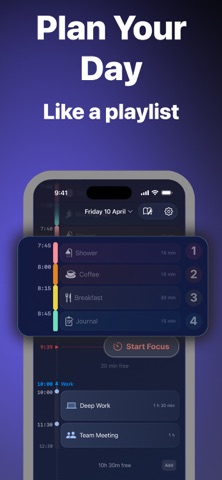
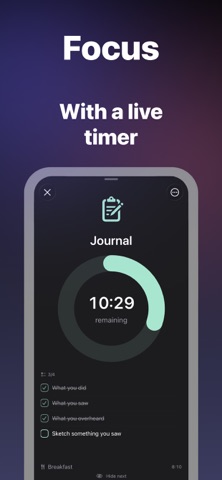
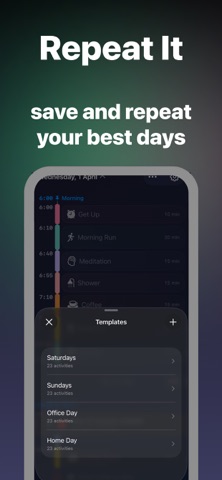
A daily planner that feels like making a playlist. Drop in your morning routine, slide things around, and watch your day take shape — no pressure, no guilt, just a gentle plan that moves with you. Couchday is the daily planner for people who want structure without the stress. Set day markers like Morning, Noon, and Evening to anchor your schedule, then fill in activities that flow between them. When plans change — and they always do — your timeline adjusts automatically. No red alerts. No overdue shame. Just a calm, living schedule that reshapes around your real day. Built your perfect morning once? Save it as a template and drop it in tomorrow. Forgot to open the app for a week? It welcomes you back fresh — no streak broken, no guilt trip. This is a daily planner that works the way you actually live. PLAN YOUR DAY - Set day markers to anchor your schedule — Morning, Noon, Evening, or anything you choose - Add activities with durations that flow between your markers - Use ticks for quick actions — take meds, feed the cat, drink water - Drag to reorder and watch your timeline recalculate in real time - See free time gaps between activities with the option to fill them A DAILY PLANNER THAT ADAPTS - Your timeline auto-adjusts when plans shift — no manual rescheduling - Compact mode collapses past activities so you always see what's next - Auto-scrolls to now when you open the app — you're always in the right place - Conflict detection shows when activities overlap so you can fix it in a tap STAY ON TRACK - Reminders to keep you gently on schedule - Focus timers on active activities - Live Activities so your current task is always visible - Home screen widgets — small, medium, and large — to see your day at a glance - Checklists inside activities for multi-step tasks MAKE IT YOURS - Customizable colors for every activity - Warm, dark frosted-glass design that's easy on the eyes - iCloud sync across your devices COUCHDAY PRO Unlock the full daily planner experience: - Weekly report to see how you actually spend your time - Save your best days as templates and reuse them - Pin activities to exact times for events that can't move - Sync your calendar so everything lives in one timeline - Set alarms for the moments that matter most - Use the app across your Apple devices via iCloud sync Pro is available as an annual or lifetime purchase. Couchday is made by an independent developer in Melbourne, Australia. No ads. No data selling. Just a calm daily planner built for real life. Privacy Policy: https://couchday.app/privacy Standard End User License Agreement: https://www.apple.com/legal/internet-services/itunes/dev/stdeula/
What's new · 2.7.1
Fixes, and clearer free time. • Free time between activities is now a dashed cell that says how long it lasts. The line for the current time passes behind it. • Tap a free time cell to see what's next, then tap Start Focus or Fill this gap. • Fixed: a marker's menu offered Delete All Below even when nothing was below it. • Fixed: Past 7 Days now ends today, not yesterday. Previously: Two days, side by side. • On iPad, just open two windows and each window keeps its own day. Put tomorrow next to today for better planning. • Focus mode uses the room it has. When an activity has a checklist, the list moves beside the ring on iPad and in landscape, instead of below it. • Adding an activity after another one now starts at 15 minutes, instead of inheriting the length of the one above. • Fixed: a calendar event you ignored could come back on the next calendar sync, and lose its place in the day. • Fixed: dragging an activity no longer shifts the rows under your finger when something overruns. • Fixed: tapping the date header always opens and closes the week strip. • Fixed: the Today button and the undo toast no longer overlap at the bottom of the screen. Previously: Your day, even more like a playlist. • Start now — running early? Open the next activity and tap Start now. The rest of the day follows. • Finish now — finished early? Tap Finish now on the current activity. Everything after it moves up. • Undo — deleted, reordered, or started the wrong thing? Undo is one tap away at the bottom of the screen. • Templates are now called Playlists. Same library, same place. Previously: Changing an activity's duration is much faster. The timeline keeps up as you tap, however many days you have behind you. Previously: Ask Siri about your day. Say "Couchday status" to hear what's on now and how long is left, "what's left in Couchday" for the rest of the day, or "what's lined up in Couchday" for the next three. No need to open the app. English only for now. Fixed: all-day calendar events jumped to the end of the day whenever a calendar changed elsewhere. They stay put now. Previously: Stability improvements and small fixes under the hood. Previously: Fixed: Send Feedback was broken. It works again — please do write in. On the focus timer: • See the time you've put in, alongside the time left. • Collapse the checklist down to its progress, the way timeline rows already work. • The next-activity line now shows only when there's a next one, and eases in instead of snapping.
Details