

RICOH Printer
RICOH COMPANY,LTD. · Utilities
Independent analytics for this App Store listing. AppTracker is not affiliated with RICOH COMPANY,LTD.
Chart standing · US
In-app purchases · US
No in-app purchases.
Screenshots


About
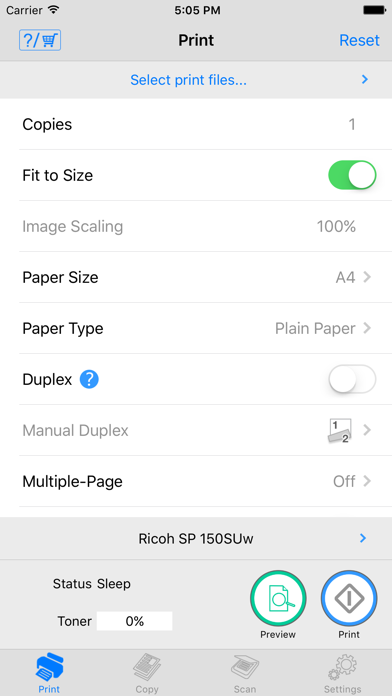
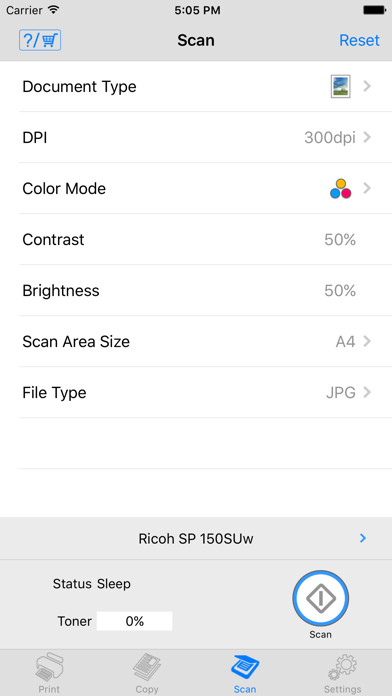
Description Features of Ricoh Printer - Ricoh Printer allows users to do Print, Copy, Scan, change settings, and see status of the printer from smart devices. Copy function - You can execute Copy by selecting parameters such as resolution and paper size. Scan function - You can select parameters such as resolution and save scanned file to your smart phone. - The files that are scanned with a MFP can be saved in you smart phone in PDF or JPEG file. Print function - You can print photos and documents stored in your smart phone - Documents and photos in your smart phone can be printed from a MFP - You can select parameters such as paper size and print density and print photos in JPEG, PNG, BMP format and files in TXT, PDF format. Machine Settings - You can set Wi-Fi, IP address, and also access point using Soft AP mode - You can change password and sleep time. Languages: Japanese, English, Arabic, Catalan, Czech, Danish, Dutch, Finnish, French, German, Greek, Hungarian, Italian, Norwegian, Polish, Portuguese, Brazilian Portuguese, Russian, Simplified Chinese, Spanish, Swedish, Thai, Traditional Chinese, Turkish, Vietnamese, Indonesian, Hindi, Urdu, Bengali
What's new · 1.0.2
This update from Apple will improve the functionality of this app. No new features are included. - The JPEG files that are scanned with a MFP can be saved in your smart phone album.
Details