

Photo Collage Maker • PicGrid
Goutom Dhar · Photo & Video
Independent analytics for this App Store listing. AppTracker is not affiliated with Goutom Dhar.
Chart standing · US
What changed · US
Listing changes AppTracker has observed for this app in this storefront — new versions, price moves, rating shifts, and store copy.
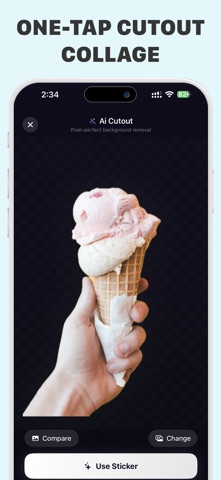
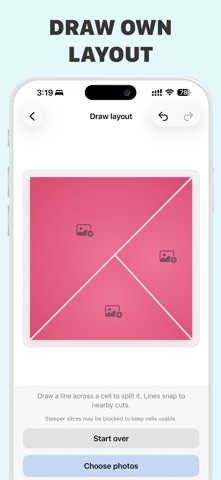
Welcome to our biggest update yet! We’ve completely overhauled the app to give you ultimate creative freedom and a blazing-fast experience. NEW FEATURES: Apple Image Playground: Create cool custom backgrounds and stickers for your collages with Image Playground, right inside the app (on supported devices). AI One-Tap Cutouts: Instantly isolate subjects, erase backgrounds, and create custom stickers with powerful AI. Layout Design Freedom: Draw, slice, and fully customize your own geometric canvas layouts—no more rigid boxes! Next-Gen Collage Engine: Built from scratch for ultra-fast rendering, seamless photo scaling, and silky-smooth performance. Weekly Content & Template Stores: Discover fresh layouts, seasonal stickers, and premium assets updated every single week. Save Projects: Never lose your progress. Save layouts as editable projects to tweak them anytime. Ultra HD Exports: Share your masterpieces in stunning, ultra-high resolution with zero quality loss. Import Custom Fonts: Personalize your artwork exactly how you want by importing your favorite fonts. One-Tap Layout Generator & Custom Shapes: Instantly generate balanced layouts or insert and color-customize geometric shapes. PERFORMANCE & FIXES: Fixed Alignment issue: Resolved the Text alignment issues during export. Item dragging: Smoothness restored, reduced the laggy drag performce of sticker and texts. Blazing Fast Loading: Optimized the photo library to load your images incredibly fast. Template Alignment: Fixed text alignment issues across various templates. Streamlined Workspace: Skipped the clutter- jump straight into creating with an optimized engine.
Ratings breakdown · US
The star breakdown behind this app's rating in this storefront.
In-app purchases · US
What this app sells inside itself, grouped by kind and priced for this storefront.
Screenshots




About
Make Perfect Collages with Photo Collage Maker – The Ultimate Creative Suite! Photo Collage Maker is the most powerful and fast photo collage app for social media creators, families, and digital artists. Make your photos into professional masterpieces. Combine your favorite memories with next-generation grid layouts, advanced AI tools, and premium editing features seamlessly. Whether you’re designing viral Instagram stories, archiving a travel adventure, or showcasing your indie business, this all-in-one photo collage maker app has everything you need to bring your unique vision to life instantly. # Why Photo Collage Maker? 1. All-in-One Collage App: Create stunning, high-impact stories by mixing up to 24 photos. 2. 400+ Instant Photo Grids: An endless library of classic grids, freestyle templates, mirror collages, and custom frames. 3. Layout Design Freedom: Draw, slice, and customize your own geometric canvas layout without the rigidity of boundaries. 4. AI One-Tap Cutouts: Automatically cut out subjects, remove backgrounds, and make your own stickers with pixel-perfect AI automation. 5. Text & Typography Suite: Select from 80+ hot fonts or import your own favorite custom fonts easily. 6. Stylish Assets & Backgrounds: Get a curated storefront of seasonal stickers, aesthetic textures, and beautiful gradient backgrounds. 7. Ultra HD Exports: Save and share your high-resolution artwork instantly, watermark-free with Pro. # High-Velocity Editing Capabilities * Pro Filters & Effects: Apply professional color-grading filters to enhance your aesthetic. * Precision Editing Tools: Crop, rotate, resize, and adjust brightness, contrast, and saturation inside any grid slot. * Instant Social Sharing: Export to Instagram, Facebook, WhatsApp, Messages, and more with a tap. Perfect for Any Occasion Whether you want to create memorable family digital albums, trending memes, or high-converting marketing materials for your brand, Photo Collage Maker is your go-to layout companion. Jump right into the workspace – no onboarding required, just start creating! # Subscription Plans Upgrade to Photo Collage Maker Pro for unlimited exports in Ultra HD, access to our complete library of trending templates, the AI cutout tool, and an ad-free workspace. Opt for a flexible access plan: * Weekly Access: Perfect for short-term events, one-off projects, or weekend getaways. * Monthly Membership: Great if you’re creating content monthly. * Annual Savings Pass: The smart choice for long-term power users seeking the best value. * Lifetime Ownership: One-time payment, and our premium engine is yours forever. Subscription Information: Subscriptions renew automatically unless auto-renew is turned off at least 24 hours before the end of the current billing period. You can cancel your subscription at any time by going to your App Store Account Settings after purchase. Terms of Use: https://sites.google.com/view/photo-collage-maker-ios/terms-of-use Privacy Policy: https://sites.google.com/view/photo-collage-maker-ios/privacy-policy
What's new · 3.2.2
Welcome to our biggest update yet! We’ve completely overhauled the app to give you ultimate creative freedom and a blazing-fast experience. NEW FEATURES: Apple Image Playground: Create cool custom backgrounds and stickers for your collages with Image Playground, right inside the app (on supported devices). AI One-Tap Cutouts: Instantly isolate subjects, erase backgrounds, and create custom stickers with powerful AI. Layout Design Freedom: Draw, slice, and fully customize your own geometric canvas layouts—no more rigid boxes! Next-Gen Collage Engine: Built from scratch for ultra-fast rendering, seamless photo scaling, and silky-smooth performance. Weekly Content & Template Stores: Discover fresh layouts, seasonal stickers, and premium assets updated every single week. Save Projects: Never lose your progress. Save layouts as editable projects to tweak them anytime. Ultra HD Exports: Share your masterpieces in stunning, ultra-high resolution with zero quality loss. Import Custom Fonts: Personalize your artwork exactly how you want by importing your favorite fonts. One-Tap Layout Generator & Custom Shapes: Instantly generate balanced layouts or insert and color-customize geometric shapes. PERFORMANCE & FIXES: Fixed Alignment issue: Resolved the Text alignment issues during export. Item dragging: Smoothness restored, reduced the laggy drag performce of sticker and texts. Blazing Fast Loading: Optimized the photo library to load your images incredibly fast. Template Alignment: Fixed text alignment issues across various templates. Streamlined Workspace: Skipped the clutter- jump straight into creating with an optimized engine.
Details