

Conversion Calculator Plus
Yan Liong Tan · Productivity
Independent analytics for this App Store listing. AppTracker is not affiliated with Yan Liong Tan.
Chart standing · US
What changed · US
Listing changes AppTracker has observed for this app in this storefront — new versions, price moves, rating shifts, and store copy.
Version 3.0 introduces new ways to convert and calculate. • Currency+ lets you compare multiple currencies in a reorderable list and perform calculations in the amount field. • Currency History displays historical exchange rates on a chart. • The built-in calculator accepts expressions in supported converters and updates results as you type. • Interactive Home Screen widgets let you use saved converters without opening the app. • Siri can run a saved conversion by name, start a new conversion and update a widget's amount. Command availability depends on your iPhone's Siri language. • Updated onboarding and tutorials explain the new features. This release also includes interface and localization improvements. Interactive widgets and Siri require Premium. Rates refresh when you open Currency, Currency+ or your currency favourites. Refresh again anytime in Currency+. Improved support for Syrian and South Sudanese pounds. • Fixed a crash on startup.
Price & rating history · US
Reconstructed from the listing changes AppTracker has observed in this storefront. A field is charted once it has changed more than once, and each line starts at the value it moved from.
Average rating · ★ 4.72 now · 3 changes on record
Ratings breakdown · US
The star breakdown behind this app's rating in this storefront.
Screenshots




About
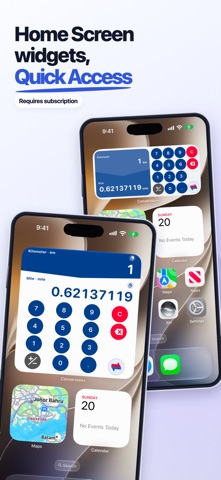
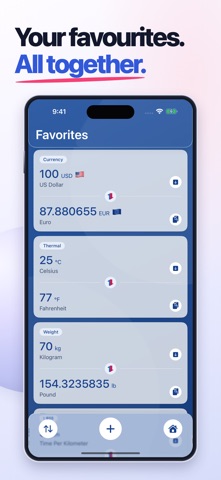
Whether you are measuring ingredients for a recipe, comparing currencies while traveling or working through an everyday calculation, Conversion Calculator Plus brings the tools together in one app. Convert among 685 units in 72 categories, with exchange rates for 160 currencies, 126 cryptocurrencies and four precious metals. NEW IN VERSION 3.0 • Currency+: compare multiple currencies in a list you can reorder, and calculate directly in the amount field. • Currency History: view historical exchange rates on a chart. • Built-in calculator: enter expressions in supported converters and see results update as you type. • Interactive Home Screen widgets: save a converter and calculate from the Home Screen. Premium required. • Siri: run a saved conversion by name, start a new conversion or update a widget's amount. Premium required; command availability depends on your iPhone's Siri language. UNIT CONVERSION • Convert length, area, weight, temperature, speed, time, pressure, volume, energy, data and many other measurements. • Work with cooking measures, shoe and ring sizes, running pace, fuel economy and blood sugar. • View results as you enter an amount, and copy them to use in other apps. CURRENCY AND MARKETS • Exchange rates for 160 world currencies update automatically. • Compare 126 cryptocurrencies and the prices of gold, silver, platinum and palladium. • Use Currency+ to compare several currencies at once and Currency History to examine past rates. PERSONALIZE YOUR WORKSPACE • Choose Classic, Modern Simple or Modern Carousel, and switch styles in Settings. • Save frequently used conversions as Favorites; edit, delete or reorder them. • Hide categories and units you do not use. • Search categories and units, and arrange category icons on the Home Screen. • Use the app on iPhone or iPad, including Split View on iPad. Light and dark appearances are supported. • Available in 33 app languages. PREMIUM Premium is an optional auto-renewing annual subscription. It removes ads, enables offline use, and unlocks interactive Home Screen widgets and Siri conversions. Payment is charged to your Apple Account when you confirm the purchase. It renews automatically unless cancelled at least 24 hours before the end of the current period. Manage or cancel in your Apple Account settings. The price is shown before you confirm. Terms of Use (EULA): https://www.apple.com/legal/internet-services/itunes/dev/stdeula/ Privacy Policy: https://developer-yl.github.io/convert-units-plus/privacy.html
What's new · 3.0.3
Version 3.0 introduces new ways to convert and calculate. • Currency+ lets you compare multiple currencies in a reorderable list and perform calculations in the amount field. • Currency History displays historical exchange rates on a chart. • The built-in calculator accepts expressions in supported converters and updates results as you type. • Interactive Home Screen widgets let you use saved converters without opening the app. • Siri can run a saved conversion by name, start a new conversion and update a widget's amount. Command availability depends on your iPhone's Siri language. • Updated onboarding and tutorials explain the new features. This release also includes interface and localization improvements. Interactive widgets and Siri require Premium. Rates refresh when you open Currency, Currency+ or your currency favourites. Refresh again anytime in Currency+. Improved support for Syrian and South Sudanese pounds. • Fixed a crash on startup.
Details