

My Recipes +
Claudio Valgimigli · Food & Drink
Independent analytics for this App Store listing. AppTracker is not affiliated with Claudio Valgimigli.
Chart standing · US
What changed · US
Listing changes AppTracker has observed for this app in this storefront — new versions, price moves, rating shifts, and store copy.
Version 3.9 lets you check every import and keeps the original with the recipe. • After importing from the web, a file, a photo or a scan, you see what was recognized and choose: accept it, keep only the original, or discard the import • The original photo, document or web link stays attached to the recipe, even when recognition fails • New Document step: attach a PDF, Word, RTF or text file and open it with a tap • Photos in preparation steps open full screen with a tap • If a web address does not work, edit it right from the review • Restoring a large backup no longer runs out of memory, and no longer closes the app when the cookbook holds the same recipe twice • Importing the same backup again no longer duplicates the shopping list
In-app purchases · US
What this app sells inside itself, grouped by kind and priced for this storefront.
Screenshots




About
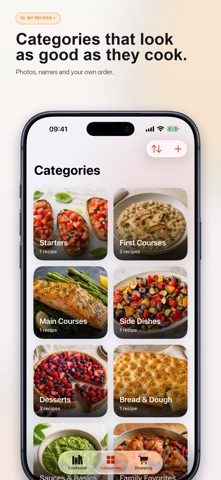
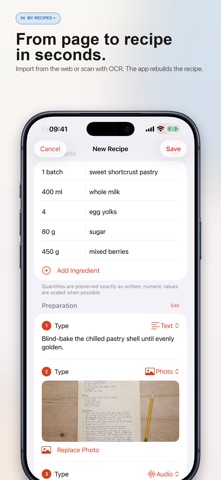
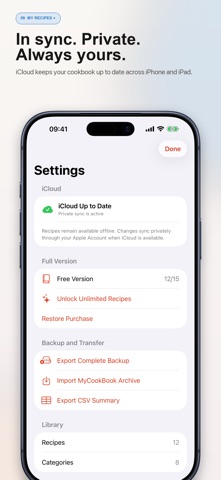
Turn scattered recipes into a cookbook that is truly yours. My Recipes brings together family notes, favorite websites, magazine clippings, photos and voice recordings in one private, beautifully organized library. It works on iPhone and iPad, remains available offline, and keeps changes up to date across your devices through your private iCloud account. BUILD YOUR COOKBOOK • Create as many visual categories as you like, with a name, photo and custom order. • Save ingredients exactly as written, preparation time, servings, rating, favorites and personal notes. • Add text, photos, web links, audio recordings and documents such as PDFs to individual preparation steps. • Connect related recipes (such as a tart and its pastry, pasta and its sauce, or a main course and its side) and reuse their ingredients. • Search by name or ingredient, then sort and browse in a true grid or list. IMPORT WITHOUT RETYPING • Import a recipe from a web page and review the reconstructed fields before saving. • Scan a book, handwritten note or magazine page with the camera. On-device OCR reads the text and rebuilds a draft recipe for you. • Read a saved photo, PDF, Word document or text file to turn an existing recipe document into an editable draft. • Check what was recognized after every import, and keep the original photo, document or web link with the recipe. • Bring in editable MyCookBook archives, including backups exported by earlier versions. PLAN THE SHOPPING • Add scaled ingredients from one or more recipes to a grouped shopping list. • Check off items as you shop and always see live progress. • Share the list or add all unchecked items to a chosen Apple Reminders list in one step: ideal for a shared household list and Siri. COOK WITH CONFIDENCE • Follow one clear step at a time in Cook Mode. • Start several preset or custom timers for the same recipe. • Timers keep accurate time in the background and can notify you when they finish. PRIVATE, PORTABLE AND SAFE • No advertising, no third-party tracking and no developer account. • Your library remains available offline and syncs privately through iCloud when enabled. • Export a complete editable backup, a PDF recipe or a CSV summary whenever you want. The free version stores up to 15 recipes. A single non-consumable in-app purchase unlocks unlimited recipes. Customers who purchased the full version previously keep their access and can restore it from Settings. Made for iPhone and iPad.
What's new · 3.9
Version 3.9 lets you check every import and keeps the original with the recipe. • After importing from the web, a file, a photo or a scan, you see what was recognized and choose: accept it, keep only the original, or discard the import • The original photo, document or web link stays attached to the recipe, even when recognition fails • New Document step: attach a PDF, Word, RTF or text file and open it with a tap • Photos in preparation steps open full screen with a tap • If a web address does not work, edit it right from the review • Restoring a large backup no longer runs out of memory, and no longer closes the app when the cookbook holds the same recipe twice • Importing the same backup again no longer duplicates the shopping list
Details