

GoodTask - To Do List, Tasks
haha Interactive · Productivity
Independent analytics for this App Store listing. AppTracker is not affiliated with haha Interactive.
Chart standing · US
What changed · US
Listing changes AppTracker has observed for this app in this storefront — new versions, price moves, rating shifts, and store copy.
## Multiple Task Alerts - Add multiple alerts to a task using General or Advanced date settings. - Choose a fixed date and time, or an alert before, at, or after the due date. Relative alerts follow changes to the due date. - Configure default alerts under Settings > New Task > Alerts. ## Notification Sounds and Voice - Import your own notification sounds and enable Read Title to hear task titles aloud. - Choose a voice, adjust Speaking Rate and Playback Order, and preview your settings under Settings > General > Notifications > Sound. - On iPhone and iPad with iOS 27, customize sounds and spoken titles separately for normal and urgent notifications. ## Urgent Snooze - On iPhone and iPad, enable Urgent Snooze to make manually snoozed alerts urgent regardless of task priority. ## Repeat Descriptions - See repeat patterns directly in task rows. - Show or hide them under Settings > Appearance > Task Display > Repeat Description. ## Other Improvements - Other fixes and stability improvements. (Previously..) ## Year View - See the year at a glance with task and calendar event indicators. - Scroll through years and select a date to see its tasks and events. - Add Year View to your View Bar or choose it as your Default View. ## Calendar Events and Sorting - Show calendar events alongside tasks in Matrix View. Adjust this under Matrix View > Show: Calendar Events. - Choose Top, Bottom, or Hide for All-Day Events under Calendar Events or Sort settings. Top and Bottom apply when sorting by date. - Set No Time Tasks to appear before or after timed items, independently of all-day events. ## Other Improvements - On iPhone and iPad, long press a task and choose Remove from Today Page to remove it from your plan without deleting the task. - Other fixes and stability improvements. Thanks!
Price & rating history · US
Reconstructed from the listing changes AppTracker has observed in this storefront. A field is charted once it has changed more than once, and each line starts at the value it moved from.
Average rating · ★ 4.60 now · 9 changes on record
Ratings breakdown · US
The star breakdown behind this app's rating in this storefront.
In-app purchases · US
What this app sells inside itself, grouped by kind and priced for this storefront.
Screenshots



About
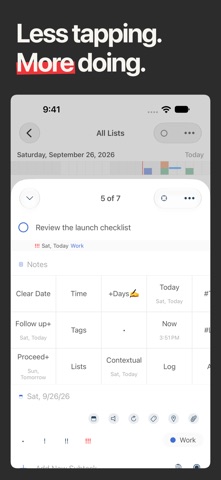
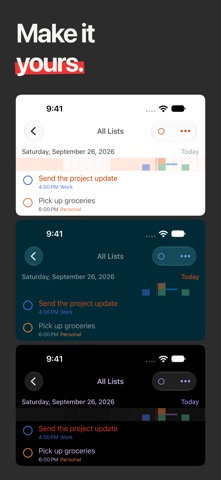
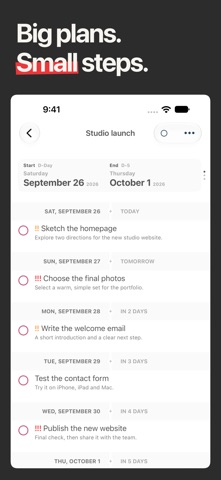
Plan your day with the reminders and calendars you already use. GoodTask builds on Apple Reminders and Calendar, bringing your to-do lists, schedule and projects together. "a masterful blend of power-user task management features and the inherent simplicity of Reminders." - Federico Viticci, MacStories, on GoodTask for iOS (2018) Start with a simple checklist. Add Smart Lists, flexible views and Quick Actions as your needs grow. Use iCloud to keep your reminders and calendar events in sync across devices. PLAN A DAY THAT WORKS Choose what to work on in Today Page without changing your tasks' due dates. See your calendar events alongside your plan, then use Next Page to focus on one task or subtask at a time. Set a focus timer and look back on completed work and daily notes in Reports. FIND WHAT NEEDS YOUR ATTENTION Create Smart Lists that bring together tasks from different lists. Filter by dates, priorities, tags and more to see what matters now: overdue work, errands or the next steps in a project. Update a task wherever you find it, and the change stays with the original reminder. SEE YOUR WORK YOUR WAY Switch between list, day, week and month views. Organize tasks in kanban-style boards by date, priority, list or tag. Use Matrix View to compare priorities in four customizable quadrants, or Project View to follow tasks and events across dates. SPEND LESS TIME ORGANIZING Capture tasks with presets and text snippets. Customize Quick Actions to reschedule work, change priorities, move tasks between lists or add tags. Make changes to several tasks at once with bulk actions. SIMPLIFY RECURRING WORK Break tasks into subtasks, set flexible repeating schedules and save reusable Templates for routines such as a weekly review or packing for a trip. KEEP YOUR PLAN CLOSE Personalize colors, fonts and task displays. On iPhone and iPad, use widgets to keep your lists in sight. On supported iPhones, follow a focus session with Live Activities on the Lock Screen and Dynamic Island. The Apple Watch companion lets you check tasks and add new ones from your wrist when used with an iPhone. RECOGNITION GoodTask for iOS was named Federico Viticci's App of the Year in MacStories Selects 2018 and featured in the App Store's Apps We Love. FULL ACCESS Try GoodTask for 14 days without starting a subscription. To continue afterward, choose the one-time Unlock Everything in-app purchase or the optional GoodTask Supporter subscription. The Mac app is sold separately. ABOUT SUBSCRIPTIONS - GoodTask Supporter is an optional auto-renewing subscription with a one-year term. It provides full access while active and supports continued development. - The subscription price is shown before purchase. Payment will be charged to your Apple Account at confirmation of purchase. - Your subscription automatically renews unless auto-renewal is turned off at least 24 hours before the end of the current subscription period. - Your account will be charged for renewal within 24 hours before the end of the current period, at the applicable annual subscription price. - You can manage your subscription and turn off auto-renewal in your App Store account settings after purchase. Learn more: https://goodtaskapp.com Support: contact@hahaint.com Terms of Use: https://hahaint.com/tos.html Privacy Policy: https://hahaint.com/privacy.html
What's new · 8.4.9
## Multiple Task Alerts - Add multiple alerts to a task using General or Advanced date settings. - Choose a fixed date and time, or an alert before, at, or after the due date. Relative alerts follow changes to the due date. - Configure default alerts under Settings > New Task > Alerts. ## Notification Sounds and Voice - Import your own notification sounds and enable Read Title to hear task titles aloud. - Choose a voice, adjust Speaking Rate and Playback Order, and preview your settings under Settings > General > Notifications > Sound. - On iPhone and iPad with iOS 27, customize sounds and spoken titles separately for normal and urgent notifications. ## Urgent Snooze - On iPhone and iPad, enable Urgent Snooze to make manually snoozed alerts urgent regardless of task priority. ## Repeat Descriptions - See repeat patterns directly in task rows. - Show or hide them under Settings > Appearance > Task Display > Repeat Description. ## Other Improvements - Other fixes and stability improvements. (Previously..) ## Year View - See the year at a glance with task and calendar event indicators. - Scroll through years and select a date to see its tasks and events. - Add Year View to your View Bar or choose it as your Default View. ## Calendar Events and Sorting - Show calendar events alongside tasks in Matrix View. Adjust this under Matrix View > Show: Calendar Events. - Choose Top, Bottom, or Hide for All-Day Events under Calendar Events or Sort settings. Top and Bottom apply when sorting by date. - Set No Time Tasks to appear before or after timed items, independently of all-day events. ## Other Improvements - On iPhone and iPad, long press a task and choose Remove from Today Page to remove it from your plan without deleting the task. - Other fixes and stability improvements. Thanks!
Details