

Alarm & Timer
KAZUTERU YOKOI · Lifestyle
Independent analytics for this App Store listing. AppTracker is not affiliated with KAZUTERU YOKOI.
Chart standing · US
What changed · US
Listing changes AppTracker has observed for this app in this storefront — new versions, price moves, rating shifts, and store copy.
- Holiday settings are now available for repeating alarms. - Added an option to choose whether the alarm screen is shown when you open the app. (Settings > Alarm > More) - Added an option to resume the alarm on the alarm screen. (Settings > Alarm > More) - The stopwatch can now show the “Lap Time Difference”. (Settings > Stopwatch) - Fixed an issue where the timer’s end notification was still delivered after stopping the timer with the (X) button on the Lock Screen. (Swiping the timer away on the Lock Screen does not stop it, so the notification will still be delivered.) - Fixed an issue where the alarm sound could play twice. - Fixed an issue where the background was not displayed in the alarm preview.
Ratings breakdown · US
The star breakdown behind this app's rating in this storefront.
In-app purchases · US
What this app sells inside itself, grouped by kind and priced for this storefront.
Screenshots




About
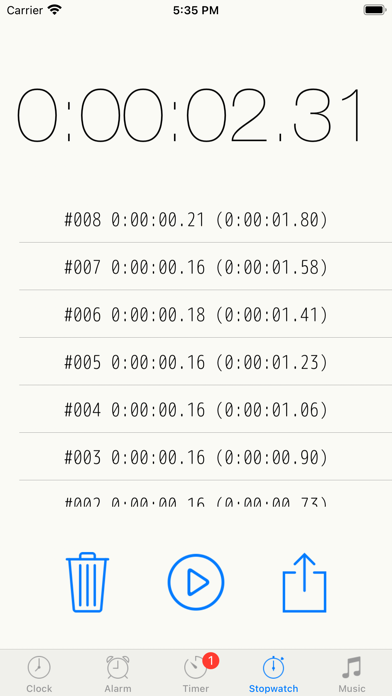
Simple, powerful, and customizable. This all-in-one clock app combines Alarm, Timer, and Stopwatch functions into a clean, intuitive interface. Privacy-friendly: When headphones are connected, the alarm sounds only through the headphones, not the device speakers. By making advanced features optional, we maintain a minimalist design while meeting a wide range of user needs. [General] Customization: Color themes, "My Theme" creation, and adjustable font sizes. Typography: Choose from system fonts, specialized clock fonts, or even add your own custom fonts. Time Display: Toggle between 12/24-hour formats, customize 12:00 vs. 0:00 display, and enable/disable leading zeros (e.g., 09:00 vs. 9:00). [Clock] Dual analog and digital display with extensive layout options. Design: Multiple dial designs and support for custom image/video backgrounds. Visibility: Toggle seconds, choose second hand movement (Ticking vs. Smooth), and customize date formats/languages. Dynamic Layout: Hide the status bar, tab bar, or settings button for a cleaner look. Digital-only mode available in landscape orientation. Hourly Chime: Use simple presets or create a fully customized hourly schedule. World Clock: View multiple cities and time zones simultaneously in a convenient list. [Alarm] Set unlimited alarms with full background notification support. Compatible with AlarmKit (iOS 26.1+), allowing alarms to sound even in Silent or Focus modes. Scheduling: Powerful repeat options including daily, weekly, monthly, yearly, and custom intervals (e.g., every 2 days). Supports pause periods. Sound: Use custom recordings or local music files (when the app is in the foreground). Management: Organize alarms with folders, label search, and easy duplication. Sort by time or firing order. Advanced Features: Checklist, Snooze, Auto-stop (by duration/repetition), Skip next, and one-tap global pause. New alarms can automatically inherit previous settings for faster setup. [Timer] Run multiple timers simultaneously ranging from 1 second to 10000 hours. Quick Start: Access presets and history for instant activation. Interface: Switch between list and full-screen views. Choose between 10-key or picker input with customizable units (1s/10s/1m/10m). Foreground Features: Displays estimated completion time and supports auto-stop for sounds. [Stopwatch] Records: Capture lap times with precision. Export: Send your recorded data as a text file via email. [Other Settings] System Integration: Audio mix mode (play alongside other music apps), and Auto-lock. Display: Brightness adjustment with "Darkness Correction" and customizable UI elements (toggle between switches or checkboxes). Note on Music: Currently, this app does not support playback for Apple Music, iCloud-only songs, or purchased songs that have not been downloaded to the device storage. URL Scheme: net.hakoniwa.clock://
What's new · 15.1.0
- Holiday settings are now available for repeating alarms. - Added an option to choose whether the alarm screen is shown when you open the app. (Settings > Alarm > More) - Added an option to resume the alarm on the alarm screen. (Settings > Alarm > More) - The stopwatch can now show the “Lap Time Difference”. (Settings > Stopwatch) - Fixed an issue where the timer’s end notification was still delivered after stopping the timer with the (X) button on the Lock Screen. (Swiping the timer away on the Lock Screen does not stop it, so the notification will still be delivered.) - Fixed an issue where the alarm sound could play twice. - Fixed an issue where the background was not displayed in the alarm preview.
Details