

Forecast Bar - Weather + Radar
Higher Bar, LLC · Weather
Independent analytics for this App Store listing. AppTracker is not affiliated with Higher Bar, LLC.
Chart standing · US
What changed · US
Listing changes AppTracker has observed for this app in this storefront — new versions, price moves, rating shifts, and store copy.
Your own weather station • Weather Station (Gold) shows current conditions from a nearby personal station, or your own. Tune My Forecast learns how your station's spot runs, so the coming hours and daily highs and lows fit where you actually live, in the app, widgets and on Apple Watch. • Tune for My Neighborhood shifts forecasts by how your part of town usually runs, Apple Weather included, and Station vs. Forecast shows day by day whether tuning helps. • Explore Your City's Microclimates: a live map of every station around you, a two-day replay, and your area's typical day. A sky that matches the real weather • The realistic background follows the real sky: cloud layers, rain and snow by type and rate, rainbows, sun halos, fog, haze and smoke. • Clear nights show real stars, planets and the Milky Way, with meteor showers and auroras, turned toward the best view. The moon shows its real surface. • Sky, sun and clouds sit behind the hills, trees and buildings in your photo, in Visualize Day too, and wind-blown rain and snow fill the whole screen. • A Visualize Day widget in four sizes shows the scene for this hour. Tap it to watch the day unfold, or show just the current conditions. Hurricane tracking (Gold) • Each storm's forecast cone, track and forecast points on the radar, with coastal watches and warnings and NHC's 7-day outlook for where storms may form. Tap a storm for its winds, pressure and movement. • A card on the main screen, and optional Hurricane Cone Alerts, when your location falls in a storm's cone. Storm Surge and Extreme Wind Warnings can break through Do Not Disturb. Apple Watch, redesigned • A new main screen with a sky that matches the weather, a range bar for today, an hourly strip in three styles, a Week Ahead list and data tiles you choose. Arrange every section from your iPhone, where Watch Layout shows your real watch screen as you go. • New day, hour, Sun & Moon and Wind screens, a Pollen tile, 6-hour precipitation by type and Apple Weather's minute-by-minute rain for the next hour. • Interactive charts you scrub hour by hour with the Digital Crown, a week out: temperature, rain chance, wind, UV, humidity, pressure, heat index, wind chill and more. • Weather alerts appear as a card above current conditions. Complications show highs in red and lows in blue, follow tinted faces and fit smaller watches. Everything else • Show Overnight Lows, in Data & Layout, gives each day the low of the night that follows it. • Radar starts playing sooner and uses far less data while it loops. • Smart Weather Stories load faster, open each day with what sets it apart, and work late at night. Quick stories are shorter. • Life-threatening warnings can't be hidden, alert mute settings say what they can't silence, and AMBER and Blue Alerts no longer appear. • A Sunrise & Sunset Lock Screen widget, and the temperature curve setting is now a picker that draws both timelines. • Rain and storm Live Activities stay readable in the Dynamic Island beside a call or another app's activity. • Siri and Shortcuts read cleaner forecast sentences, and widgets keep the right hours in half-hour time zones such as India. • Settings has a Rate Forecast Bar row, and after an unexpected close you can send a quick bug report. • Smart and Single Location widgets keep their usual layout when rain is past the hours they show, and backgrounds fall back to a built-in scene when a chosen city pack is gone. • The Current Weather widget's summary moves on with each hour, and on iPad its tall size adds today's written forecast. • Lightning haptics stop after three taps per storm, then rest for half an hour. • Hourly graph hour labels show in full instead of "…". • Widgets say "until" the hour the next condition starts, not an hour later. See everything that's new at forecastbar.com/whats-new
Ratings breakdown · US
The star breakdown behind this app's rating in this storefront.
In-app purchases · US
What this app sells inside itself, grouped by kind and priced for this storefront.
Screenshots






Keywords this app targets
Search terms AppTracker associates with this app — estimates, not search volume. ❝ = in the app's title; a highlighted number is its current position for that term.
Similar apps
Competitors and close alternatives, as estimated by AppTracker.
 Weather Now PRO – Rain Radar
DeluxeWare
1 shared topic · 2 shared title words
Weather Now PRO – Rain Radar
DeluxeWare
1 shared topic · 2 shared title words
 Weather- NOAA Weather Radar
Zhi Sys Limited
1 shared topic · 2 shared title words
Weather- NOAA Weather Radar
Zhi Sys Limited
1 shared topic · 2 shared title words
 Today Weather: Radar & Alerts
Tho Tran
1 shared topic · 2 shared title words
Today Weather: Radar & Alerts
Tho Tran
1 shared topic · 2 shared title words
 Storm NOAA Radar: Weather 24
Maxym Naryzhniy
2 shared title words
Storm NOAA Radar: Weather 24
Maxym Naryzhniy
2 shared title words
 Weather & Radar
WetterOnline - Meteorologische Dienstleistungen GmbH
1 shared topic · 2 shared title words
Weather & Radar
WetterOnline - Meteorologische Dienstleistungen GmbH
1 shared topic · 2 shared title words
 Weather Live° - Local Forecast
Mosaic S.r.l.
1 shared topic · 2 shared title words
Weather Live° - Local Forecast
Mosaic S.r.l.
1 shared topic · 2 shared title words
 Weatherly:Forecast&Radar
Magic Snail
1 shared topic · 2 shared title words
Weatherly:Forecast&Radar
Magic Snail
1 shared topic · 2 shared title words
 Live Weather Forecast & Radar
APEXMOBI PTE. LTD.
3 shared title words
Live Weather Forecast & Radar
APEXMOBI PTE. LTD.
3 shared title words
About
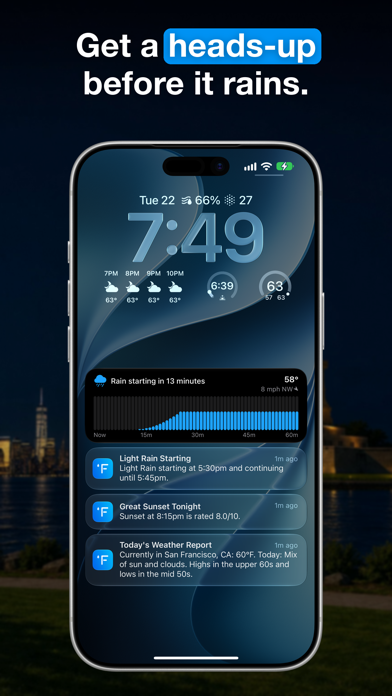
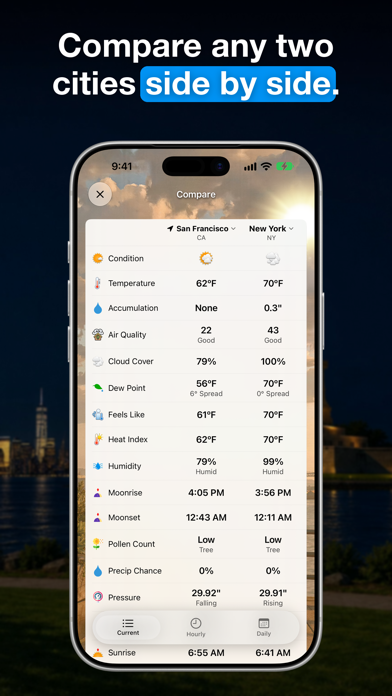
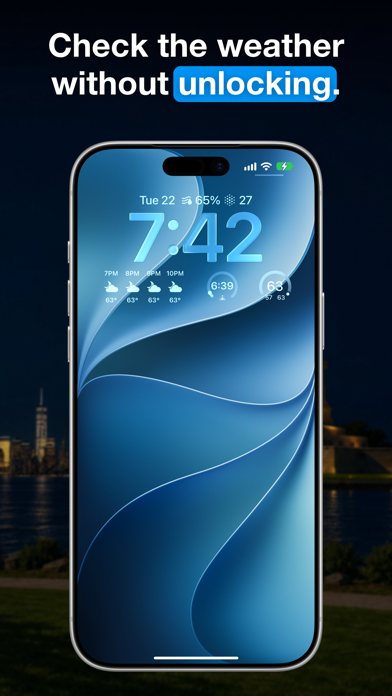
*** Featured by Apple, Lifehacker, Macworld and Cult of Mac! *** Forecast Bar offers hyper accurate, hyper local live weather and forecasts right at your fingertips, and is customizable to fit your needs. With 12+ Home Screen and Lock Screen Widgets, including a multi-city widget to see weather in up to 4 locations at once. Forecast Bar includes a beautiful and powerful Apple Watch App with 100+ customizable complications, including hourly and daily visual forecasts, Graphs to visualize several different data points, or a Custom Modular with 3 customizable lines. The Watch app is fully customizable, with 3 custom data points you can add, a customizable hourly data point. You can also customize your backgrounds with several options including using your own images, as well as custom font and font size throughout the app. == Completely Redesigned for iOS 26 and Liquid Glass == Track storms like never before with our all-new NOAA-powered radar featuring live lightning strikes, aurora forecasts, and marine warnings. Watch precipitation approach in real-time right from your Lock Screen with our new Live Activity—see exactly when rain starts and ends without opening the app. Smart Weather Stories transforms forecasts into personalized AI summaries. Connect your calendar to get advice tailored to your plans: "Light rain during your 2pm meeting—bring an umbrella." Never miss a stunning sky with aurora visibility alerts, eclipse notifications, and Beautiful Sunset alerts. Now with iOS 26 Liquid Glass design. == Built Different == Crafted by a 2-person team over a decade. Trusted daily by users who call it "the most accurate weather app" they've used. Always improving—because your weather app should be. == Stay Informed with Push Notifications == - Personalized daily weather reports for any location, at any time you wish - Push notifications for severe weather alerts in the United States - Precipitation alerts sent reliably from our servers (Gold only) - Custom notifications and alerts! You can configure 14 different data points to look out for what matters to you. For example, get notified in the morning when wind during the day will rise above a certain speed, or if temperatures overnight will drop below freezing. (Gold only) - Beautiful Sunset alerts that give you a heads up when a stunning sunset (or sunrise!) is heading your way. Get your cameras ready! (Gold only) - Get notified when earthquakes hit near you! (Gold only) == Weather at a glance, or in depth == - Quickly check the current conditions or forecast for 14 days at a glance, including a succinct summary - Tap on any day's forecast to see an hour-by-hour breakdown - Gorgeous animated weather backgrounds - Apple Weather provided minute-by-minute rain forecasts - Tap again to see rich, interactive charts of even more details like dew point, pressure, visibility, UV index and more - Choose between a compact and highly visual view for weather at up to 8 locations at a time - Animated weather radar in the United States, Europe and Australia, including future radar forecasts, as well as 10+ other powerful visualizations - Forecast Bar supports iPad multitasking in Slide Over and Split Screen All subscriptions to Forecast Bar include a free 7 day trial Subscriptions will be charged to your iTunes account at confirmation of purchase. They will automatically renew at the end of your subscription period unless canceled at least 24 hours prior to the end of the current period. Your account will be charged for renewal within 24 hours prior to the end of the current period. You can manage your subscriptions or turn off auto-renewal at any time from your iTunes account settings. Cancellation of the current active subscription period is not allowed. Our privacy policy and terms of use are here: http://forecastbar.com/privacy-policy-for-forecast-bar.pdf and https://www.apple.com/legal/internet-services/itunes/dev/stdeula/
What's new · 11.7
Your own weather station • Weather Station (Gold) shows current conditions from a nearby personal station, or your own. Tune My Forecast learns how your station's spot runs, so the coming hours and daily highs and lows fit where you actually live, in the app, widgets and on Apple Watch. • Tune for My Neighborhood shifts forecasts by how your part of town usually runs, Apple Weather included, and Station vs. Forecast shows day by day whether tuning helps. • Explore Your City's Microclimates: a live map of every station around you, a two-day replay, and your area's typical day. A sky that matches the real weather • The realistic background follows the real sky: cloud layers, rain and snow by type and rate, rainbows, sun halos, fog, haze and smoke. • Clear nights show real stars, planets and the Milky Way, with meteor showers and auroras, turned toward the best view. The moon shows its real surface. • Sky, sun and clouds sit behind the hills, trees and buildings in your photo, in Visualize Day too, and wind-blown rain and snow fill the whole screen. • A Visualize Day widget in four sizes shows the scene for this hour. Tap it to watch the day unfold, or show just the current conditions. Hurricane tracking (Gold) • Each storm's forecast cone, track and forecast points on the radar, with coastal watches and warnings and NHC's 7-day outlook for where storms may form. Tap a storm for its winds, pressure and movement. • A card on the main screen, and optional Hurricane Cone Alerts, when your location falls in a storm's cone. Storm Surge and Extreme Wind Warnings can break through Do Not Disturb. Apple Watch, redesigned • A new main screen with a sky that matches the weather, a range bar for today, an hourly strip in three styles, a Week Ahead list and data tiles you choose. Arrange every section from your iPhone, where Watch Layout shows your real watch screen as you go. • New day, hour, Sun & Moon and Wind screens, a Pollen tile, 6-hour precipitation by type and Apple Weather's minute-by-minute rain for the next hour. • Interactive charts you scrub hour by hour with the Digital Crown, a week out: temperature, rain chance, wind, UV, humidity, pressure, heat index, wind chill and more. • Weather alerts appear as a card above current conditions. Complications show highs in red and lows in blue, follow tinted faces and fit smaller watches. Everything else • Show Overnight Lows, in Data & Layout, gives each day the low of the night that follows it. • Radar starts playing sooner and uses far less data while it loops. • Smart Weather Stories load faster, open each day with what sets it apart, and work late at night. Quick stories are shorter. • Life-threatening warnings can't be hidden, alert mute settings say what they can't silence, and AMBER and Blue Alerts no longer appear. • A Sunrise & Sunset Lock Screen widget, and the temperature curve setting is now a picker that draws both timelines. • Rain and storm Live Activities stay readable in the Dynamic Island beside a call or another app's activity. • Siri and Shortcuts read cleaner forecast sentences, and widgets keep the right hours in half-hour time zones such as India. • Settings has a Rate Forecast Bar row, and after an unexpected close you can send a quick bug report. • Smart and Single Location widgets keep their usual layout when rain is past the hours they show, and backgrounds fall back to a built-in scene when a chosen city pack is gone. • The Current Weather widget's summary moves on with each hour, and on iPad its tall size adds today's written forecast. • Lightning haptics stop after three taps per storm, then rest for half an hour. • Hourly graph hour labels show in full instead of "…". • Widgets say "until" the hour the next condition starts, not an hour later. See everything that's new at forecastbar.com/whats-new
Details