

EASA FTL Calc
Ralf Keber · Utilities
Independent analytics for this App Store listing. AppTracker is not affiliated with Ralf Keber.
Chart standing · US
What changed · US
Listing changes AppTracker has observed for this app in this storefront — new versions, price moves, rating shifts, and store copy.
Full iOS 27 support • Added the new “Pilot Helpers” tools menu. • Reorganised the Information section for clearer navigation. • Redesigned the iPad Dark Mode appearance and made various design refinements. • Modernised the Duty Toolbox for improved reliability and consistency across different devices and screen sizes. Major internal modernisation Large parts of the app’s internal architecture, data handling and processes have been extensively modernised and optimised for future development. • Modernised the airport data structures, particularly the handling of manually selected time zones. • Improved compatibility with older saved data. • Various additional improvements and bug fixes.
Ratings breakdown · US
The star breakdown behind this app's rating in this storefront.
In-app purchases · US
No in-app purchases.
Screenshots





Keywords this app targets
Search terms AppTracker associates with this app — estimates, not search volume. ❝ = in the app's title; a highlighted number is its current position for that term.
Similar apps
Competitors and close alternatives, as estimated by AppTracker.
 EASA FTL 2025
Thomas Oswald
1 shared topic · 3 shared title words
EASA FTL 2025
Thomas Oswald
1 shared topic · 3 shared title words
 EASA FTL Calculator
William Beal
3 shared title words
EASA FTL Calculator
William Beal
3 shared title words
 EASA vs Airline FTL
Alexander Flohr
1 shared topic · 2 shared title words
EASA vs Airline FTL
Alexander Flohr
1 shared topic · 2 shared title words
 Flight Duty Calculator (FAA)
Thomas Oswald
1 shared topic
Flight Duty Calculator (FAA)
Thomas Oswald
1 shared topic
 Crew Rest Calculator
Adam Da Costa
2 shared topics
Crew Rest Calculator
Adam Da Costa
2 shared topics
 FDPme
Andrew Oakley
FDPme
Andrew Oakley
 OffBlock
 GmbH
1 shared topic
OffBlock
OffBlock GmbH
1 shared topic
 PILOTLOG - CrewLounge AERO
Aviovision N.V.
1 shared topic
PILOTLOG - CrewLounge AERO
Aviovision N.V.
1 shared topic
About
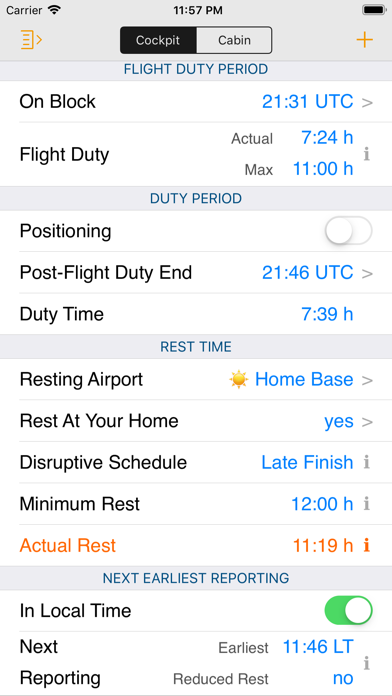
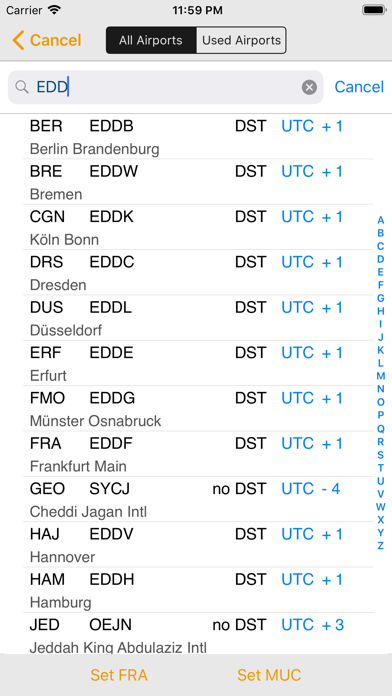
EASA FTL Calc helps flight and cabin crew calculate and monitor: • Cockpit and cabin crew limits • Actual and maximum Flight Duty Periods (FDP) • Latest on-block times • Duty Periods (DP) • Actual and minimum rest periods • Acclimatisation status • Commander’s discretion • Planned reduced rest • Disruptive schedules • Required local nights at home base • Extended recovery rest periods • Cumulative duty times for 7, 14 and 28 days • Monthly duty times The app takes into account: • Standby, airport standby and airport duty • Extended cabin crew FDP due to earlier reporting times • Delayed reporting • In-flight rest for cockpit and cabin crew based on the applicable rules • Split duty • FDP extensions • Planned reduced rest • Positioning • Time-zone differences • Company-specific minimum rest periods • Your assigned home base • Back-to-back operations You do not need to calculate or enter time zones manually: • Simply select an airport from the database • The time zone is determined automatically based on the airport and date For each rotation, you only need to select: • The airport where the rotation begins • The rest location after each duty day • The next reporting airport is automatically set to the previous rest location EASA FTL Calc is designed as a duty logbook, not as a flight logbook: • You do not need to enter every individual block time • The app does not manage cumulative block-hour limits • Imported flights may still be displayed for reference Separate cockpit and cabin calculations: • Reporting times may differ • In-flight rest rules are different • Your own limits are calculated using all available information • Calculations for other crew members may be limited because less information about their previous and subsequent rotations is available Rotation management: Rotations are stored automatically and displayed in a dedicated overview. The overview includes: • Flight Duty Periods • Duty periods • Rest periods • Separate calculations for cockpit and cabin crew XML import: • BA rosters only RosterBuster import: • Direct import from the server Direct import from other apps and websites: • NASImport • CrewLounge CONNECT • RosterworX • MyRoster for Crew by Lumabyte — sadly no longer available eCrew AIMS Dashboard import: If your roster can be downloaded as a .txt or .csv file, it can be opened directly in EASA FTL Calc. Because AIMS can be configured differently by each airline, occasional compatibility issues may occur. In many cases, these can be resolved. Calendar import: Roster data can also be imported from your calendar. Because calendar entries can use different formats and naming conventions, occasional compatibility issues may occur. In many cases, these issues can be resolved.
What's new · 3.2.0
Full iOS 27 support • Added the new “Pilot Helpers” tools menu. • Reorganised the Information section for clearer navigation. • Redesigned the iPad Dark Mode appearance and made various design refinements. • Modernised the Duty Toolbox for improved reliability and consistency across different devices and screen sizes. Major internal modernisation Large parts of the app’s internal architecture, data handling and processes have been extensively modernised and optimised for future development. • Modernised the airport data structures, particularly the handling of manually selected time zones. • Improved compatibility with older saved data. • Various additional improvements and bug fixes.
Details