

Day Counter — Countdown
Marco Tini · Utilities
Independent analytics for this App Store listing. AppTracker is not affiliated with Marco Tini.
Chart standing · US
What changed · US
Listing changes AppTracker has observed for this app in this storefront — new versions, price moves, rating shifts, and store copy.
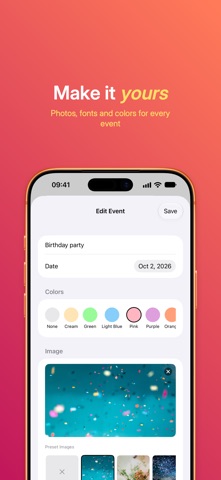
Countdown 1.6 introduces Countdown Pro, an optional one-time purchase that unlocks background images, extra fonts, any color and unlimited events. Already bought Countdown? Nothing changes: Pro is yours, forever, and there's nothing you need to do. Everything you used works just like before. Also in this update: • Much smaller download: the built-in background images have been optimized • Larger image previews in the event editor • The Long text option in Settings now shows a live preview
Price & rating history · US
Reconstructed from the listing changes AppTracker has observed in this storefront. A field is charted once it has changed more than once, and each line starts at the value it moved from.
Average rating · ★ 4.41 now · 2 changes on record
Ratings breakdown · US
The star breakdown behind this app's rating in this storefront.
In-app purchases · US
What this app sells inside itself, grouped by kind and priced for this storefront.
Screenshots



Keywords this app targets
Search terms AppTracker associates with this app — estimates, not search volume. ❝ = in the app's title; a highlighted number is its current position for that term.
Similar apps
Competitors and close alternatives, as estimated by AppTracker.



About
Countdown helps you keep track of the dates that matter: birthdays, vacations, weddings, deadlines, anniversaries. Add an event and see at a glance how many days are left (or how many have passed). FOR EVERYONE • Add an event in a few taps: tap "+", enter a title and a date, done • 8 theme colors to tell your events apart • List, small grid or large grid view • Two Home Screen widgets: your upcoming events, or a single event of your choice • Your preferred date format, Dark Mode and a setting for long titles • Search by name • Your events are also saved to a file you can find in the Files app COUNTDOWN PRO An optional one-time purchase. No subscription. • Background images: pick one of 20 built-in backgrounds or use your own photos • 4 more fonts besides the system one: Rounded, Serif, Monospace and Condensed • Any color you like for each event, beyond the 8 presets • Unlimited events (without Pro you can create up to 3; sample events don't count) Already bought Countdown? Pro is yours, forever, and there's nothing you need to do: everything stays just as it was. If it doesn't show as active, open Settings → Countdown Pro in the app and tap "Restore purchases". NATIVE, OFFLINE, CLEAN Countdown is built in SwiftUI, native to iPhone and iPad: fast, light and right at home on iOS. It works entirely offline. No ads, no accounts, no tracking, no third-party SDKs: your events stay on your device. Available on iPhone and iPad, in more than 30 languages.
What's new · 1.6
Countdown 1.6 introduces Countdown Pro, an optional one-time purchase that unlocks background images, extra fonts, any color and unlimited events. Already bought Countdown? Nothing changes: Pro is yours, forever, and there's nothing you need to do. Everything you used works just like before. Also in this update: • Much smaller download: the built-in background images have been optimized • Larger image previews in the event editor • The Long text option in Settings now shows a live preview
Details